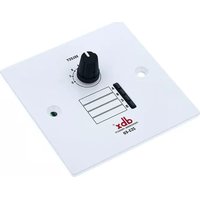
ZC-3 - Remote control DBX - Free user manual and instructions
Find the device manual for free ZC-3 DBX in PDF.


Pick your language and provide your email: we'll send you a specifically translated version.
| Product Type | Remote Control |
| Brand | DBX |
| Model | ZC-3 |
| Dimensions (approx.) | 15 × 5 × 2 cm |
| Weight (approx.) | 100 g |
| Power Source | 2 × AAA batteries (not included) |
| Battery Life (approx.) | 6 months with normal use |
| Operating Range (approx.) | 8 meters |
| Compatible Devices | DBX TVs and audio systems |
| Key Functions | Power, volume, channel, menu, navigation, mute, input select |
| Signal Technology | Infrared (IR) |
| Material | ABS plastic |
| Color | Black |
| Cleaning Instructions | Wipe with a soft, dry cloth; avoid liquids |
| Safety Precautions | Keep away from heat, moisture, and direct sunlight; do not disassemble |
| Battery Replacement | Open battery compartment, insert new AAA batteries with correct polarity |
| Spare Parts Availability | Batteries only (standard AAA) |
| Repairability | Not repairable by user; contact DBX support |
| Certifications | CE, RoHS |
Frequently Asked Questions - ZC-3 DBX
How do I pair the DBX ZC-3 remote with my device?
The ZC-3 remote uses infrared (IR) technology and should work immediately after inserting batteries. Point the remote directly at the device and press any button. If it doesn't work, ensure the batteries are fresh and the IR sensor is not blocked.
What type of batteries does the remote require?
The remote requires 2 AAA alkaline batteries. Insert them with correct polarity (plus and minus signs matching the diagram in the battery compartment).
Why is my remote not responding?
Possible causes: dead batteries, IR sensor blocked, device not powered on, or remote out of range. First replace batteries. Then check for obstacles between remote and device, and ensure you are within 8 meters.
Can I use rechargeable batteries?
Yes, you can use rechargeable AAA batteries (Ni-MH). Note that rechargeable batteries have a lower voltage (1.2V) than alkaline (1.5V), so operating range may be slightly reduced.
How do I clean the remote control?
Wipe the exterior with a soft, dry cloth. Do not use water, solvents, or abrasive cleaners. For stubborn dirt, slightly dampen the cloth with water and wipe immediately. Keep the remote dry.
Is the remote universal or dedicated to specific devices?
The DBX ZC-3 is a dedicated remote designed for DBX TVs and audio systems. It may not work with other brands unless they use the same IR codes.
What should I do if the remote works intermittently?
Check for weak batteries, dirt on the IR emitter (small bulb at the front), or a faulty IR sensor on the device. Clean the emitter with a dry cloth and replace batteries. If problem persists, contact DBX support.
Can I reset the remote control?
There is no reset button. Simply remove batteries, wait 30 seconds, reinsert them. This clears any temporary glitches.
How far can the remote be from the device?
The maximum operating range is approximately 8 meters (26 feet) in direct line of sight. Range may be less if there are obstacles or strong ambient light.
Where can I find the user manual or spare parts?
The user manual is available for free download on notice-facile.com. For spare parts, only batteries are user-replaceable; for other issues, contact DBX customer service.
User questions about ZC-3 DBX
0 question about this device. Answer the ones you know or ask your own.
Ask a new question about this device
No questions yet. Be the first to ask one.
Download the instructions for your Remote control in PDF format for free! Find your manual ZC-3 - DBX and take your electronic device back in hand. On this page are published all the documents necessary for the use of your device. ZC-3 by DBX.
USER MANUAL ZC-3 DBX

Manual assistant
Powered by Anthropic
Waiting for your message
Product information
Brand : DBX
Model : ZC-3
Category : Remote control