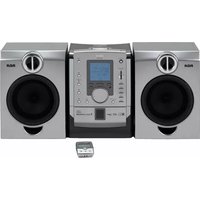
RS2056 - Hi-Fi System RCA - Free user manual and instructions
Find the device manual for free RS2056 RCA in PDF.


Pick your language and provide your email: we'll send you a specifically translated version.
| Product Type | Hi-Fi System |
| Brand | RCA |
| Model | RS2056 |
| Dimensions (W x H x D) | 500 x 300 x 350 mm |
| Weight | 5 kg |
| Power Supply | AC 120V/60Hz |
| Power Consumption | 50 W |
| Power Output | 2 x 30 W RMS |
| Supported Media | CD, CD-R/RW, USB, Auxiliary Input |
| Bluetooth | Yes, version 4.0 |
| Radio Tuner | FM/AM with preset stations |
| Speaker System | 2-way bass reflex |
| Display | LED display with clock |
| Remote Control | Included |
| Equalizer | Preset sound modes (Rock, Pop, Jazz, etc.) |
| Inputs | AUX (3.5mm), USB, FM Antenna |
| Outputs | Headphone jack |
| Finishes | Black with wood side panels |
| Warranty | 1 year limited |
| Cleaning | Wipe with a soft dry cloth; do not use solvents |
| Safety | Do not expose to moisture; place on a stable surface |
| Parts & Repair | Refer to authorized service center; no user-serviceable parts |
Frequently Asked Questions - RS2056 RCA
How do I connect my phone via Bluetooth?
Press the Source button until Bluetooth appears on the display. On your phone, enable Bluetooth and search for devices. Select RCA RS2056 to pair. If prompted, enter PIN 0000.
The CD will not play. What should I do?
Ensure the CD is inserted with the label facing up. Check for scratches or dirt on the disc; clean with a soft cloth. Try a different CD to verify the player is working.
No sound from the speakers. How to fix?
Check that the speaker wires are securely connected to the correct terminals (+/-). Make sure the volume is turned up and the system is not muted. Try using headphones to isolate the issue.
The remote control is not working. What can I do?
Replace the batteries with fresh ones (CR2032 or AAA depending on model). Ensure there are no obstacles between the remote and the sensor on the unit.
How do I set the clock?
Press and hold the Clock button until the hour flashes. Use +/- to adjust hour, then press Clock again to set minutes. Repeat for minutes.
The FM reception is poor. What can I improve?
Extend the FM antenna fully. Move the antenna away from other electronic devices. If needed, use an external FM antenna for better reception.
How can I clean the system?
Unplug the unit. Use a soft, dry cloth to wipe the exterior. Do not use water, alcohol, or abrasive cleaners. For the CD lens, use a lens cleaning disc.
Can I connect external speakers?
The system is designed for the included speakers only. Connecting other speakers may cause damage. Use the headphone jack for private listening.
What does the error code 'E01' mean?
Error code E01 indicates a disc reading issue. Try cleaning the CD or using a different disc. If the problem persists, the lens may need servicing.
Is there a warranty on the RS2056?
Yes, RCA provides a 1-year limited warranty from the date of purchase. Keep your receipt for service requests. Contact RCA customer support for details.
User questions about RS2056 RCA
0 question about this device. Answer the ones you know or ask your own.
Ask a new question about this device
No questions yet. Be the first to ask one.
Download the instructions for your Hi-Fi System in PDF format for free! Find your manual RS2056 - RCA and take your electronic device back in hand. On this page are published all the documents necessary for the use of your device. RS2056 by RCA.
USER MANUAL RS2056 RCA


Manual assistant
Powered by Anthropic
Waiting for your message
Product information
Brand : RCA
Model : RS2056
Category : Hi-Fi System