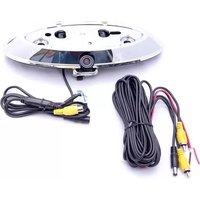
CFD-03E - Rear Camera CRUX - Free user manual and instructions
Find the device manual for free CFD-03E CRUX in PDF.


Pick your language and provide your email: we'll send you a specifically translated version.
| Product Type | Rear View Camera |
| Brand | CRUX |
| Model | CFD-03E |
| Compatibility | Universal fit for most vehicles with standard license plate mount |
| Image Sensor | CMOS, 1/3 inch |
| Resolution | 720 x 480 (NTSC), 720 x 576 (PAL) |
| Viewing Angle | 170 degrees diagonal |
| Minimum Illumination | 0.5 Lux |
| Video Output | Composite video (RCA), 1.0 Vp-p, 75 Ohm |
| Power Supply | 12V DC (negative ground) |
| Current Consumption | ≤ 80 mA |
| Dimensions (Camera Head) | Approx. 66 x 44 x 30 mm (L x W x D) |
| Weight | Approx. 100 g (camera only) |
| Housing Material | Plastic with aluminum bracket |
| Waterproof Rating | IP67 (camera head) |
| Operating Temperature | -20°C to +70°C |
| Storage Temperature | -30°C to +80°C |
| Mounting Type | License plate mount or surface mount |
| Parking Guide Lines | Adjustable via switch (on/off) |
| Mirror Image | Switchable (normal/reverse) |
| Maintenance | Clean lens with soft, dry cloth periodically |
| Safety | Do not install where it blocks license plate illumination; ensure secure mounting. |
| Spare Parts | Mounting bracket, screws, RCA cable (6m) included; contact CRUX for replacements. |
| General Information | Designed for rear view assistance; may not be legal for continuous use in all jurisdictions. |
Frequently Asked Questions - CFD-03E CRUX
How do I install the CRUX CFD-03E rear camera?
Mount the camera on your license plate bracket or rear surface. Route the RCA video cable to your display and connect to a 12V power source. Secure all connections and test the video feed.
Is the camera compatible with my car's factory radio?
The camera provides a standard composite video output. It will work with any display that has an RCA video input. For factory radios without an input, an adapter may be required.
Can I use this camera in the rain or snow?
Yes, the camera head has an IP67 rating, meaning it is dust-tight and can withstand temporary submersion. However, keep the lens clean for best performance.
How do I adjust the parking guide lines?
The camera has a physical switch on the cable or camera body to toggle the guide lines on or off. There is no adjustment for position; they are fixed.
What is the power requirement for this camera?
The camera operates on 12V DC with a negative ground system. It draws less than 80 mA. Connect the red wire to a switched 12V source (e.g., reverse light) and black to ground.
Why is my camera showing a mirrored image?
The camera has a mirror image switch. If the image appears reversed, toggle the switch to normal mode to see a true image as if looking through a rearview mirror.
Can I use this camera with a wireless transmitter?
This camera outputs a wired composite video signal. You can add an aftermarket wireless transmitter, but performance may vary. A direct wired connection is recommended.
How long is the included video cable?
The package includes a 6-meter (approx. 20-foot) RCA video cable, sufficient for most vehicles. Extensions can be purchased if needed.
What should I do if the camera stops working?
First check the power connection and voltage. Ensure the reverse light is functioning if tapped into it. Clean the lens and inspect the cable for damage. If issues persist, contact CRUX support.
Is it legal to have a rear view camera always on?
In many regions, rear view cameras are intended for parking assist only and should activate when the vehicle is in reverse. Continuous use while driving may violate local laws; check your jurisdiction.
User questions about CFD-03E CRUX
0 question about this device. Answer the ones you know or ask your own.
Ask a new question about this device
No questions yet. Be the first to ask one.
Download the instructions for your Rear Camera in PDF format for free! Find your manual CFD-03E - CRUX and take your electronic device back in hand. On this page are published all the documents necessary for the use of your device. CFD-03E by CRUX.
USER MANUAL CFD-03E CRUX
Manual assistant
Powered by Anthropic
Waiting for your message
Product information
Brand : CRUX
Model : CFD-03E
Category : Rear Camera