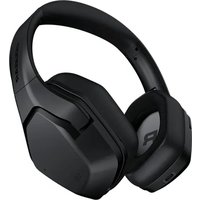
Spettro - Headset Cougar - Free user manual and instructions
Find the device manual for free Spettro Cougar in PDF.


Pick your language and provide your email: we'll send you a specifically translated version.
| Product Type | Wired Gaming Headset |
| Driver Size | 50 mm |
| Frequency Response | 20 Hz - 20 kHz |
| Impedance | 32 Ω |
| Sensitivity | 100 dB |
| Connectivity | 3.5 mm jack (4-pole) |
| Cable Length | 1.2 m |
| Microphone Type | Unidirectional, noise-canceling |
| Microphone Frequency Response | 100 Hz - 10 kHz |
| Dimensions (Headset) | 200 x 180 x 90 mm |
| Weight | Approx. 280 g |
| Power Source | No battery (wired) |
| Compatibility | PC, PlayStation, Xbox, Nintendo Switch, mobile |
| Ear Cup Design | Over-ear, closed-back |
| Headband Adjustment | Adjustable steel slider |
| Ear Cushion Material | Leatherette with memory foam |
| Inline Controls | Volume wheel and mute switch |
| Maintenance | Wipe with damp cloth; do not submerge |
| Safety Warnings | Avoid prolonged high volume to prevent hearing damage |
| Spare Parts Availability | Ear cushions and cable available from Cougar support |
Frequently Asked Questions - Spettro Cougar
How do I connect the Cougar Spettro headset to my PC?
The headset uses a single 3.5 mm 4-pole jack. On PCs with separate headphone and microphone jacks, you may need a splitter cable (sold separately).
Can I use the Spettro headset with my Xbox or PlayStation?
Yes, as long as the controller has a 3.5 mm audio jack. For newer consoles without a jack, an adapter may be required.
How do I mute the microphone?
There is an inline mute switch on the cable. Slide it to the mute position to disable the microphone.
Is the microphone removable?
No, the microphone is fixed to the headset. However, it is flexible and can be positioned out of the way.
How do I clean the ear cushions?
Wipe gently with a damp cloth and mild soap. Do not use alcohol or harsh chemicals. Allow to air dry completely before use.
Does the headset have volume control?
Yes, an inline volume wheel lets you adjust the audio level without leaving your game.
What devices are compatible with the Spettro headset?
It works with any device that has a 3.5 mm audio output, including PCs, gaming consoles, smartphones, and tablets.
Can I replace the ear cushions?
Yes, replacement ear cushions are available from Cougar's official support. They can be removed by gently pulling them off.
How long is the cable?
The cable is 1.2 meters (3.9 feet) long, suitable for close-range use with a controller or PC.
Does the headset support surround sound?
The Spettro is a stereo headset. You can enable virtual surround sound via software on PC, but it depends on your sound card.
User questions about Spettro Cougar
0 question about this device. Answer the ones you know or ask your own.
Ask a new question about this device
No questions yet. Be the first to ask one.
Download the instructions for your Headset in PDF format for free! Find your manual Spettro - Cougar and take your electronic device back in hand. On this page are published all the documents necessary for the use of your device. Spettro by Cougar.
USER MANUAL Spettro Cougar
Manual assistant
Powered by Anthropic
Waiting for your message
Product information
Brand : Cougar
Model : Spettro
Category : Headset