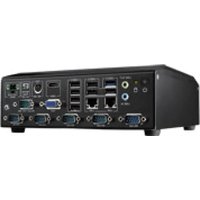
AIMC-2000 - Computer Advantech - Free user manual and instructions
Find the device manual for free AIMC-2000 Advantech in PDF.


Pick your language and provide your email: we'll send you a specifically translated version.
| Product Type | Fanless Embedded Box PC |
| Brand | Advantech |
| Model | AIMC-2000 |
| Processor | Intel Core i5-7200U (2.5 GHz, up to 3.1 GHz) |
| Memory | 8 GB DDR4 SO-DIMM (expandable up to 32 GB) |
| Storage | 128 GB M.2 SATA SSD |
| Dimensions (W x D x H) | 200 mm x 150 mm x 50 mm |
| Weight | 2.0 kg |
| Power Supply | 12 V DC, 60 W adapter included |
| Operating Temperature | 0°C to 50°C |
| Storage Temperature | -20°C to 60°C |
| Relative Humidity | 10% to 90% non-condensing |
| I/O Ports | 2 x Gigabit LAN, 4 x USB 3.0, 2 x COM (RS-232/422/485), 1 x HDMI, 1 x VGA, 1 x audio |
| Expansion | 1 x Full-size Mini PCIe, 1 x M.2 2230 Key E |
| Operating System | Windows 10 IoT Enterprise (optional), Linux compatible |
| Mounting | VESA mount (75mm/100mm) and wall mount kit included |
| Main Functions | Industrial automation, edge computing, digital signage, IoT gateway |
| Maintenance & Cleaning | Keep vents clear; use dry cloth; avoid solvents |
| Safety | CE, FCC, UL certified; overcurrent and overvoltage protection |
| Spare Parts & Repairability | Fanless design for low failure; replaceable memory and storage; contact Advantech support |
Frequently Asked Questions - AIMC-2000 Advantech
How do I install the AIMC-2000?
Mount the device using the included VESA or wall mount bracket. Connect the power adapter, peripherals, and network cables. Power on using the front panel button.
What operating systems are supported?
The AIMC-2000 supports Windows 10 IoT Enterprise and Linux distributions like Ubuntu. Drivers are available from the Advantech website.
How do I clean the device?
Use a soft dry cloth to wipe the exterior. Do not use liquids or solvents. Ensure the unit is powered off and disconnected from power before cleaning.
Can I upgrade the memory or storage?
Yes, the AIMC-2000 has a SO-DIMM slot for memory (up to 32 GB) and an M.2 slot for SSD. Refer to the manual for compatible modules.
What is the maximum operating temperature?
The device operates reliably between 0°C and 50°C. Above this range, performance may degrade or shutdown to protect components.
How do I connect multiple displays?
The unit features HDMI and VGA ports. Connect one display to each; use the display settings in the OS to configure extended or mirrored mode.
Does it support PoE (Power over Ethernet)?
No, the AIMC-2000 does not support PoE. A standard 12V DC power adapter is required for each unit.
How do I update the BIOS?
Visit the Advantech support page for your model. Download the latest BIOS update and follow the instructions in the readme file. Ensure stable power during update.
What warranty does the AIMC-2000 have?
Advantech offers a standard 2-year limited warranty. Extended warranty options may be available through your reseller.
How do I access the COM ports?
The COM ports are located on the front panel. Use RS-232/422/485 compatible cables. Configure the port settings in the device manager or BIOS.
User questions about AIMC-2000 Advantech
0 question about this device. Answer the ones you know or ask your own.
Ask a new question about this device
No questions yet. Be the first to ask one.
Download the instructions for your Computer in PDF format for free! Find your manual AIMC-2000 - Advantech and take your electronic device back in hand. On this page are published all the documents necessary for the use of your device. AIMC-2000 by Advantech.
USER MANUAL AIMC-2000 Advantech


Manual assistant
Powered by Anthropic
Waiting for your message
Product information
Brand : Advantech
Model : AIMC-2000
Category : Computer