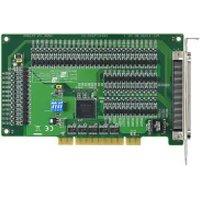
PCI-1752U - Electronic board Advantech - Free user manual and instructions
Find the device manual for free PCI-1752U Advantech in PDF.


Pick your language and provide your email: we'll send you a specifically translated version.
| Product Type | Digital I/O PCI Card |
| Model | PCI-1752U |
| Brand | Advantech |
| Number of Channels | 48 |
| I/O Type | TTL/CMOS compatible digital I/O |
| Output Capability | Source and sink modes |
| Input Voltage Range | 0 to 5V DC (Logic High: 2.0V min, Low: 0.8V max) |
| Bus Interface | PCI (32-bit, 33 MHz) |
| Dimensions (card only) | 175 x 106 mm (approx.) |
| Weight (card only) | Approx. 100 g |
| Power Consumption | +5V @ 500 mA typical |
| Operating Temperature | 0°C to 60°C |
| Storage Temperature | -20°C to 80°C |
| Humidity | 5% to 95% non-condensing |
| Connector | 50-pin IDC header with pull-up/pull-down options |
| Software Support | Windows, Linux via Advantech driver suite |
| Repairability | Field-replaceable fuses, no user-serviceable components |
| Safety Compliance | CE, FCC Class A |
| Included Accessories | Software CD, manual, and cable (if applicable) |
Frequently Asked Questions - PCI-1752U Advantech
What is the PCI-1752U and what is it used for?
The PCI-1752U is a 48-channel digital I/O PCI card from Advantech, used for industrial control, automation, and data acquisition applications.
How do I physically install the PCI-1752U?
Power off the computer, open the chassis, insert the card into an available PCI slot, secure it with screws, and close the chassis. Then connect external devices via the 50-pin IDC header.
Which drivers are needed for the PCI-1752U?
Advantech provides drivers for Windows (through Device Manager) and Linux (kernel modules). Download from the Advantech support website or use the included CD.
What is the wiring configuration for digital inputs?
Connect the signal ground to the card's GND pin and the signal line to the corresponding input pin. The card accepts TTL/CMOS levels (0-5V). Use the pull-up/down resistors if needed.
How can I test if the card is working?
Install the driver and use Advantech's Device Manager or DAQNavi software to detect the card. Then run a simple loopback test: connect an output pin to an input pin and toggle the output.
What is the maximum current per output channel?
Each output can sink/source up to 24 mA typical. Exceeding this may damage the card or external components.
Can I use multiple PCI-1752U cards in one system?
Yes, the card supports multiple installations. Each card is assigned a unique device ID by the system BIOS. Use Advantech's software to configure each card individually.
How do I clean and maintain the PCI-1752U?
Keep the card dry and free of dust. Use compressed air to clean the PCI connector and board. Avoid using liquids or solvents.
What should I do if the card is not recognized by the computer?
Check that the card is firmly seated in the PCI slot. Ensure the driver is properly installed. Try a different PCI slot or update the BIOS. If still unrecognized, test the card on another PC as a last resort.
Is the PCI-1752U compatible with Windows 10/11?
Yes, Advantech provides drivers for Windows 10 and Windows 11 (both 32-bit and 64-bit). Download the latest driver from the support site for best compatibility.
User questions about PCI-1752U Advantech
0 question about this device. Answer the ones you know or ask your own.
Ask a new question about this device
No questions yet. Be the first to ask one.
Download the instructions for your Electronic board in PDF format for free! Find your manual PCI-1752U - Advantech and take your electronic device back in hand. On this page are published all the documents necessary for the use of your device. PCI-1752U by Advantech.
USER MANUAL PCI-1752U Advantech




Manual assistant
Powered by Anthropic
Waiting for your message
Product information
Brand : Advantech
Model : PCI-1752U
Category : Electronic board