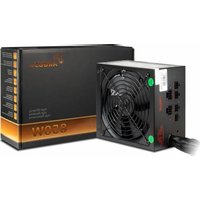
BPS-850CM - PC Power Supply Inter-Tech - Free user manual and instructions
Find the device manual for free BPS-850CM Inter-Tech in PDF.


| Product Type | PC Power Supply |
| Model | BPS-850CM |
| Brand | Inter-Tech |
| Form Factor | ATX |
| Output Power | 850W |
| Efficiency Rating | 80+ Bronze |
| Input Voltage | 100-240V AC |
| Input Frequency | 50-60Hz |
| PFC Type | Active PFC |
| Fan Size | 120mm |
| Fan Type | Sleeve Bearing |
| Modular Design | Fully Modular |
| Main Connector | 1x 24-pin ATX |
| CPU Connector | 1x 8-pin (4+4) EPS |
| PCIe Connectors | 4x 6+2-pin |
| SATA Connectors | 6x |
| Molex Connectors | 3x |
| Protections | OVP, UVP, OCP, OPP, SCP |
| Dimensions (W x L x H) | 150 x 140 x 86 mm |
| Weight | 2.0 kg |
| Certifications | CE, RoHS |
| MTBF | 100,000 hours |
| Warranty | 2 years |
Frequently Asked Questions - BPS-850CM Inter-Tech
User questions about BPS-850CM Inter-Tech
0 question about this device. Answer the ones you know or ask your own.
Ask a new question about this device
Download the instructions for your PC Power Supply in PDF format for free! Find your manual BPS-850CM - Inter-Tech and take your electronic device back in hand. On this page are published all the documents necessary for the use of your device. BPS-850CM by Inter-Tech.
USER MANUAL BPS-850CM Inter-Tech
- Introduction......4
- Signs and symbols....5
- Safety......6
3.1 Intended use 6
3.2 General information 6
3.3 Danger and protection 7
- Technical data 8
4.1 General data 8
4.2 Output 9
4.3 Safety 10
4.4 Efficiency 11
- Connectors 11
5.1 Quantity 11
5.2 Pin configuration 12
- Assembling and initial operation 15
- FAQ 17
- Maintenance 18
- Disposal 19
- Warranty terms ...... 19
- Contact information 20
1. Introduction
Thank you for buying an ArgusNT® power supply. You chose a high-quality and high-efficient power supply which is made from selected components and subjected to a strict quality management system. This ensures best performance and reliability.
The power supply has a high efficiency which respects the environmental and lowers the cost of power. This is documented by the 80+ Bronze EU certification of the independent web site PlugLoadSolutions made by CLEAResult, the biggest North American provider of energy efficiency programs and services.
The high 12V output with three PCI Express connectors as well as the newest Intel ATX 12V 3.1 standard with a 12VHPWR 600W PCIe 5.0 output ensure a future-proof system.
We recommend to read this manual carefully and especially paying attention for the security advices to enjoy this power supply for a long time.

2. Signs and symbols
| Symbols | Meaning |
 | Handling and effects of safety instructions. |
 | Allusion to dangerous situation which can cause injury or death if not prohibited. |
 Flammable Flammable | Allusion to dangerous situation which can cause fire. |
 | Allusion to property damages and general information. |

3. Safety
3.1 Intended use
This device is made only for indoor use and for mounting in computer cases.
Don't use and store the device inside humid rooms or near water.
Don't use it close to source of heat. The additional heat could lead to overheating and fire.
3.2 General information
Please read this manual carefully before installing or using this product.
Keep this manual and pass it by passing the product.
Please follow the instructions and warnings of this manual before using the product.
The inobservance of this manual can cause violations and damages.
We disclaim liability for violations and damages caused by inobservance of this manual.

3.3 Danger and protection
Don't stick any items into the power supply (electric strike).
Don't pull the plug by pulling at the cable.
Don't use any patched or damaged cable or plug.
Don't place the device close to source of heat.
In case of strange noise or smell pull the power cord out of the socket.
Don't open the housing of the device (fire hazzard/ electric strike).
Ensure that all cables are fixed permanently.
Keep the product away from children.
Don't remove the cable with wet hands (electric strike).
Don't use the product with wet hands (electric strike).
Please remove the power cord from socket in case of longer non-use (Could led to overheating, fire hazard or electric strike).
Keep the product free of dust (Overheating or fire).
Look for sufficient airflow and ventilation to avoid overheating or fire.
Leave service or cleaning only authorized and qualified personnel.


Flammable


Flammable

4. Technical data
4.1 General data
Standard Intel ATX 12V 2.4, Intel ATX 12V 3.0 (only BPS-850, BPS-850CM)
Input voltage 100 – 240 V\~ AC, 47-63Hz
Input current BPS-500 110V\~ -7A / 230V\~ -3,5A
BPS-600 110V\~ -8A / 230V\~ -4A
BPS-700 110V\~ -9A / 230V\~ -4,5A
BPS-850 110V\~ - 10A / 230V\~ - 5A
BPS-850CM 110V\~ - 10A /230V\~ - 5A
PFC Active
Power factor > 0,90 at 100% load
Stand-by 0,30W
MTBF 100,000h at 25°C
Environmental Operation 0 – 40°C
-85% not condensing
Storage -20 – 90°C -95% not condensing

4.2 Output
| Max. | Total | 3,3V | 5V | Combined 3,3V + 5V | 12V | 12V HPWR | -12V | 5Vsb |
| BPS-500 | 500W | 15A | 15A | 100W | 41A | - | 0,3A | 2,5A |
| BPS-600 | 600W | 15A | 15A | 100W | 50A | - | 0,3A | 2,5A |
| BPS-700 | 700W | 15A | 15A | 100W | 58A | - | 0,3A | 2,5A |
| BPS-850 | 850W | 20A | 20A | 100W | 70,8A | 50A | 0,3A | 3,0A |
| BPS-850CM | 850W | 20A | 20A | 100W | 70,8A | 50A | 0,3A | 3,0A |

4.3 Safety
| OPP Over-Power-Protection of the nominal output. | Power supply will shut down if the output is more than 130% |
| OCP Over-Current-Protection will exceed the tolerance value. | Power supply will shut down if the current of the output lines |
| OVP Over-Voltage-Protection | To prevent further damages the power supply will shut down if a fault causes a higher output voltage. |
| SCP Short-Circuit-Protection secondary output lines. | Power supply will shut down in case of a short circuit on |
| NLP No-Load-Protection output lines to prevent damages. | Power supply will shut down in case of no load on secondary |

4.4 Efficiency 230V\~
| Load | 10% | 20% | 50% | 100% | |
| BPS-500 | 500W | 80,50 % | 85,30 % | 88,40 % | 85,30 % |
| BPS-600 | 600W | 82,50 % | 86,90 % | 88,70 % | 85,60 % |
| BPS-700 | 700W | 83,30 % | 87,40 % | 88,90 % | 85,90 % |
| BPS-850 | 850W | 82,68 % | 87,57 % | 89,21 % | 86,32 % |
| BPS-850CM | 850W | 82,68 % | 87,57 % | 89,21 % | 86,32 % |
5. Connectors
All connectors are standardized and made against reverse connection. In case of difficulties during connection, please make sure to use the right connector. Don't try to insert a connector forcibly.
5.1 Quantity
| ATX20+4pin | EPS/ P44+4pin | IDE4pin | SATA15pin | 12VHPWR | FDD4pin | PCIe6+2pin | |
| BPS-500 | 1 | 1 | 3 | 6 | - | 1 | 2 |
| BPS-600 | 1 | 2 | 3 | 6 | - | 1 | 4 |
| BPS-700 | 1 | 2 | 3 | 6 | - | 1 | 4 |
| BPS-850 | 1 | 1 | 3 | 6 | 1 | 1 | 4 |
| BPS-850CM | 1 | 2 | 3 | 8 | 1 | 1 | 4 |

5.2 Pin configuration
5.2.1 P1 ATX-Mainboard connector 20+4 pin


Pins 11/ 12/ 23/ 24 are made as separate jacks. It can be swung away in case of using older Mainboards.
Don't mix the separate jack with the P4 connector.
5.2.2 EPS/ P4 Mainboard connector 4+4 pin


Don't plug it into another socket on the board.
Depending your mainboard you need an 8pin or 4pin connector. For that the connector is divisible. In case of using just the 4pin connector the rest of the connector is without function.

5.2.3 IDE connector 4 pin


5.2.4 FDD connector 4 pin


5.2.5 PCI-Express connector 6+2 pin


Some graphic adapter need only a 6pin plug for connection. In this case, pull off the 2pin connector from the PCIe connector.

5.2.6 SATA connector 15 pin


5.2.7 12VHPWR connector 12+4 pin
| Signal | Pin | Signal | Pin | Signal | Pin |
| CARD_PWR_ Stable | S1 | +12V | 1 | GRD | 7 |
| CARD_CBL_PRES# | S2 | +12V | 2 | GRD | 8 |
| SENSE0 | S3 | +12V | 3 | GRD | 9 |
| - | S4 | +12V | 4 | GRD | 10 |
| +12V | 5 | GRD | 11 | ||
| +12V | 6 | GRD | 12 | ||


Please note: This connector is made up to 600W output only!
To avoid possible fire make sure that the jack is completely plugged into the socket.


6. Assembling and initial operation
- Take out the power supply and check the package content for completeness or damages.
Please contact you local dealer for replacement in case of missing or damaged parts.
Please keep the original package for shipping in case of warranty claim.
Please connect the power supply to the grid after connecting all other devices.

- Fix the power supply with the enclosed screws to the allocated space of the computer case.
- Connect all components with the suitable cables.
Please follow also chapter 5.2 (Pin configuration) as well as the instructions of the device manufacturers.
A faulty connection of the components can cause damages. Please ask your local dealer or our service-hotline in case of discrepancies or questions.
- Lay all cables in a way to avoid disturbing airflow or any rotating fan. Use the enclosed cable ties to fix the cables.
- Connect the power supply with the electric socket.
Use only the original power cord. In case of a damaged cable, please change it against an approved power cord from your local dealer.
- Switch on the power supply at the backside of the power supply. Your computer is ready now.
By power-on the power supply it is in Stand-By mode to start the computer by pressing the power button at the case front. To separate the computer totally from the electric grid power –off the power supply directly.

7. FAQ
| Error | Possible reason(s) | Help |
| The power supply runs shortly and stops. | Short circuit at Mainboard, HDD, FDD or CD-ROM | Check all connectors for right connection. |
| Eliminate short circuit or change components. | ||
| Power supply does not start | Secondary connectors not connected | Check all connectors for right connection. |
| Main switch on power supply is off | Switch on the main switch of the power supply. | |
| Power cord is not connected | Check if power cord is connected to power supply and electric grid. | |
Power cord defective  | Change power cord against an approved new power cord. | |
Power socket defective  | Let authorized experts check the socket. |
Please unplug power cord generally when working inside the computer case.
In case of checking the electric socket exists risk of electric strike.
Leave work on mains supply only authorized experts.


8. Maintenance
The power supply needs no maintenance which requires opening of the housing or working inside the power supply.
But cause of the intake of air, dust can collect inside the power supply.
This can lead to overheating or fire.
You can remove this dust with compressed air by yourself. To do this, unplug the power supply from mains supply, dismount the power supply in reversed way as described before and blow the dust with compressed air through the fan grid out of the housing.
Do not use a wet or moist rag to remove dust. Hazard of electric shock.
Do not open the power supply in any circumstances. You will risk your life by an electric shock, destroy any components and lose your warranty claim.
We recommend to let authorized experts do the cleaning.
HINWEIS

HINWEIS

9. Disposal
Please dispose this device by using the special discharge point for electronic waste and ask your municipality or disposal company in case of further questions.
Please dispose the cardboard and plastics by using the appropriate containers of the household garbage.

10. Warranty terms
In spite of best efforts and quality controls a device can have a fault. But because the ArgusNT® BPS- series is made by highest quality standard we extend the legal warranty terms to totally 3 years up from purchase date at proper use. In case of a warranty claim please contact your dealer from whom you bought the product.
We will grant no warranty by:
- Missing or damaged warranty seal,
- Negligent behavior,
- Improper use,

- Nonobservance of the manual,
- External violence,
- Acts of god,
- Damages caused by manipulation, upgrading, updating or reconstruction of hardware or software
- Damages caused by other harm,
In case of data loss Inter-Tech will only be liable at wanton negligence or deliberate intention or, in all other cases, only for the recovery of data from a continuous, daily backup. Inter-Tech does not assume liability for all other matters.
Please look also at our complete warranty terms on our website.
11. Contact information



- INTRODUCTION
- SIGNS AND SYMBOLS
- SAFETY
- 3.1 INTENDED USE
- 3.2 GENERAL INFORMATION
- 3.3 DANGER AND PROTECTION
- TECHNICAL DATA
- 4.1 GENERAL DATA
- 4.3 SAFETY
- 4.4 EFFICIENCY 230V
- CONNECTORS
- 5.1 QUANTITY
- 5.2 PIN CONFIGURATION
- 5.2.3 IDE CONNECTOR 4 PIN
- 5.2.4 FDD CONNECTOR 4 PIN
- 5.2.5 PCI-EXPRESS CONNECTOR 6+2 PIN
- 5.2.6 SATA CONNECTOR 15 PIN
- 5.2.7 12VHPWR CONNECTOR 12+4 PIN
- ASSEMBLING AND INITIAL OPERATION
- FAQ
- MAINTENANCE
- HINWEIS
- DISPOSAL
- WARRANTY TERMS
- CONTACT INFORMATION
Brand : Inter-Tech
Model : BPS-850CM
Category : PC Power Supply