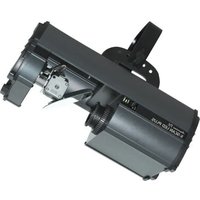
X-Scan LED Plus - Light projector American Audio - Free user manual and instructions
Find the device manual for free X-Scan LED Plus American Audio in PDF.


Pick your language and provide your email: we'll send you a specifically translated version.
| Product Type | LED Scanner / Moving Head Light |
| Brand | American Audio |
| Model | X-Scan LED Plus |
| Light Source | LED, multiple colors |
| Control Protocol | DMX512 |
| DMX Channels | 6 or 8 channels (selectable) |
| Operating Modes | DMX, Sound Active, Master/Slave, Auto |
| Power Supply | AC 100-240V, 50/60Hz |
| Power Consumption | 60W |
| Dimensions (L x W x H) | 10.2 x 8.5 x 11.8 inches |
| Weight | 8.8 lbs (4 kg) |
| Pan Range | 180° |
| Tilt Range | 90° |
| Beam Angle | 15° |
| Built-in Programs | Yes, multiple auto shows |
| Strobe Rate | 1-20 Hz |
| Dimmer | Linear 0-100% |
| Maintenance | Clean lenses with dry soft cloth. Keep ventilation slots clear. |
| Safety | Use safety cable. Mount on stable surface. Do not expose to rain or moisture. |
| Spare Parts | LED module, power supply, fuse. Contact authorized service center. |
Frequently Asked Questions - X-Scan LED Plus American Audio
How do I set the DMX address on the X-Scan LED Plus?
Press the Menu button until Addr shows on the display. Use Up/Down to set the desired address (1-512). Press Enter to confirm.
Can I use the fixture without a DMX controller?
Yes, it has Sound Active and Auto modes. Press Mode until Sound or Auto appears, then adjust sensitivity if needed.
How do I clean the lenses?
Use a soft dry cloth to gently wipe the lenses. For stubborn dirt, slightly dampen the cloth with water or a mild glass cleaner. Never use abrasive cleaners.
What power supply does the X-Scan LED Plus require?
It operates on AC 100-240V, 50/60Hz. Use the included power cord. Do not use a dimmer or modified sine wave inverter.
How do I connect multiple units in Master/Slave mode?
Set the first unit as Master (mode set to Master). Set all others as Slave (mode set to Slave). Connect them via DMX cables. The slaves will follow the master.
The fixture is not responding to DMX. What should I check?
Ensure the DMX address matches the controller, the cable is properly connected and terminated (if last fixture), and the controller is sending data. Check the DMX polarity (pin 2 hot or pin 3 hot).
Can I replace the LED module myself?
No, the LED module should be replaced by a qualified technician. Contact American Audio service or an authorized dealer.
How do I reset the fixture to factory settings?
Press and hold the Menu button for 5 seconds. Select Reset and confirm. All settings will return to defaults.
What is the maximum number of fixtures I can daisy-chain?
You can connect up to 32 fixtures on a single DMX line without a signal booster. For longer runs, use a DMX splitter.
Why is the fan running even when the light is off?
The internal fan runs to cool the electronics and may continue for a short time after power-off. This is normal. Ensure good ventilation.
User questions about X-Scan LED Plus American Audio
0 question about this device. Answer the ones you know or ask your own.
Ask a new question about this device
No questions yet. Be the first to ask one.
Download the instructions for your Light projector in PDF format for free! Find your manual X-Scan LED Plus - American Audio and take your electronic device back in hand. On this page are published all the documents necessary for the use of your device. X-Scan LED Plus by American Audio.
USER MANUAL X-Scan LED Plus American Audio



Manual assistant
Powered by Anthropic
Waiting for your message
Product information
Brand : American Audio
Model : X-Scan LED Plus
Category : Light projector