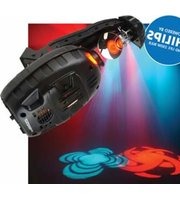
Fusion Scan 250 - Light projector American Audio - Free user manual and instructions
Find the device manual for free Fusion Scan 250 American Audio in PDF.


Pick your language and provide your email: we'll send you a specifically translated version.
| Product Type | Moving Head Scanner |
| Model | Fusion Scan 250 |
| Brand | American Audio |
| Light Source | 250W Halogen Lamp |
| Beam Angle | Approx. 15° |
| Pan Range | 540° |
| Tilt Range | 270° |
| DMX Channels | 6 or 8 Channels |
| Control Modes | DMX512, Sound Active, Auto, Master/Slave |
| Power Supply | AC 100-240V, 50/60Hz |
| Power Consumption | 350W |
| Dimensions | 12.5 x 8.3 x 6.1 inches (318 x 211 x 155 mm) |
| Weight | 12.5 lbs (5.7 kg) |
| Housing | Metal with black finish |
| Cooling | Fan cooled |
| Safety Certifications | CE, RoHS |
| Cleaning | Clean lens with soft cloth; keep ventilation slots clear |
| Spare Parts | Lamp, fuse, gobo set (optional) |
| Reparability | Replaceable lamp and fuse; service by qualified technician |
Frequently Asked Questions - Fusion Scan 250 American Audio
How do I connect the Fusion Scan 250 to a DMX controller?
Use a standard 3-pin XLR cable. Connect the DMX output of your controller to the DMX input of the scanner. Set the scanner's DMX address via the DIP switches on the back.
What is the DMX address range for this scanner?
The scanner uses 6 or 8 channels depending on mode. Set the starting address using DIP switches (1-512). Refer to the manual for binary addressing.
How do I replace the lamp?
Disconnect power first. Allow lamp to cool. Open the lamp compartment cover, remove the old lamp, and install a new 250W halogen lamp (type GY9.5). Do not touch the bulb with bare hands.
Why is the scanner not responding to DMX?
Check that the DMX cable is properly connected and not damaged. Verify the DMX address matches the controller. Ensure the scanner is in DMX mode (not sound-active or auto). Restart both devices.
How do I clean the lens?
Use a soft, lint-free cloth slightly dampened with lens cleaner. Wipe gently in circular motions. Avoid using abrasive materials or solvents.
Can I use this scanner without a controller?
Yes, it has sound-active mode (built-in microphone) and auto mode (preprogrammed patterns). Use the buttons on the rear panel to select mode.
What is the power consumption of the Fusion Scan 250?
The power consumption is approximately 350W. It operates on AC 100-240V, 50/60Hz. Use a grounded power outlet.
How do I set up master/slave mode?
Connect multiple scanners via DMX cables. Set one scanner as master (dip switch or menu) and the others as slave (e.g., DMX address = 0). The master will control the others.
What safety precautions should I take?
Always use a safety cable when mounting overhead. Keep away from flammable materials. Ensure ventilation is not blocked. Disconnect power before servicing.
How often should I replace the lamp?
Lamp life is approximately 1000-2000 hours. Replace if it dims or fails. Allow lamp to cool before replacement. Use only specified lamp type.
User questions about Fusion Scan 250 American Audio
0 question about this device. Answer the ones you know or ask your own.
Ask a new question about this device
No questions yet. Be the first to ask one.
Download the instructions for your Light projector in PDF format for free! Find your manual Fusion Scan 250 - American Audio and take your electronic device back in hand. On this page are published all the documents necessary for the use of your device. Fusion Scan 250 by American Audio.
USER MANUAL Fusion Scan 250 American Audio



Manual assistant
Powered by Anthropic
Waiting for your message
Product information
Brand : American Audio
Model : Fusion Scan 250
Category : Light projector