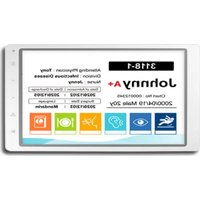
EPD-662 - Electronic screen Advantech - Free user manual and instructions
Find the device manual for free EPD-662 Advantech in PDF.


Pick your language and provide your email: we'll send you a specifically translated version.
| Product Type | Industrial Panel PC |
| Display Size | 6.5 inches |
| Resolution | 800 x 480 pixels |
| Touchscreen | Resistive touch |
| Processor | Intel Atom E3827 or similar |
| Memory | 2 GB DDR3L |
| Storage | 32 GB SSD |
| Operating System | Windows 10 IoT or Linux |
| Ports | 2 x USB 2.0, 1 x COM, 1 x LAN |
| Mounting | Panel mount (VESA 75 mm) |
| Power Supply | 12 V DC, 2.5 A max |
| Operating Temperature | 0°C to 50°C |
| Certifications | CE, FCC, UL |
| Dimensions | 180 x 130 x 45 mm |
| Weight | 1.2 kg |
Frequently Asked Questions - EPD-662 Advantech
How do I install the EPD-662?
Mount the panel using the provided brackets. Connect power via 12V DC input. Attach any peripherals to USB/COM ports. Install drivers and OS as per manual.
What is the default operating system?
The EPD-662 typically comes with Windows 10 IoT Enterprise or can be ordered with Linux. Check your unit for specifics.
How do I clean the screen?
Use a soft, lint-free cloth lightly dampened with water or a mild non-abrasive screen cleaner. Do not spray directly onto the screen.
Can I upgrade the RAM?
Yes, the EPD-662 supports up to 8 GB DDR3L RAM. Access the SODIMM slot by removing the bottom panel.
Is the touchscreen multi-touch?
No, the resistive touchscreen only supports single-touch input.
What are the backup procedures?
Regularly back up important data to external USB drive or network location. Use Windows Backup or built-in imaging tools.
How do I update drivers?
Visit the Advantech support website, enter model EPD-662, and download the latest drivers. Install via device manager.
Can I use it vertically?
Yes, the display can be rotated 90° in software. Ensure the installation is secure if mounting vertically.
What is the power consumption?
Typical power consumption is 15W under normal load. Maximum 30W at startup.
How do I reset to factory defaults?
Power off the unit. Press and hold the reset button (if available) or use system restore from Windows recovery environment.
User questions about EPD-662 Advantech
0 question about this device. Answer the ones you know or ask your own.
Ask a new question about this device
No questions yet. Be the first to ask one.
Download the instructions for your Electronic screen in PDF format for free! Find your manual EPD-662 - Advantech and take your electronic device back in hand. On this page are published all the documents necessary for the use of your device. EPD-662 by Advantech.
USER MANUAL EPD-662 Advantech

Manual assistant
Powered by Anthropic
Waiting for your message
Product information
Brand : Advantech
Model : EPD-662
Category : Electronic screen