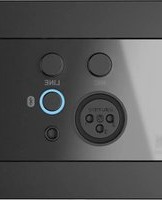
WP225 - Audio/video converter Audac - Free user manual and instructions
Find the device manual for free WP225 Audac in PDF.


Pick your language and provide your email: we'll send you a specifically translated version.
| Product Type | Audio/Video Converter |
| Brand | Audac |
| Model | WP225 |
| Dimensions (approx.) | 120 mm x 80 mm x 30 mm |
| Weight (approx.) | 200 g |
| Power Supply | DC 5V 1A via micro USB |
| Input Interface | HDMI, VGA, Composite (selectable) |
| Output Interface | HDMI, VGA, Composite (selectable) |
| Supported Resolutions | Up to 1080p @60Hz |
| Audio Support | Analog stereo and digital audio (PCM) |
| Conversion Modes | HDMI to VGA, VGA to HDMI, Composite to HDMI, etc. |
| Operating Temperature | 0°C to 40°C |
| Storage Temperature | -10°C to 60°C |
| Humidity | 10% to 90% non-condensing |
| Maintenance | Wipe with a dry cloth; avoid liquids and solvents |
| Safety Precautions | Do not expose to moisture; use only supplied power adapter |
| Spare Parts Available | Power adapter, remote control (if applicable) |
| Repairability | No user-serviceable parts; contact Audac support |
| Compliance | CE, RoHS |
Frequently Asked Questions - WP225 Audac
How do I connect the converter?
Connect the input source (e.g., HDMI) to the corresponding input port, then connect your display to the output port using the appropriate cable. Ensure both devices are powered on and select the correct input on your display.
What resolutions does the WP225 support?
The converter supports resolutions up to 1080p @60Hz. It can also handle lower resolutions like 720p and 480p.
What power supply do I need?
The WP225 requires a DC 5V 1A power supply via micro USB. Use only the supplied adapter or a certified equivalent.
Can I convert HDMI to VGA?
Yes, the WP225 can convert HDMI signals to VGA output. No external converter is needed for this mode.
Why is there no signal on my display?
First, check all cable connections and ensure the power supply is plugged in. Verify that the input source is active and the display is set to the correct input channel. If the issue persists, try a different cable or source.
Does this converter support audio?
Yes, the WP225 supports analog stereo audio (via 3.5mm jack) and digital audio (PCM) depending on the conversion mode. Refer to the manual for specific audio routing.
How do I clean the device?
Use a soft, dry cloth to wipe the exterior. Do not use liquids, solvents, or abrasive cleaners. Ensure the device is unplugged before cleaning.
Can I use the converter without external power?
No, the WP225 requires external power via the micro USB port to operate. It does not draw power from the HDMI or VGA ports.
What should I do if the converter gets hot?
The device may become warm during use. Ensure adequate ventilation and do not cover the device. If it becomes excessively hot, power off and contact Audac support.
Are spare parts available for the WP225?
Yes, spare parts like the power adapter are available. For repairs, contact Audac authorized service centers. Do not attempt to open the device.
User questions about WP225 Audac
0 question about this device. Answer the ones you know or ask your own.
Ask a new question about this device
No questions yet. Be the first to ask one.
Download the instructions for your Audio/video converter in PDF format for free! Find your manual WP225 - Audac and take your electronic device back in hand. On this page are published all the documents necessary for the use of your device. WP225 by Audac.
USER MANUAL WP225 Audac
Manual assistant
Powered by Anthropic
Waiting for your message
Product information
Brand : Audac
Model : WP225
Category : Audio/video converter