
PUV-1620S-TX - Émetteur vidéo HDMI CYP - Free user manual and instructions
Find the device manual for free PUV-1620S-TX CYP in PDF.


| Product Type | HDMI Extender Transmitter |
| Brand | CYP |
| Model | PUV-1620S-TX |
| Dimensions (W x D x H) | 140 mm x 80 mm x 25 mm |
| Weight | 200 g |
| Power Supply | DC 5V / 1A via USB or PoE (Power over Ethernet) |
| Power Consumption | < 5W |
| Video Input | 1x HDMI Type A (Female) |
| Video Output | 1x RJ45 (Ethernet) for HDBaseT transmission |
| Max Video Resolution | 4K@60Hz (4:4:4, 8-bit) |
| HDCP Support | HDCP 2.2 / 1.4 |
| Transmission Distance | Up to 100 meters (CAT6a cable) |
| Audio Support | Up to 7.1 channels LPCM, Dolby TrueHD, DTS-HD Master Audio |
| Operating Temperature | 0°C to 50°C |
| Storage Temperature | -20°C to 60°C |
| Relative Humidity | 20% to 90% (non-condensing) |
| Mounting | Desktop or wall-mountable (bracket included) |
| LED Indicators | Power, Link, Signal |
| Cleaning Instructions | Use a soft, dry cloth. Do not use liquids. |
| Safety Certifications | CE, FCC, RoHS |
Frequently Asked Questions - PUV-1620S-TX CYP
User questions about PUV-1620S-TX CYP
0 question about this device. Answer the ones you know or ask your own.
Ask a new question about this device
Download the instructions for your Émetteur vidéo HDMI in PDF format for free! Find your manual PUV-1620S-TX - CYP and take your electronic device back in hand. On this page are published all the documents necessary for the use of your device. PUV-1620S-TX by CYP.
USER MANUAL PUV-1620S-TX CYP
The information in this manual has been carefully checked and is believed to be accurate. CYP (UK) Ltd assumes no responsibility for any infringements of patents or other rights of third parties which may result from its use.
CYP (UK) Ltd assumes no responsibility for any inaccuracies that may be contained in this document. CYP (UK) Ltd also makes no commitment to update or to keep current the information contained in this document.
CYP (UK) Ltd reserves the right to make improvements to this document and/or product at any time and without notice.
COPYRIGHT NOTICE
No part of this document may be reproduced, transmitted, transcribed, stored in a retrieval system, or any of its part translated into any language or computer file, in any form or by any means—electronic, mechanical, magnetic, optical, chemical, manual, or otherwise—without express written permission and consent from CYP (UK) Ltd.
© Copyright 2011 by CYP (UK) Ltd.
All Rights Reserved.
Version 1.1 August 2011
TRADEMARK ACKNOWLEDGMENTS
All products or service names mentioned in this document may be trademarks of the companies with which they are associated.
SAFETY PRECAUTIONS
Please read all instructions before attempting to unpack, install or operate this equipment and before connecting the power supply.
Please keep the following in mind as you unpack and install this equipment:
- Always follow basic safety precautions to reduce the risk of fire, electrical shock and injury to persons.
- To prevent fire or shock hazard, do not expose the unit to rain, moisture or install this product near water.
- Never spill liquid of any kind on or into this product.
- Never push an object of any kind into this product through any openings or empty slots in the unit, as you may damage parts inside the unit.
- Do not attach the power supply cabling to building surfaces.
- Use only the supplied power supply unit (PSU). Do not use the PSU if it is damaged.
- Do not allow anything to rest on the power cabling or allow any weight to be placed upon it or any person walk on it.
- To protect the unit from overheating, do not block any vents or openings in the unit housing that provide ventilation and allow for sufficient space for air to circulate around the unit.
REVISION HISTORY
VERSION NO. DATE SUMMARY OF CHANGE
| v1.00 20/06/2018 First release | ||
CONTENTS
- Introduction......6
- Applications ......6
- Package Contents ......6
- System Requirements ....7
- Features....7
- Operation Controls and Functions......8
6.1 Front Panel 8
6.2 Rear Panel....9
6.3 IR Cable Pinouts ....10
6.4 OSD Menu....10
- Connection Diagram ...... 18
- Specifications....19
8.1 Technical Specifications ....19
8.2 Video Specifications....20
8.3 Audio Specifications....21
8.4 Cable Specifications ....22
8.5 HDBaseT Features....22
- Acronyms......23
1. INTRODUCTION
This Transmitter is designed to scale and convert HDMI and PC video, with optional analogue audio embedding, for extension over long distances to standard HDBaseT Receivers. The HDMI input supports resolutions up to 4K@60Hz and the VGA input supports resolutions up to 1080p60/WUXGA (RB). The scaled HDBaseT output supports resolutions from 640×480@60Hz up to 4K@60Hz (4:2:0, 8-bit) and provides the ability to adjust the image with a number of fine tuning options including: contrast, brightness, hue, saturation, sharpness, noise reduction, and RGB levels.
Furthermore, this unit supports passing 7.1 channel LPCM digital audio as well as advanced Bitstream and HD Bitstream audio formats via the HDMI input, or analogue stereo audio may be embedded from the provided stereo mini-jack connection. Shortcut keys are provided to quickly change the output resolution to 1080p60 or XGA when needed for quick connection to a display or for troubleshooting purposes.
Additionally, the unit may be powered locally or via 48V PoH (Power over HDBaseT) from a compatible HDBaseT Receiver, which allows for greater flexibility in installations. The unit can be controlled via front panel buttons with a comprehensive OSD.
2. APPLICATIONS
Presenter device display in classrooms and lecture halls
PC/Laptop presentation switching in boardrooms
Using classic media players with 4K HDMI displays
3. PACKAGE CONTENTS
1×HDMI/VGA to HDBaseT Scaler (PD)
1×5V/2.6A DC Power Adapter
1×3.5mm to IR Extender Cable
1×3.5mm to IR Blaster Cable
1×3-pin Terminal Block to 9-pin D-sub Adapter Cable
1×Shockproof Feet (Set of 4)
1×Operation Manual
4. SYSTEM REQUIREMENTS
HDMI or VGA source equipment such as media players, video game consoles, PCs or set-top boxes.
A compatible HDBaseT receiver with 48V PoH support is strongly recommended.
The use of "Premium High Speed HDMI" cables is highly recommended.
The use of industry standard Cat.6, Cat.6a or Cat.7 cable is highly recommended.
5. FEATURES
HDMI 2.0 and DVI 1.0 compatible
HDCP 1.x and HDCP 2.2 compliant
1 HDMI and 1 PC input
1 Analogue Stereo Audio input
1 HDBaseT output
HDMI input supports input resolutions up to 4K@60Hz
VGA input supports resolutions up to 1080p60/WUXGA (RB)
Scaled HDBaseT output supports resolutions from 640×480@60Hz up to 4K@60Hz (4:2:0, 8-bit)
HDBaseT feature support: HD Video and Audio, 100BaseT Ethernet, 48V PoH, and Control (bidirectional IR/RS-232 pass-through)
Simultaneous transmission of uncompressed video, audio and data over a single 100m/328ft Cat.5e/6/7 cable at 1080p60 and 70m/230ft at 4K
■ Supports pass-through of LPCM 7.1, Bitstream and HD Bitstream audio formats
Analogue stereo audio insertion support via stereo mini-jack
Unit may be powered locally or via 48V PoH from a compatible HDBaseT Receiver (PSE)
Controllable via front panel buttons with comprehensive OSD
6. OPERATION CONTROLS AND FUNCTIONS
6.1 Front Panel

1 SERVICE: This is reserved for firmware update use only.
2 POWER LED: This LED will illuminate to indicate the unit is on and receiving power.
3 IN Button & LEDs: Press this button to switch between the HDMI and VGA inputs. The LED will illuminate to indicate which source is currently selected.
4 MENU: Press to enter the OSD menu, or to back out from menu items.
Note: Pressing "MENU" and "+" together will reset the output resolution to XGA (1024×768@60Hz). Pressing "Menu" and "-" together will reset the output resolution to 1080p@60Hz.
5 -: Press to move down or adjust selections within OSD menus.
6 +: Press to move up or adjust selections within OSD menus.
Note: Pressing and holding the "+" and "-" keys at the same time for more than 3 seconds will perform a factory reset of the unit.
7 ENTER: Press to confirm a selection within the OSD or to go deeper into a menu item.
6.2 Rear Panel

1 HDMI IN: Connect to HDMI source equipment such as a media player, game console or set-top box. DVI sources are supported with the use of an HDMI to DVI adapter.
2 VGA IN: Connect to VGA source equipment such as a PC or laptop.
3 AUDIO IN: Connect to the stereo analogue output of a device such as a CD player or PC.
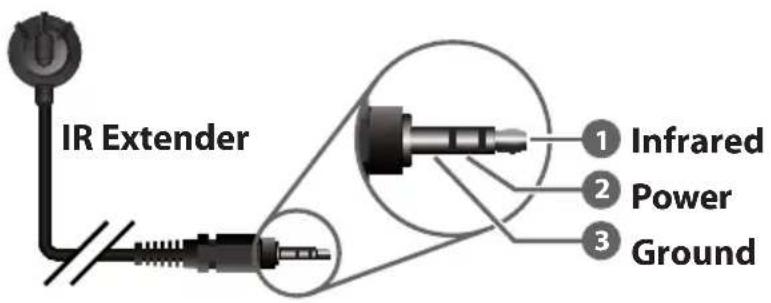
4 IR IN: Connect to the provided IR Extender to extend the IR control range of devices connected to the other end of the HDBaseT connection. Ensure that the remote being used is within direct line-of-sight of the IR Extender.
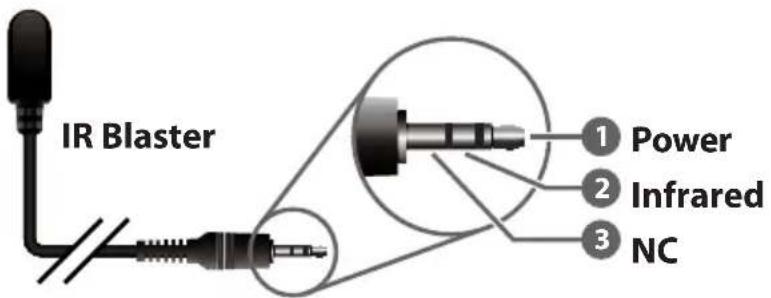
5 IR OUT: Connect to the provided IR Blaster to transmit IR signals from the other end of the HDBaseT connection to devices within direct line-of-sight of the IR Blaster.
6 RS-232: Connect to a PC, laptop or other serial control device for the extension of RS-232 signals.
7 LAN: Connect to an Ethernet supporting device or to your local network, as appropriate, to extend the network to both ends of the HDBaseT connection.
8 CAT5e/6/7 OUT: Connect to a compatible HDBaseT Receiver with a single Cat.5e/6/7 cable for transmission of all data signals.
9 DC 5V: Plug the 5V DC power adapter into the unit and connect it to an AC wall outlet for power. (Optional)
Note: This unit can be powered completely via HDBaseT if connected to a compatible 48V PoH PSE (Power Supplying Equipment) Receiver. Use of the 5V DC power adapter is optional in that case.
6.3 IR Cable Pinouts
6.4 OSD Menu
All functions of this unit can be controlled by using the OSD (On Screen Display) which is activated by pressing the Menu button on the front of the unit. Use the + (PLUS), – (MINUS), and ENTER buttons to navigate the OSD menu. Press the Menu button to back out from any menu item and then press it again to close the menu.
| MAIN MENU |
| Picture |
| Input |
| Output |
| OSD |
| Miscellany |
| Factory |
| Information |
The individual functions of the OSD will be introduced in the following section. Items marked in BOLD are the factory default settings.
| PICTURE | ||
| LEVEL 2 LEVEL 3 LEVEL 4 | ||
| Brightness 0~100 (50) | ||
| Contrast 0~100 (50) | ||
| Finetune Hue 0~100 (50) | ||
| Saturation 0~100 (50) | ||
| Sharpness 0~100 (0) | ||
| Noise Reduction OFF | ||
| Low | ||
| Middle | ||
| High | ||
| Auto | ||
| Colour Red 0~100 (50) | ||
| Green 0~100 (50) | ||
| Blue 0~100 (50) | ||
1) Brightness: Provides control over the overall brightness of the scaled output image.
2) Contrast: Provides control over the overall contrast of the scaled output image.
3) Finetune (Hue): Provides control over the hue shift of the scaled output image.
Finetune (Saturation): Provides control over the colour saturation level of the scaled output image.
Finetune (Sharpness): Provides control over the amount of sharpness processing to apply to the scaled output image.
Finetune (Noise Reduction): Provides control over the aggressiveness of the digital noise reduction processing when applied to the scaled output image. Selecting "Off" disables all noise reduction processing.
4) Colour (Red/Green/Blue): Provides control over the red, green, and blue colour level of the scaled output.
| INPUT | |
| LEVEL 2 LEVEL 3 | |
| Video Source HDMI | |
| PC | |
| Audio Source EMBEDDED | |
| Automatic | |
| Analogue | |
1) Video Source: Selects the input source to display.
2) Audio Source: Provides control over the audio source to use with the HDMI input. Selecting "Embedded" passes the HDMI source's audio without modification. Selecting "Analogue" embeds the analogue audio source into the HDMI signal for output. Selecting "Automatic" allows the unit to automatically use the analogue audio source if no audio is detected from the HDMI input.
| OUTPUT | |
| LEVEL 2 LEVEL 3 | |
| Size Overscan | |
| Full | |
| BEST FIT | |
| Pan Scan | |
| Letterbox | |
| Underscan | |
| Follow In | |
| 4K In -> 4K Out BYPASS | |
| Scaler | |
| Resolution NATIVE | |
| 640×480 60 | |
| 800×600 60 | |
| 1024×768 60 | |
| 1280×768 60 | |
| 1360×768 60 | |
| 1280×720 60 | |
| 1280×800 60 | |
| 1280×1024 60 | |
| 1440×900 60 | |
| 1400×1050 60 | |
| 1680×1050 60 | |
| 1600×1200 60 | |
| 1920×1080 60 | |
| 1920×1200 60 | |
| 720×480p 60 | |
| 720×576p 50 | |
| 1280×720p 50 | |
| 1280×720p 60 | |
| 1920×1080p 24 | |
| 1920×1080p 25 | |
| 1920×1080p 30 | |
| 1920×1080p 50 | |
| 1920×1080p 60 | |
| 4K2K 24 | |
| 4K2K 25 | |
| 4K2K 30 | |
| 4K2K (4:2:0) 50 | |
| 4K2K (4:2:0) 60 | |
1) Size: Selects the aspect ratio to use when outputting the source. "Full" stretches the source to fill the output resolution, regardless of the original aspect ratio, while "Best Fit" will always attempt to retain the original source's correct aspect ratio by adding black bars if necessary. "Follow In" centers the source on the screen, without any scaling (1:1 pixel reproduction).
Notes: This menu is only available when scaler mode is enabled and the input/output is not 4K with matching refresh rates. When "Follow In" is used with 4K sources the input resolution will automatically be reduced to 1080p prior to output.
2) 4K In -> 4K Out: Selecting "Bypass" forces the unit to pass all 4K sources without modification (scaling or frame rate conversion). Selecting "Scaler" allows the unit to scale 4K sources when they do not match the output resolution exactly.
Note: If a 4K source exactly matches the selected output resolution it will be output in bypass mode, even if "Scaler" mode is selected.
3) Resolution: Selects the output resolution to use. Selecting "Native" will make the unit automatically select an output resolution based on the detected EDID of the connected display.
| OSD | |
| LEVEL 2 LEVEL 3 | |
| H-Position 0~100 (50) | |
| V-Position 0~100 (50) | |
| Timer OFF | |
| 5s | |
| 10s | |
| 15s | |
| 20s | |
| 25s | |
| 30s | |
| 35s | |
| 40s | |
| 45s | |
| Timer 50s | |
| 55s | |
| 60s | |
| Transparent 0~100 (100) | |
| Display Off | |
| On | |
| INFO | |
1) H-Position: Set the horizontal position of the OSD menu.
2) V-Position: Set the vertical position of the OSD menu.
3) Timer: Set the length of time to wait before automatically turning off the OSD menu if there is no user interaction. The timer may also be disabled.
4) Transparent: Set the transparency level of the OSD menu. A setting of 100 is completely opaque.
5) Display: Control the visibility of the on screen information display.
Selecting "Info" will show the information display for a few seconds before automatically turning it off after a source or resolution change.
| MISCELLANY | ||
| LEVEL 2 LEVEL 3 LEVEL 4 | ||
| HDCP On Input ON | ||
| Off | ||
| HDCP On Output FOLLOW OUTPUT | ||
| Follow Input | ||
| Auto Sync Off DISABLE | ||
| Fast | ||
| Slow | ||
| Auto Input On | ||
| OFF | ||
| EDID Manage HDMI EDID DEF. 1080P | ||
| Def. 4K2K (3G) | ||
| Def. 4K2K (4:2:0) | ||
| Def. 4K2K (6G) | ||
| Output | ||
1) HDCP On Input: Enables or disables HDCP support on the HDMI input.
2) HDCP On Output: Sets the HDCP version selection logic to use with the output signal. Selecting "Follow Input" will cause the unit to output using the HDCP version required by the currently connected source. Selecting "Follow Output" will always output using the maximum supported HDCP version reported by the connected receiver.
3) Auto Sync Off: Sets the relative amount of time to continue outputting black with sync if there is no live source and no operations have been executed on the unit. Setting this to "Disable" forces the unit to always output sync.
4) Auto Input: Enables or disables automatically switching on source loss or when a new live input has been detected.
5) EDID Manage (HDMI EDID): Select the EDID to use with the HDMI input. Selecting "Output" will use the EDID copied from the currently connected receiver.
1) Reset: Selecting YES will reset all of the unit's settings back to their factory defaults.
| INFORMATION | |
| LEVEL 2 LEVEL 3 | |
| Source | [Current Status Details] |
| Input | |
| Output | |
| Valens Version | |
| Version | |
1) Information: This screen displays information about the unit's current state, input and output status, as well as the current Valens and unit firmware versions.
7. CONNECTION DIAGRAM
![graph TD A["Media Player"] -->|HDMI Input| B["PC/Laptop"] B -->|VGA Input| C["RS-232 Equipped PC/Laptop"] C -->|LAN| D["Network Switch"] D -->|60°| E["IR In & Out"] E -->|7m3m 3m| F["Radio Cable"] F --> G["Power Supply"] G --> H["HDMI Output"] H --> I["RS-232 Controlled Device"] I --> J["LAN"] J -->…](/content/2026/07/1457299/images/9e9823e8c86dd5473247373a047dfe4e0804e677aa27a577e4af8a7b25d35915.jpg)
8. SPECIFICATIONS
8.1 Technical Specifications
HDMI Bandwidth 600MHz/18Gbps
HDBaseT Bandwidth 340MHz/10.2Gbps
Input Ports 1×HDMI
1×VGA
1×Stereo (3.5mm)
Output Port 1×HDBaseT (RJ45)
Pass-through Ports 1×IR Extender (3.5mm)
1×IR Blaster (3.5mm)
1×RS-232 (3-pin Terminal Block)
1×LAN (RJ45)
IR Frequency 30–50kHz
(30–60kHz under ideal conditions)
Baud Rate Up to 115200bps
Power Supply 5V/2.6A DC
(US/EU standards, CE/FCC/UL certified)
ESD Protection Human Body Model:
±8kV (Air Discharge)
±4kV (Contact Discharge)
Dimensions 231.5mm×25mm×158mm (W×H×D)
[Case Only]
Silkscreen Colour Black
Operating Temperature 0 °C–40 °C/32 °F–104 °F
Storage Temperature -20 °C–60 °C/-4 °F–140 °F
Relative Humidity 20–90% RH (Non-condensing)
Power Consumption 8.3W/19.6W (PoH)
8.2 Video Specifications
| Supported PC Resolutions (Hz) | HDMI Input | VGA Input | HDBaseT Output | |
| 640×480 60, 72, 75, 85 | √ | √ | 60 | |
| 800×600 56, 60, 72, 75, 85 | √ | √ | 60 | |
| 1024×768 60, 70, 75, 85 | √ | √ | 60 | |
| 1280×768 60, 75, 85 | √ | √ | 60 | |
| 1360×768 60 | √ √ | √ | ||
| 1280×720 60 | √ √ | √ | ||
| 1280×800 60 | √ √ | √ | ||
| 1280×1024 60 | √ √ | √ | ||
| 1440×900 60 | √ √ | √ | ||
| 1400×1050 60 | √ √ | √ | ||
| 1680×1050 60 | √ √ | √ | ||
| 1600×1200 60 | √ √ | √ | ||
| 1920×1080 60 | √ √ | √ | ||
| 1920×1200 60 (RB) | √ √ | √ | ||
| Supported TV Resolutions (Hz) | HDMI Input | VGA Input | HDBaseT Output | |
| 720×480i 60 | √ x | x | ||
| 720×576i 50 | √ x | x | ||
| 720×480p 60 | √ x | √ | ||
| 720×576p 50 | √ x | √ | ||
| 1280×720p 50, 60 | √ x | √ | ||
| 1920×1080i 24, 25, 30, 50, 60 | √ x | x | ||
| 1920×1080p 24, 25, 30, 50, 60 | √ x | √ | ||
| 3840×2160p 24, 25, 30 | √ x | √ | ||
| 3840×2160p (YUV 4:2:0) | 50, 60 | √ × | √ | |
| 3840×2160p 50, 60 | √ × | × | ||
| 4096×2160p 24, 25, | 30 | √ × | × | |
| 4096×2160p (YUV 4:2:0) | 50, 60 | √ × | × | |
| 4096×2160p 50, 60 | √ × | × | ||
8.3 Audio Specifications
| Analogue Input | |
| Max Audio Level 2Vrms | |
| Impedance 499kΩ | |
| Type Unbalanced | |
8.4 Cable Specifications
| HDMI Cable Length | 1080p 4K | ||
| 8-bit 12-bit 8-bit | |||
| Input 10m 10m 5m | |||
| Cat. CableLength 1080p 4K | ||
| Cat.5e 100m 70m | ||
| Cat.6 100m 70m | ||
| Cat.7 100m 100m |
Full HD Video (1080p)
- Up to 1080p@60Hz, 12-bit colour
- Data rates lower than 5.3Gbps or below 225MHz TMDS clock
Ultra HD Video (4K)
- 4K@24, 25, 30Hz & 4K@50, 60Hz (YUV 4:2:0), 8-bit colour
- Data rates higher than 5.3Gbps or above 225MHz TMDS clock
8.5 HDBaseT Features
| HDBaseT Feature Supported | |
| Video & Audio | √ |
| IR Pass-through | √ |
| RS-232 Pass-through | √ |
| Accept power from Receiver | √ |
| Send power to Receiver | × |
| LAN Pass-through | √ |
9. ACRONYMS
| ACRONYM COMPLETE TERM | |
| Cat.5e Category 5 (enhanced) cable | |
| Cat.6 Category 6 cable | |
| Cat.7 Category 7 cable | |
| CEC Consumer Electronics Control | |
| DVI Digital Visual Interface | |
| EDID Extended Display Identification Data | |
| HD High-Definition | |
| HDCP High-bandwidth Digital Content Protection | |
| HDMI High-Definition Multimedia Interface | |
| HDR High Dynamic Range | |
| HDTV High-Definition Television | |
| IR Infrared | |
| LAN Local Area Network | |
| LPCM Linear Pulse-Code Modulation | |
| OSD On-Screen Display | |
| PC Personal Computer | |
| PD | Powered Device |
| PoH | Power over HDBaseT |
| PSE | Power Sourcing Equipment |
| UHD | Ultra-High-Definition |
| UHDTV | Ultra-High-Definition Television |
| USB | Universal Serial Bus |
| VGA | Video Graphics Array |
| WUXGA (RB) | Widescreen Ultra Extended Graphics Array (Reduced Blanking) |

CYP (UK) Ltd., Unit 7, Shepperton Business Park, Govett Avenue, Shepperton, Middlesex, TW17 8BA
Tel: +44 (0) 20 3137 9180 | Fax: +44 (0) 20 3137 6279
Email: sales@cypeurope.com
www.cypeurope.com
v1.00



- COPYRIGHT NOTICE
- TRADEMARK ACKNOWLEDGMENTS
- SAFETY PRECAUTIONS
- REVISION HISTORY
- CONTENTS
- INTRODUCTION
- APPLICATIONS
- PACKAGE CONTENTS
- SYSTEM REQUIREMENTS
- FEATURES
- OPERATION CONTROLS AND FUNCTIONS
- 6.1 FRONT PANEL
- 6.2 REAR PANEL
- 6.3 IR CABLE PINOUTS
- 6.4 OSD MENU
- CONNECTION DIAGRAM
- SPECIFICATIONS
- 8.1 TECHNICAL SPECIFICATIONS
- 8.3 AUDIO SPECIFICATIONS
- 8.4 CABLE SPECIFICATIONS
- FULL HD VIDEO (1080P)
- ULTRA HD VIDEO (4K)
- 8.5 HDBASET FEATURES
- ACRONYMS
Brand : CYP
Model : PUV-1620S-TX
Category : Émetteur vidéo HDMI