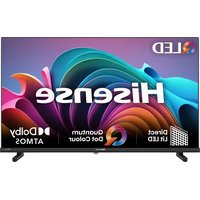
40A5NQTUK - Television HISENSE - Free user manual and instructions
Find the device manual for free 40A5NQTUK HISENSE in PDF.


Pick your language and provide your email: we'll send you a specifically translated version.
| Product Type | LED TV |
| Brand | Hisense |
| Model | 40A5NQTUK |
| Screen Size | 40 inches (diagonal) |
| Resolution | 1920 x 1080 (Full HD) |
| Refresh Rate | 60 Hz |
| Smart TV Platform | VIDAA U4 |
| Built-in Wi-Fi | Yes (802.11 b/g/n) |
| HDMI Ports | 3 |
| USB Ports | 2 |
| Composite Input | 1 (shared with component) |
| Ethernet Port | 1 |
| Audio Output | Digital optical, 3.5mm headphone jack |
| Speaker Power | 2 x 8W |
| Power Consumption (Standby) | < 0.5 W |
| Power Consumption (Typical) | 60 W |
| Energy Efficiency Class | F (EU) |
| Dimensions (W x H x D) with stand | 892 x 559 x 230 mm |
| Weight with stand | 8.2 kg |
| VESA Mount Pattern | 200 x 200 mm |
Frequently Asked Questions - 40A5NQTUK HISENSE
How do I connect my Hisense 40A5NQTUK to Wi-Fi?
Press the Menu button on your remote, go to Settings > Network > Wireless. Select your network, enter the password, and confirm.
What is the resolution of the 40A5NQTUK?
The TV has a Full HD (1920 x 1080) resolution, providing clear and sharp images.
Can I mount this TV on the wall?
Yes, it supports VESA 200 x 200 mm wall mounts. Ensure the mount can support the TV's weight.
How do I reset the TV to factory settings?
Go to Settings > Device Preferences > Reset > Factory Reset. Confirm when prompted.
What sound formats are supported?
The TV supports Dolby Audio and MPEG sound formats through its built-in speakers and digital audio output.
How do I clean the TV screen?
Turn off the TV and unplug it. Use a soft, dry microfiber cloth to gently wipe the screen. Do not use liquids or abrasive cleaners.
Does the TV have a USB recording feature?
Yes, you can record live TV to a USB drive. Connect a USB storage device, go to the Media menu, and select Record.
What is the warranty period for Hisense TVs in the UK?
Typically, Hisense offers a 2-year manufacturer warranty. Register your product on the Hisense website for full coverage.
How do I update the TV software?
Go to Settings > Device Preferences > System Update > Check for Updates. If available, follow on-screen instructions.
Why is the remote control not working?
Check if the batteries need replacing. Ensure there are no obstacles between the remote and the TV sensor. If using a Bluetooth remote, re-pair it via Settings > Remotes & Accessories.
User questions about 40A5NQTUK HISENSE
0 question about this device. Answer the ones you know or ask your own.
Ask a new question about this device
No questions yet. Be the first to ask one.
Download the instructions for your Television in PDF format for free! Find your manual 40A5NQTUK - HISENSE and take your electronic device back in hand. On this page are published all the documents necessary for the use of your device. 40A5NQTUK by HISENSE.
USER MANUAL 40A5NQTUK HISENSE


Manual assistant
Powered by Anthropic
Waiting for your message
Product information
Brand : HISENSE
Model : 40A5NQTUK
Category : Television