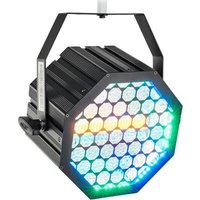
Retro Blinder OCTO 180 - Projector Varytec - Free user manual and instructions
Find the device manual for free Retro Blinder OCTO 180 Varytec in PDF.


Pick your language and provide your email: we'll send you a specifically translated version.
| Product Type | LED Blinder / Strobe Light |
| Model | Retro Blinder OCTO 180 |
| Brand | Varytec |
| Number of LEDs | 8 |
| Power Consumption | 180 W |
| Power Supply | AC 100-240 V, 50/60 Hz |
| Dimensions (W x D x H) | Approx. 580 x 120 x 230 mm |
| Weight | Approx. 4.5 kg |
| Control Protocols | DMX-512 (3-pin XLR), Standalone, Master/Slave |
| DMX Channels | 2, 4, 8, or 16 (selectable) |
| Main Functions | Strobe, Blinder, Dimmer, Color Mixing (RGBW) |
| Color Modes | RGBW color mixing with individual LED control |
| Strobe Rate | 0 - 25 Hz |
| Beam Angle | Approx. 40 degrees |
| Housing Material | Metal with black finish |
| Cooling | Passive cooling (no fan) |
| Safety Features | Overheat protection, safety cable attachment point |
| Mounting | Floor standing or truss mounting via included brackets |
| Accessories Included | Power cord, DMX cable, mounting brackets, user manual |
| Spare Parts and Repairability | LED modules replaceable; contact Varytec support |
| Cleaning and Maintenance | Wipe with dry cloth; avoid liquids; check cables periodically |
| General Information | Professional stage lighting fixture, suitable for clubs, concerts, events |
Frequently Asked Questions - Retro Blinder OCTO 180 Varytec
How do I connect the Retro Blinder OCTO 180 to a DMX controller?
Use a 3-pin XLR DMX cable to connect the fixture's DMX IN to your controller's output. Set the DMX address using the display panel and menu buttons. Refer to the user manual for channel mapping.
Can I use the fixture without a DMX controller?
Yes, the fixture has standalone modes including sound activation, auto programs, and master/slave mode. Use the menu to select the desired mode.
How do I clean the Retro Blinder OCTO 180?
Disconnect the fixture from power. Use a soft, dry cloth to wipe the housing and lenses. Do not use water or cleaning solvents. For stubborn dirt, use a slightly damp cloth and dry thoroughly.
What is the maximum ambient temperature for safe operation?
The maximum ambient temperature is 40°C (104°F). Do not operate in direct sunlight or near heat sources. Ensure adequate ventilation around the fixture.
Can I replace the LEDs myself?
LED modules are replaceable, but we recommend contacting Varytec customer support or an authorized technician to avoid damage and ensure proper installation.
How do I set the DMX address?
Press the Menu button until the DMX address setting appears. Use the Up/Down buttons to select the desired address. Press Enter to confirm. The display will show the current address.
What are the available DMX channel modes?
The fixture supports 2, 4, 8, and 16-channel modes. Mode 2: dimmer + strobe. Mode 4: RGBW dimmer. Mode 8: individual RGBW control for 2 sections. Mode 16: full individual LED control.
Why is the fixture not turning on?
Check if the power cord is securely connected to a working outlet. Verify the main power switch is on. If using a DMX controller, ensure the fixture is not in 'DMX Hold' mode without a signal.
Can the fixture be mounted upside down?
Yes, the fixture can be mounted on a truss using the included brackets. Ensure it is secured with safety cables and that the mounting surface can support the weight.
How do I update the firmware?
Firmware updates are available through Varytec's official website. Use a USB cable (if applicable) or contact support. Follow the instructions provided with the update file.
User questions about Retro Blinder OCTO 180 Varytec
0 question about this device. Answer the ones you know or ask your own.
Ask a new question about this device
No questions yet. Be the first to ask one.
Download the instructions for your Projector in PDF format for free! Find your manual Retro Blinder OCTO 180 - Varytec and take your electronic device back in hand. On this page are published all the documents necessary for the use of your device. Retro Blinder OCTO 180 by Varytec.
USER MANUAL Retro Blinder OCTO 180 Varytec


Manual assistant
Powered by Anthropic
Waiting for your message
Product information
Brand : Varytec
Model : Retro Blinder OCTO 180
Category : Projector