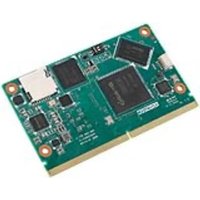
ROM-5880 - Computer module Advantech - Free user manual and instructions
Find the device manual for free ROM-5880 Advantech in PDF.


Pick your language and provide your email: we'll send you a specifically translated version.
| Product Type | Embedded Computer Module (COM Express) |
| Brand | Advantech |
| Model | ROM-5880 |
| Dimensions | 125 mm x 95 mm x 15 mm |
| Weight | Approximately 200 g |
| Power Supply | DC 12V, 15W typical |
| CPU Type | Intel Core i7 or compatible |
| Memory Support | DDR4 SO-DIMM, up to 32 GB |
| Storage Support | M.2 SATA SSD |
| Operating Temperature | -20°C to 70°C |
| Main Features | High performance computing, industrial IoT, embedded vision |
| Maintenance | Clean with dry cloth; avoid liquids |
| Safety Instructions | Disconnect power before servicing; avoid electrostatic discharge |
| Spare Parts | Contact Advantech support for replacement parts |
| Repairability | Module-level repair; contact authorized service center |
| Certifications | CE, FCC Class A |
| Warranty | 2 years limited warranty |
Frequently Asked Questions - ROM-5880 Advantech
What operating systems are supported by the Advantech ROM-5880?
The ROM-5880 supports Windows 10 IoT Enterprise, Linux (Ubuntu, Yocto), and VxWorks. Check the manual for specific BSP versions.
How do I install the ROM-5880 module on a carrier board?
Align the module edge connector with the carrier board socket, gently press down until seated, then secure with screws. Ensure anti-static precautions are taken.
What is the maximum memory capacity?
It supports up to 32 GB DDR4 via two SO-DIMM slots. Use 1.2V SO-DIMM modules.
Can I use the ROM-5880 in extreme temperatures?
Yes, it has a wide operating temperature range of -20°C to 70°C, suitable for industrial environments.
How do I update the BIOS?
Download the latest BIOS from Advantech support, copy to a FAT32 USB drive, boot into EFI shell, and run the flash utility. Refer to the manual for detailed steps.
What video outputs are available?
The module supports eDP and DisplayPort interfaces. Actual outputs depend on the carrier board design.
Does the ROM-5880 support TPM?
Yes, it includes TPM 2.0 for hardware security.
What is the typical power consumption?
Typical power consumption is around 15 watts under normal load, varying with CPU and peripherals.
How do I connect to the module for debugging?
Use the USB debug port or serial console (header) with appropriate cables. Check the pinout in the user manual.
Where can I find the latest drivers and documentation?
Visit the Advantech support website and search for ROM-5880. Drivers, manuals, and BIOS updates are available for download.
User questions about ROM-5880 Advantech
0 question about this device. Answer the ones you know or ask your own.
Ask a new question about this device
No questions yet. Be the first to ask one.
Download the instructions for your Computer module in PDF format for free! Find your manual ROM-5880 - Advantech and take your electronic device back in hand. On this page are published all the documents necessary for the use of your device. ROM-5880 by Advantech.
USER MANUAL ROM-5880 Advantech



Manual assistant
Powered by Anthropic
Waiting for your message
Product information
Brand : Advantech
Model : ROM-5880
Category : Computer module