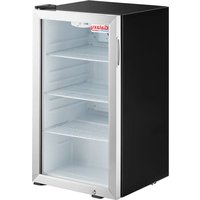
177CRG4B - Refrigerator GALAXY - Free user manual and instructions
Find the device manual for free 177CRG4B GALAXY in PDF.


Pick your language and provide your email: we'll send you a specifically translated version.
| Product Type | Refrigerator |
| Brand | GALAXY |
| Model | 177CRG4B |
| Total Gross Capacity | 120 L |
| Height | 850 mm |
| Width | 500 mm |
| Depth | 550 mm |
| Net Weight | 25 kg |
| Rated Voltage | 220-240 V |
| Rated Frequency | 50 Hz |
| Power Input | 100 W |
| Energy Consumption | 0.5 kWh/24h |
| Climate Class | N-ST (16-38°C) |
| Refrigerant | R600a |
| Noise Level | 42 dB |
| Adjustable Thermostat | Yes |
| Interior Light | Yes |
| Reversible Door | Yes |
| Number of Glass Shelves | 3 |
| Door Bins | 2 |
| Defrost Method | Manual (Ice tray) |
| Compliance | CE, RoHS |
| Spare Parts Availability | From manufacturer or authorized dealers |
Frequently Asked Questions - 177CRG4B GALAXY
How do I adjust the temperature on my GALAXY 177CRG4B refrigerator?
Turn the thermostat dial inside the refrigerator compartment. Usually, a lower number (e.g., 1) is warmer and a higher number (e.g., 5) is colder. Start at a medium setting and adjust as needed.
What is the best temperature setting for the refrigerator?
The ideal refrigerator temperature is between 3°C and 5°C (37°F and 41°F). Use a thermometer to check and adjust the thermostat accordingly.
How do I defrost the refrigerator?
This model requires manual defrosting. When frost builds up (more than 5 mm), unplug the refrigerator, remove all food, and leave the door open until the ice melts. Clean and dry before restarting.
Why is my refrigerator not cooling properly?
Check if the thermostat is set correctly. Ensure the door seals are clean and airtight. Verify that the condenser coils (at the back) are dust-free. Also, do not overload the refrigerator.
How do I clean the refrigerator?
Unplug the refrigerator before cleaning. Use a soft cloth with warm water and mild detergent. Avoid abrasive cleaners. Clean door gaskets regularly to maintain a good seal.
Can I install the refrigerator in a garage or outdoor area?
No, this refrigerator is designed for indoor use only. The ambient temperature should be between 16°C and 38°C (60°F and 100°F) for proper operation.
How do I reverse the door swing?
Refer to the user manual for step-by-step instructions. Typically, you remove the top hinge, lift the door off, and reattach it on the opposite side. You may need to swap the hinges and handle.
What is the warranty period for this refrigerator?
GALAXY offers a standard 2-year warranty on the 177CRG4B. For detailed terms, contact the seller or check the warranty card included with the product.
Why is there water pooling at the bottom of the refrigerator?
This may indicate a clogged defrost drain. Clean the drain hole (usually at the back wall) with a pipe cleaner or soft brush. Also, check if the drip tray is properly positioned.
How do I replace the interior light bulb?
Unplug the refrigerator. Remove the light cover (usually snaps off or unscrews). Replace the bulb with an identical type (e.g., 10W, E14 base). Reattach the cover and plug in.
User questions about 177CRG4B GALAXY
0 question about this device. Answer the ones you know or ask your own.
Ask a new question about this device
No questions yet. Be the first to ask one.
Download the instructions for your Refrigerator in PDF format for free! Find your manual 177CRG4B - GALAXY and take your electronic device back in hand. On this page are published all the documents necessary for the use of your device. 177CRG4B by GALAXY.
USER MANUAL 177CRG4B GALAXY
Manual assistant
Powered by Anthropic
Waiting for your message
Product information
Brand : GALAXY
Model : 177CRG4B
Category : Refrigerator