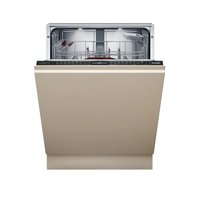
S199ZB803E - Dishwasher NEFF - Free user manual and instructions
Find the device manual for free S199ZB803E NEFF in PDF.


Pick your language and provide your email: we'll send you a specifically translated version.
| Product Type | Built-in Dishwasher |
| Brand | Neff |
| Model | S199ZB803E |
| Energy Efficiency Class | A+++ |
| Capacity | 13 Place Settings |
| Noise Level | 42 dB(A) |
| Water Consumption per Cycle | 9.5 L |
| Annual Energy Consumption | 260 kWh |
| Drying Efficiency Class | A |
| Number of Programs | 6 (Eco, Auto, Intensive, Quick, Delicate, Pre-rinse) |
| Height | 81.5 cm (Adjustable) |
| Width | 60 cm |
| Depth | 55 cm |
| Net Weight | Approx. 45 kg |
| Safety Features | Child Lock, AquaStop Leak Protection |
| Drying System | Zeolith Drying |
| Connectivity | Home Connect (Wi-Fi) |
| Adjustable Racking | Height-Adjustable Upper Basket, Fold-Down Tines |
| Interior Lighting | LED Interior Light |
| Delay Start | Up to 24 Hours |
Frequently Asked Questions - S199ZB803E NEFF
How do I start a wash cycle on the Neff S199ZB803E dishwasher?
Press the On/Off button, select a program using the Program Selector, and press Start. Ensure the door is fully closed.
What does the E15 error code mean?
The E15 error indicates water in the base pan. Check for leaks and ensure the AquaStop system hasn't tripped. Contact service if needed.
How often should I clean the filters?
Clean the fine filter and coarse filter after every few cycles or at least once a month to prevent clogs.
Can I use regular dishwasher tablets?
Yes, use any standard dishwasher tablet, but ensure it is placed in the detergent dispenser and not loose in the basket.
How do I activate the child lock?
Press and hold the Child Lock button (usually indicated by a key symbol) for 3 seconds to lock the control panel.
What is the recommended rinse aid setting?
Adjust the rinse aid dispenser to a setting between 3 and 5, depending on water hardness. Higher settings for harder water.
How do I connect the dishwasher to Wi-Fi?
Download the Home Connect app, follow in-app instructions, and press the Wi-Fi button on the panel to pair.
Why is the dishwasher not drying properly?
Check if rinse aid is filled, ensure Zeolith drying is active, and select a program with Extra Dry option if available.
How do I reset the dishwasher?
Turn off the dishwasher, wait 10 seconds, then turn it back on. If error persists, perform a factory reset via the settings menu.
What is the maximum load capacity?
The maximum capacity is 13 place settings. Refer to the loading pattern in the manual for optimal arrangement.
User questions about S199ZB803E NEFF
0 question about this device. Answer the ones you know or ask your own.
Ask a new question about this device
No questions yet. Be the first to ask one.
Download the instructions for your Dishwasher in PDF format for free! Find your manual S199ZB803E - NEFF and take your electronic device back in hand. On this page are published all the documents necessary for the use of your device. S199ZB803E by NEFF.
USER MANUAL S199ZB803E NEFF
Manual assistant
Powered by Anthropic
Waiting for your message
Product information
Brand : NEFF
Model : S199ZB803E
Category : Dishwasher