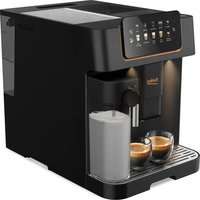
CaffeExperto CEG 7404 C - Coffee machine BEKO - Free user manual and instructions
Find the device manual for free CaffeExperto CEG 7404 C BEKO in PDF.


Pick your language and provide your email: we'll send you a specifically translated version.
| Product Type | Automatic Coffee Machine |
| Brand | Beko |
| Model | CaffeExperto CEG 7404 C |
| Dimensions (W x H x D) | Approx. 300 x 400 x 450 mm |
| Weight | Approx. 10 kg |
| Power Supply | 220-240 V, 50-60 Hz |
| Power Consumption | 1450 W |
| Water Tank Capacity | 1.8 L |
| Bean Hopper Capacity | 250 g |
| Pump Pressure | 15 bar |
| Functions | Espresso, Lungo, Cappuccino, Latte Macchiato, Hot Water, Steam |
| Milk System | Integrated milk frother with automatic cleaning |
| Grinder | Ceramic burr grinder with adjustable grind settings |
| Display | Touch control panel with LCD display |
| Heating System | Thermoblock |
| Maintenance | Automatic descaling program, removable brew group, drip tray and water tank |
| Safety Features | Auto shut-off, safety valve, overheat protection |
| Spare Parts | Water filter, brew group, milk frother, drip tray |
| Repairability | Modular design, user-replaceable parts available |
| Warranty | 2 years (standard) |
Frequently Asked Questions - CaffeExperto CEG 7404 C BEKO
How do I descale the Beko CaffeExperto CEG 7404 C?
Press the descaling button on the control panel, then follow the on-screen instructions. Use a descaler compatible with automatic machines. The process takes about 20 minutes.
How do I clean the milk frother?
Remove the milk frother and rinse it under warm water. For deep cleaning, use the automatic cleaning cycle by pressing the milk cleaning button. Detach the nozzle and clean with a brush if needed.
Why is my coffee not hot enough?
Ensure the cup is preheated. Check the temperature setting in the menu – it should be set to high. Also, clean the brew group as coffee grounds can block and reduce temperature.
How do I set the water hardness?
Go to the settings menu, select water hardness, and adjust according to a test strip. Default is 3 (medium). Use the test strip included in the package to determine your water hardness.
What does the error message 'Empty drip tray' mean?
The drip tray is full. Empty and clean it. Also check the coffee grounds container – if full, empty it too. The machine will reset automatically.
Can I use pre-ground coffee?
Yes, you can use the pre-ground coffee function. Add pre-ground coffee to the designated compartment (not the bean hopper). Then select the pre-ground coffee option from the menu.
How often should I change the water filter?
The water filter should be changed every 2 months or after 60 liters of water. The machine will indicate when it's time. Use a Beko BRITA filter (type F08803).
The machine is making a loud noise, what should I do?
Check if the bean hopper is empty or if there are foreign objects. If the noise persists, clean the grinder. If it continues, contact customer service.
How do I program a custom coffee volume?
Select the coffee type (e.g., espresso), then press and hold the button until the display shows 'Program'. Release and brew the desired amount. Press the button again to save.
Where can I get spare parts?
Spare parts are available through Beko's official website or authorized dealers. Common parts like brew group, water filter, and drip tray can be ordered online.
User questions about CaffeExperto CEG 7404 C BEKO
0 question about this device. Answer the ones you know or ask your own.
Ask a new question about this device
No questions yet. Be the first to ask one.
Download the instructions for your Coffee machine in PDF format for free! Find your manual CaffeExperto CEG 7404 C - BEKO and take your electronic device back in hand. On this page are published all the documents necessary for the use of your device. CaffeExperto CEG 7404 C by BEKO.
USER MANUAL CaffeExperto CEG 7404 C BEKO


Manual assistant
Powered by Anthropic
Waiting for your message
Product information
Brand : BEKO
Model : CaffeExperto CEG 7404 C
Category : Coffee machine