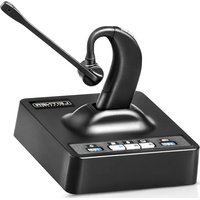
LH380 - Headphones Leitner - Free user manual and instructions
Find the device manual for free LH380 Leitner in PDF.


| Product Type | Cordless Leaf Blower |
| Brand | Leitner |
| Model | LH380 |
| Dimensions (L x W x H) | 80 cm x 20 cm x 30 cm |
| Weight | 3.5 kg |
| Power Source | 40V Lithium-ion Battery |
| Battery Capacity | 4.0 Ah |
| Charging Time | 2 hours |
| Runtime (High Speed) | Up to 30 minutes |
| Air Speed | 180 km/h |
| Air Volume | 450 m³/h |
| Noise Level | 78 dB(A) |
| Vibration Level | 2.5 m/s² |
| Maintenance | Clean air intake regularly; check battery contacts |
| Safety Features | Lock-off switch; trigger safety guard |
| Spare Parts Available | Battery, charger, nozzle, filter |
| Warranty | 2 years |
Frequently Asked Questions - LH380 Leitner
User questions about LH380 Leitner
0 question about this device. Answer the ones you know or ask your own.
Ask a new question about this device
Download the instructions for your Headphones in PDF format for free! Find your manual LH380 - Leitner and take your electronic device back in hand. On this page are published all the documents necessary for the use of your device. LH380 by Leitner.
USER MANUAL LH380 Leitner
LH380
LEITNER
HEADSETS
WHEN THE CALL COUNTS
CONTENTS
Understanding your...
| Headset controls | 4 | |
| Charging base | 5 | |
| Indicator lights | 6 | |
| Audio signals | 7 |
How to...
Set up your headset 8
Connect to Bluetooth 11
Make a landline call 12
Make a Bluetooth call 13
Answer a call 14
Use UniBase ® Technology 15
Control your volume 16
Activate auto-on feature 17
Turn on call control 17
Connect a 2nd headset for conference calls or training 18
Register a new primary headset 20
Troubleshooting & Frequently Asked Questions 21
Health and Safety Instructions 22
UNDERSTANDING YOUR
HEADSET CONTROLS
Incoming Volume Up
Methopone Mute Button
Incoming Volume Down
Headset ON/OFF (and Online Indicator)

WHAT'S IN
THE BOX
Headset
Charging Base
Lithium-Ion Battery
Battery Door
Replacement Ear Tips
Foam Windscreen
8.5v AC Adaptor
RJ-9 Phone Cord
Type A-to-Mini USB Cord
UNDERSTANDING YOUR
CHARGING BASE
1 Battery Indicator
2 Computer Mode Button
3 Bluetooth Mode Button
4 Telephone Mode Button
5 Indicator Lights (see page 6)
6 USB Connector Port
7 Power Port
8 AUX Port
9 Telephone Connector Port
10 Handset Connector Port
11 Microphone Volume Up/Down
12 Accessory Selection Switch
13 Compatibility Switch

1 2 3 4 5

6719 10
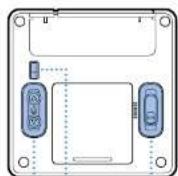
11
UNDERSTANDING THE
INDICATOR LIGHTS
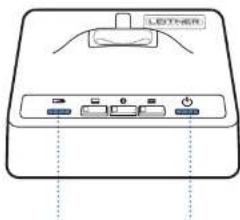
Battery Lights Indicator Lights
| 50% | 100% | 25% | 75% |
| 2 41 3 |
below 20%, the first battery light will flash.
1 Power Light (it's plugged in) When the heads
2 Bluetooth Indicator* (it's connected)
3 Online Indicator (headset is on)
4 Charging Light (off when at 100%)
* This light will turn off when your headset is in the charging base. It does not mean your Bluetooth has disconnected.
UNDERSTANDING THE
AUDIO SIGNALS
| SOUND | WHAT IT MEANS |
| 2 quick beeps (60 sec repeat) | Low battery |
| 2 beeps | Nearly out of range |
| 2 pitch tone | Out of range |
| 2 rapid beeps | Back in range |
| 1 beep | Receiver volume up/down |
| 2 pitch tone (8 sec repeat) | Mute is on |
| 1 beep | Mute off/on |
When you walk out of range of the base, you will hear warning beeps in the headset. If the headset disconnects due to being out of range, the call will not drop. The headset will automatically reconnect (when you are back in range).
NOTE: If you do not move back in range within 5 minutes, the call will disconnect.
HOW TO
SET UP YOUR HEADSET
1 Plug the power adaptor into the charging base. The power light on the base will light up. We recommend charging your headset for at least 4 hours before use.
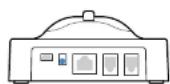
Power port Power light

2a CONNECTING TO A TELEPHONE WITH A HEADSET JACK Use the included connector cord to connect the telephone port on the base to the headset port on your desk phone. You may need to adjust the compatibility switch on the bottom of the base to find the correct setting for your phone model. Most phones use 1. Cisco phones should be set to 4 only when using the headset jack.

Telephone port
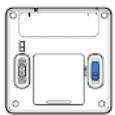
Compatibility switch
LEITNER HEADSETS
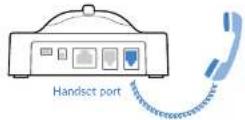
2b CONNECTING TO A TELEPHONE WITHOUT A HEADSET JACK Connect the curly cord of your handset to the handset port on the charging base. Use the included connector cord to connect the telephone port on the charging base to the handset jack on your desk phone. See 2a on using the compatibility switch.

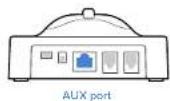
3 CONNECTING TO A LEITNER HANDSET LIFTER (OPTIONAL) Connect your headset to your desk phone as shown in Step 2b. Attach the handset lifter to your desk phone and connect it to the AUX port on the charging base. Set the accessory selection switch on the bottom of the base to RHL. See the included user guide or go to headsets.com/LifterSetup for more help.

4 CONNECTING TO A LEITNER ELECTRONIC HOOKSWITCH (EHS) CABLE
(OPTIONAL) * Each office phone is a bit different, so please refer to the EHS cable instructions for quick and easy setup.
*With a handset lifter or EHS cable connected, you'll be able to answer and end calls using the ON/OFF button on the headset—up to 350 feet away from your desk!
5 CONNECTING TO YOUR COMPUTER Use the included USB cable to connect the charging base to an available USB port on your computer. If your computer doesn't recognize the device after a minute, go to your sound settings and select "IDCT Headset" as both your default microphone and default speakers.

USB port
We'd love to help you get set up!
Call us at 1-800-432-3738, Monday through Friday 6:00am-4:30pm Pacific Time
HOW TO
CONNECT TO BLUETOOTH
1 With your headset turned off, hold down the Bluetooth button (1) for three seconds until the light starts flashing.
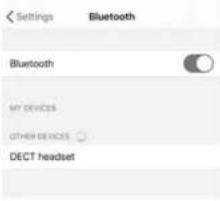
2 Make sure Bluetooth is enabled on the device you're trying to connect to. On most devices like iPhone or Android, this can be found in your settings menu.
3 Select 'DECT Headset' from the list of available devices (2).
4 The light on your charging base will stop flashing once it's successfully connected.

HOW TO
MAKE A LANDLINE CALL
1 Make sure telephone mode is on (1).
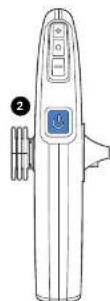
2 Press the ON/OFF button (2).
3 Press the headset button on your telephone or you can lift the phone handset if yours doesn't have one. If you have a handset lifter or electronic hookswitch (EH5) cable connected to the charging base, the line will automatically connect.
4 Dial the number you're calling.
5 To end the call: Place the headset on the charging base or press the ON/OFF button (2). If you have a handset lifter or an EHS cable, the call will disconnect automatically. If not, then manually hang up the phone.

HOW TO
MAKE A BLUETOOTH CALL
1 Ensure your Bluetooth device is successfully connected to your charging base by following the steps on page 11.
2 Make sure Bluetooth mode is on (1).
3 Press the ON/OFF button (2).
4 Dial your call on your Bluetooth device as you normally would.
5 Depending on your device's settings, you may need to change the audio source on your device to 'DECT I headset' (most devices will connect automatically).
6 To end the call you can either:
- Press the ON/OFF button (2)
- Place the headset on the charging base
- Manually end the call from your device

HOW TO
ANSWER A CALL
For incoming landline call:
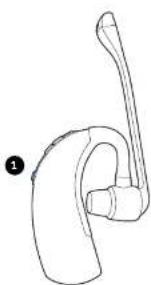
1 Press the ON/OFF button (1) and make sure your base is in telephone mode (2).
2 Press the headset button on your phone. If your phone doesn't have a headset button, simply lift the handset to activate the call. *
you have a handset lifter or EHS cable connected to the charging base, the call will connect automatically.
For incoming Bluetooth call:
1 Press the ON/OFF button (1) and your call will connect automatically.
To end the call:
1 Press the ON/OFF button (1) or place the headset on the charging base.
2 Manually hang up the call from your landline phone or Bluetooth device.*
If you have a handset lifter or EHS cable connected to the charging base, the call will end automatically.

HOW TO
USE UNIBASE®
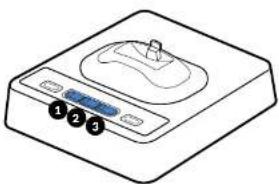
UniBase Technology allows you to conference calls between any two devices. Have a call on your cell phone and one on your landline? Conference them together with UniBase!
1 Begin a call on your first device.
2 Hold the mode bull on for the second device you want to add: Computer (1), Bluetooth (2) or Telephone (3).
3 After a few seconds, the mode button lights for the two selected devices will light up.
4 To exit UniBase mode, simply press the mode button of the device you want to stay on with.
Sounds from your computer will be shared automatically with the conference call
HOW TO
CONTROL YOUR VOLUME
To adjust the headset listening volume:
While the headset is on, use the Incoming Volume
Up button (1) to increase or Incoming Volume
Down button (2) to decrease. The headset will
beep each lime the volume is adjusted.
To mute the headset microphone:
Press the mute button (3). While in mute
mode, the headset will beep every 8 seconds.
To unmute, press the mute button again.
To adjust the headset microphone volume:
Use the volume control buttons on the bottom
of the headset base (4 or 5).
To adjust the ring detection volume:
If you're using a handset lifter or EHS cable, you'll hear a ring lone in your headset when you have
an incoming call.
While the headset is off, use the volume control buttons (1 or 2) on the headset to adjust the
headset's ring tone and notification audio signals.


HOW TO
ACTIVATE AUTO-ON
Turn this feature on if you'd like your headset to turn on automatically when you pick up your headset off the charging base.
To turn this feature on: With your headset turned off, hold the + and - buttons (●) on your headset together for three seconds. Once auto-on is activated, the light on your headset will flash slowly.
To turn this feature off: Follow the same steps again. This time the light on your headset will quickly flash.
HOW TO
TURN ON CALL CONTROL
Your Leitner Headset can answer and end Skype for Business calls directly from your headset.
To turn this feature on: Hold the up button (4) on the bottom of your charging base together with the Computer Mode button on the top of your base for three seconds. Your base will quickly flash 6 times to confirm.
To turn this feature back off: Hold the down button (5) on the bottom of your charging base together with the Computer Mode button on the top of your charging base for three seconds. Your base will flash 6 times to confirm.
HOW TO
CONNECT A SECONDARY HEADSET FOR
1 Turn on the primary headset.
2 With the secondary headset turned off, place it on the charging base.
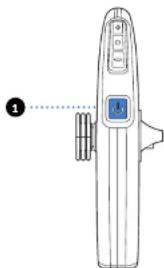
3 After a moment, the secondary headset's online indicator light (1) will turn on and the primary base's online indicator light (2) will flash to show that the headset is registering with the base unit.
4 Once the registering has completed, the base's online indicator light (2) will stop flashing and the headset's online indicator light (1) will begin flashing.

TRAINING OR CONFERENCE CALLS
5 If the secondary headset has Auto-On enabled, it will automatically connect when you lift it from the base. If it has Auto-On disabled, press the ON/OFF button (1) on the headset to connect.
NOTE: The secondary headset will remain registered to the base until the primary headset is turned off or if either headset is returned to its original base. It takes about ten seconds for the secondary headset to re-register to its original base.
Your LH380 can be conferenced with any on-the-ear Leitner wireless headset
HOW TO
REGISTER A NEW PRIMARY HEADSET
In the event that you need to replace your headset, you'll need to register the new headset to your charging base
1 Press and hold the telephone button (①) for five seconds. The light will flash showing the base is in registration mode.
2 With your headset off, press and hold the mute button (2) until it begins to flash (about five seconds) to make the headset enter registration mode.
3 Keep the headset out of the base until the light on the telephone button (1) turns solid.
4 The headset will now be registered to the base. When the registration has completed, the light will stop flashing. The whole process should take about 30 seconds.


TROUBLESHOOTING
FREQUENTLY ASKED QUESTIONS
Q. I don't have any battery lights on my headsets base and its been charging for more than 4 hours.
A. Start by unplugging the power to the headset base, then remove the battery from the headset for 30 seconds. Reinstall the battery making sure the Leitner logo is facing you. Plug the power back into your base. Press and hold the Telephone Mode button on the base until it flashes, then press and hold the Mute button on the headset until it flashes. Finally, place the headset next to the base (don't place it in your charging base until the Telephone Mode light goes solid).
Q. My headset is charged and turned on but I can't hear anything.
A. If you set up your headset through the headset jack, make sure your telephone's headset button is on. Check the compatibility switch underneath your base is set to 1. Most Cisco phones should be set to 4.
Q. I can't get my headset to work with my computer.
A. Make sure the USB cord is connected between your charging base and computer. If your computer doesn't automatically recognize your headset, go to your computer's sound settings and make sure DECT Headset is selected as your output and input device. Your sound settings can be found on mos. Windows computers by searching 'sound settings' in your search bar.
Q. I can hear people on the phone but they can't hear me.
A. Try adjusting the microphone volume from the controls underneath. The charging base. Call us at 1-800-432-3738 and we'll make sure you sound perfect!
HEALTH AND SAFETY
INSTRUCTIONS
It might seem a bit silly, but we're required to tell you these safety instructions about your Leitner headset. Please keep these instructions for your reference. When using this product, these basic safety precautions and warnings should be followed to reduce the risk of fire, electrical shock, injury to persons, and damage to property.
Operating, charging and storage temperatures are 32 °F to 104 °F (0 °C to 40 °C).
General Warnings
- Never allow children to play with the product; small parts may be a choking hazard.
- Do not disassemble the product or AC adaptor as this may expose you to dangerous voltages or other risks. Incorrect reassembly can cause electric shock or fire when the product is subsequently used.
- Do not insert anything into the product because this may cause damage to the internal components or cause personal injury.
- Avoid contact with liquids. Do not locate this product near water, for example, near a bathtub, or sink, in a wel basement, or near a swimming pool.
- Discontinue use of product, if the product overheals, has a damaged cord or plug, has been dropped or damaged, or if the product has come into contact with liquids.
- This product should never be placed over or near a heat source and should not be placed in locations which do not have proper ventilation.
- If you experience skin irritation after using this product, discontinue use.
Charging Warnings
- Use only the charger provided with your headset to charge the product. Do not use the charger for any other purpose. Ensure that the voltage rating corresponds to the power supply you intend to use.
- Charge the headset according to the instructions supplied with the unit.
- Plug the AC adaptor into an outlet that's near the headset and is easily accessible.
Headset Battery Warnings
- The headset is equipped with a replaceable battery. To reduce the risk of fire or injury to persons read and follow these instructions.
- Do not dispose of the battery in a fire. The battery may explode. Check your local laws for disposal instructions.
- Do not open or mutilate the battery. There may be corrosive materials which can cause damage to eyes or skin and may be toxic if swallowed.
- Never charge the battery where the temperature may fall below 32°F (0°C) or rise above 104°F (40°C).
RECYCLING: Your battery used in the headset must be recycled or disposed of properly. Contact your local recycling center for proper disposal of your headset battery.
To Protect Your Hearing
- Set the volume in a low position before putting on your headset
- Avoid turning up the volume to block out noisy surroundings.
- Limit the amount of time you use headsets at high volume levels.
- Turn the volume down if the sound from the headset prevents you from hearing people speaking near you.
LEITNER HEADSETS
For live product support
1-800-432-3738
Mon-Fri 6:00am-4:30pm Pacific Time
www.leitnerheadsets.com

- LEITNER
- CONTENTS
- UNDERSTANDING YOUR
- HEADSET CONTROLS
- WHAT'S IN
- THE BOX
- CHARGING BASE
- UNDERSTANDING THE
- INDICATOR LIGHTS
- BATTERY LIGHTS INDICATOR LIGHTS
- AUDIO SIGNALS
- HOW TO
- SET UP YOUR HEADSET
- LEITNER HEADSETS
- 4 CONNECTING TO A LEITNER ELECTRONIC HOOKSWITCH (EHS) CABLE
- CONNECT TO BLUETOOTH
- MAKE A LANDLINE CALL
- MAKE A BLUETOOTH CALL
- ANSWER A CALL
- FOR INCOMING LANDLINE CALL
- FOR INCOMING BLUETOOTH CALL
- TO END THE CALL
- USE UNIBASE®
- CONTROL YOUR VOLUME
- ACTIVATE AUTO-ON
- TURN ON CALL CONTROL
- CONNECT A SECONDARY HEADSET FOR
- TRAINING OR CONFERENCE CALLS
- REGISTER A NEW PRIMARY HEADSET
- TROUBLESHOOTING
- FREQUENTLY ASKED QUESTIONS
- HEALTH AND SAFETY
- INSTRUCTIONS
- GENERAL WARNINGS
- CHARGING WARNINGS
- HEADSET BATTERY WARNINGS
- TO PROTECT YOUR HEARING
Brand : Leitner
Model : LH380
Category : Headphones