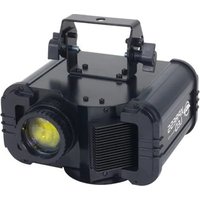
Xpress LED - Light projector American Audio - Free user manual and instructions
Find the device manual for free Xpress LED American Audio in PDF.


Pick your language and provide your email: we'll send you a specifically translated version.
| Product Type | LED Fixture |
| Model | Xpress LED |
| Brand | American Audio |
| Light Source | High-power LED |
| Beam Angle | 25° (with optional diffusion filter) |
| Color Range | RGBW (Red, Green, Blue, White) |
| Control Protocol | DMX-512 |
| DMX Channels | 4, 6, or 8 selectable |
| Operating Modes | DMX, Master/Slave, Sound Active, Auto Run |
| Dimming | 0-100% linear dimming |
| Power Supply | 100-240V AC, 50/60Hz |
| Power Consumption | 30W typical |
| Dimensions (L x W x H) | 10.5 x 9.0 x 9.0 inches |
| Weight | 5.0 lbs |
| Housing Material | Die-cast aluminum with black finish |
| Mounting Options | Floor stand, truss clamp (optional) |
| Cooling | Passive convection (no fan) |
| Included Accessories | Power cord, user manual |
| Safety Certifications | ETL, CE |
| IP Rating | IP20 (indoor use only) |
| Cleaning | Wipe with dry cloth; avoid solvents |
| Reparability | No user-serviceable parts; contact support |
Frequently Asked Questions - Xpress LED American Audio
How do I set the DMX address on the Xpress LED?
Use the DMX address dipswitches or the LED display menu (if available) to set the starting address. Refer to the user manual for specific instructions. The fixture must be in DMX mode.
Can I use the fixture without a DMX controller?
Yes, the Xpress LED has standalone modes: Sound Active, Auto Run, and Master/Slave. In Sound Active mode, it reacts to music via built-in microphone. In Auto Run, it cycles through built-in programs.
What is the maximum number of fixtures I can daisy chain?
For DMX daisy chaining, you can connect up to 32 units on a single DMX line. For power linking, check the manual - typically up to 10 units at 120V.
How do I clean the lens of the Xpress LED?
Use a soft, dry, lint-free cloth to wipe the lens. Avoid using liquids, abrasive cleaners, or solvents. For stubborn dirt, slightly moisten the cloth with water.
Why is the fixture not turning on?
First, check the power cable connection and ensure the outlet is live. Verify the fixture's power switch is on. If using a DMX controller, ensure it is powered and properly connected. Also check the fuse (if external).
Can I replace the LED in the Xpress LED?
The LED module is not user-replaceable. If the LED fails, contact American Audio support or an authorized service center for repair.
What is the beam angle of the Xpress LED?
The standard beam angle is 25 degrees. An optional diffusion filter can be purchased to increase the angle to 40 degrees for wider coverage.
How do I set the fixture to Sound Active mode?
Press the Mode button until 'Snd' appears on the display (if equipped). Alternatively, use the menu to select Sound Active. Adjust the sensitivity via the control panel.
Does the fixture support RDM (Remote Device Management)?
No, the Xpress LED does not support RDM. DMX address and settings must be configured manually on the fixture.
What mounting options are available?
The fixture has a mounting yoke for floor placement or hanging. For truss mounting, you will need an optional clamp (e.g., 2-inch truss clamp). Ensure proper safety cable attachment.
User questions about Xpress LED American Audio
0 question about this device. Answer the ones you know or ask your own.
Ask a new question about this device
No questions yet. Be the first to ask one.
Download the instructions for your Light projector in PDF format for free! Find your manual Xpress LED - American Audio and take your electronic device back in hand. On this page are published all the documents necessary for the use of your device. Xpress LED by American Audio.
USER MANUAL Xpress LED American Audio



Manual assistant
Powered by Anthropic
Waiting for your message
Product information
Brand : American Audio
Model : Xpress LED
Category : Light projector