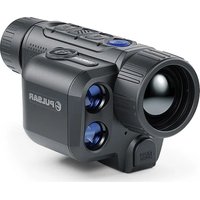
Axion 2 LRF XG35 - Binoculars PULSAR - Free user manual and instructions
Find the device manual for free Axion 2 LRF XG35 PULSAR in PDF.


Pick your language and provide your email: we'll send you a specifically translated version.
| Product type | Thermal imaging binocular with laser rangefinder |
| Sensor resolution | 640x480 pixels |
| Sensor type | Uncooled microbolometer |
| NETD | <50 mK |
| Magnification | 2.5x – 10x continuous zoom |
| Lens diameter | 35 mm |
| Detector pitch | 12 μm |
| Display | 640x400 pixel LCOS display |
| Field of view (at 100m) | 16.5 m |
| Detection range | Up to 1800 m |
| Laser rangefinder | Yes, up to 1000 m |
| Range accuracy | ±1 m |
| Video recording | Yes, in-built memory (16 GB) |
| Wi-Fi | Yes, for streaming and remote control |
| Battery type | Li-Ion rechargeable (built-in) |
| Battery life | Up to 10 hours (continuous operation) |
| Dimensions (L x W x H) | 200 x 75 x 70 mm |
| Weight | 420 g (without battery) |
| Protection rating | IPX7 (waterproof up to 1m for 30 min) |
| Operating temperature | -25°C to +50°C |
| Monitoring modes | Black-hot, white-hot, rainbow, etc. |
| Image palette modes | 10 color palettes |
| Software updates | Via PC software (Pulsar Programmer) |
| Accessories included | Carrying case, USB cable, power adapter, lens cloth |
Frequently Asked Questions - Axion 2 LRF XG35 PULSAR
How do I calibrate (NUC) my Axion 2 LRF XG35?
The device performs automatic non-uniformity correction (NUC) when the lens cap is closed or manually via the menu. Press the Menu button, navigate to Calibration, and select Manual NUC.
What type of battery does it use and how long does it last?
It uses a built-in rechargeable Li-Ion battery. A full charge lasts up to 10 hours of continuous operation.
Can I record videos with the binoculars?
Yes, the Axion 2 LRF XG35 has built-in 16 GB memory for video and photo recording. Press the Record button to start/stop.
Is the device waterproof?
It has an IPX7 rating, meaning it can be submerged in water up to 1 meter for 30 minutes.
How do I connect to Wi-Fi?
Enter the menu and select Wi-Fi. Turn it on and connect using the Stream Vision 2 app on your smartphone.
What is the maximum detection range?
The thermal sensor can detect a human-sized target up to 1800 meters under optimal conditions.
How accurate is the laser rangefinder?
The laser rangefinder has an accuracy of ±1 meter and can measure distances up to 1000 meters.
Can I use the binoculars in rain or snow?
Yes, due to the IPX7 protection, it is safe to use in heavy rain or snow. However, wipe the lens dry after use.
How do I update the firmware?
Download the latest firmware from the official Pulsar website. Connect the binoculars via USB and use Pulsar Programmer software to update.
What color palettes are available?
There are 10 color palettes including White-hot, Black-hot, Rainbow, Iron, and more, accessible from the menu.
User questions about Axion 2 LRF XG35 PULSAR
0 question about this device. Answer the ones you know or ask your own.
Ask a new question about this device
No questions yet. Be the first to ask one.
Download the instructions for your Binoculars in PDF format for free! Find your manual Axion 2 LRF XG35 - PULSAR and take your electronic device back in hand. On this page are published all the documents necessary for the use of your device. Axion 2 LRF XG35 by PULSAR.
USER MANUAL Axion 2 LRF XG35 PULSAR

Manual assistant
Powered by Anthropic
Waiting for your message
Product information
Brand : PULSAR
Model : Axion 2 LRF XG35
Category : Binoculars