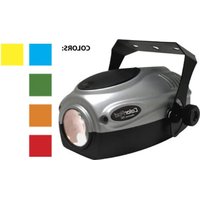
ColorPod - Light projector American Audio - Free user manual and instructions
Find the device manual for free ColorPod American Audio in PDF.


Pick your language and provide your email: we'll send you a specifically translated version.
| Product Type | LED Lighting Effect |
| Dimensions (L x W x H) | 10.5 x 8.9 x 7.2 inches |
| Weight | 3.5 lbs |
| Power Supply | AC 110-240V, 50/60Hz |
| Power Consumption | 30W |
| Light Source | RGB LED (3W each) |
| Number of LEDs | 12 |
| Color Mixing | RGB color mixing for full spectrum |
| Control Modes | DMX512, Master/Slave, Sound Active, Auto |
| DMX Channels | 4 or 7 channels selectable |
| Beam Angle | 25 degrees |
| Strobe Rate | 0-20 Hz |
| Housing Material | Aluminum alloy |
| Cooling System | Convection cooling (no fan) |
| Mounting Options | Floor stand or truss clamp |
| Operating Temperature | -10°C to 40°C |
| Maintenance | Clean with soft dry cloth; avoid solvents |
| Safety Features | Overheat protection, safety cable attachment point |
| Included Accessories | Power cord, user manual |
| Compliance | CE, RoHS |
Frequently Asked Questions - ColorPod American Audio
How do I set up the ColorPod for the first time?
Connect the power cord to a suitable AC outlet. Use the MODE button to select a control mode (Auto, Sound Active, DMX, etc.). For DMX, set the DMX address using the ADDR button and assign channels as needed.
Can I use the ColorPod outdoors?
The ColorPod is designed for indoor use only. Exposure to rain, moisture, or extreme temperatures may damage the unit and void the warranty.
How do I sync multiple ColorPod units together?
Use the Master/Slave mode. Set one unit as Master by selecting MAST in the menu, and others as Slave. Connect them using DMX cables. The slaves will follow the master's pattern.
What does the Sound Active mode do?
In Sound Active mode, the ColorPod changes colors and patterns in response to ambient music or sound. The built-in microphone picks up sound levels; you can adjust sensitivity via the SENS setting.
How do I clean the ColorPod?
Disconnect the unit from power. Use a soft, dry cloth to wipe the exterior. Do not use abrasive cleaners or liquids, as they may damage the lens or housing.
What is the maximum number of DMX channels?
The ColorPod can operate in 4-channel (basic RGB and dimmer) or 7-channel (advanced including strobe, macros) mode. Select via the CHAN setting.
The unit does not respond to DMX. What should I check?
Ensure the DMX cable is properly connected and not faulty. Verify the DMX address matches the controller. Check that the terminator is installed if the unit is at the end of the chain. Also confirm the unit is in DMX mode.
Can I replace the LEDs in the ColorPod?
The LEDs are not user-serviceable. If an LED fails, please contact American Audio support or an authorized service center for repair.
How do I reset the ColorPod to factory settings?
Hold down the MODE and SET buttons simultaneously for 5 seconds until the display shows rESEt. Release the buttons. The unit will reset.
What is the warranty period for the ColorPod?
American Audio offers a 1-year limited warranty from the date of purchase covering manufacturing defects. Retain your receipt for warranty service.
User questions about ColorPod American Audio
0 question about this device. Answer the ones you know or ask your own.
Ask a new question about this device
No questions yet. Be the first to ask one.
Download the instructions for your Light projector in PDF format for free! Find your manual ColorPod - American Audio and take your electronic device back in hand. On this page are published all the documents necessary for the use of your device. ColorPod by American Audio.
USER MANUAL ColorPod American Audio



Manual assistant
Powered by Anthropic
Waiting for your message
Product information
Brand : American Audio
Model : ColorPod
Category : Light projector