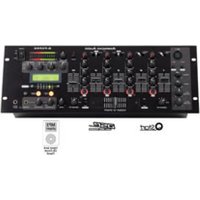
Q-FX Pro - Audio Mixer American Audio - Free user manual and instructions
Find the device manual for free Q-FX Pro American Audio in PDF.


Pick your language and provide your email: we'll send you a specifically translated version.
| Product Type | Multi-Effects Processor for DJ/VJ |
| Dimensions (W x H x D) | 19 x 1.75 x 6 inches (1U rackmount) |
| Weight | 3.5 lbs (1.6 kg) |
| Power Supply | 9V DC, 500mA (center positive) |
| Audio Inputs | 1/4" and RCA unbalanced |
| Audio Outputs | 1/4" and RCA unbalanced |
| Effects Types | Echo, Delay, Flanger, Phaser, Reverb, Chorus, Filter, and more |
| Effect Control | Tap tempo, depth, rate, and bypass footswitch jack |
| Display | LED indicators for effect selection and status |
| Construction | Steel chassis with black finish |
| Cooling | Passive (no fan) |
| Operating Temperature | 32°F to 104°F (0°C to 40°C) |
| Storage Temperature | -4°F to 140°F (-20°C to 60°C) |
| Maintenance | Clean with a soft, dry cloth; avoid liquids |
| Safety | Do not expose to rain or moisture; use only with provided power adapter |
| Spare Parts | Contact American Audio support for replacement parts |
| Repairability | Repairs should be performed by qualified service personnel |
| Documentation | User manual available for free download on notice-facile.com |
Frequently Asked Questions - Q-FX Pro American Audio
How do I connect the Q-FX Pro to my mixer?
Connect the audio output of your mixer to the input of the Q-FX Pro using standard RCA or 1/4" cables. Then connect the Q-FX Pro output to your amplifier or another mixer channel.
What power adapter does the Q-FX Pro require?
It requires a 9V DC power adapter with at least 500mA output and a center positive barrel connector.
How do I select different effects?
Use the Effect Select knob or button on the front panel to cycle through built-in effects like echo, delay, flanger, phaser, reverb, chorus, and more.
Can I use a footswitch to control the effect bypass?
Yes, connect a standard momentary footswitch (1/4" TS) to the Bypass jack on the rear panel to toggle effects on/off.
What is the tap tempo feature?
Press the Tap button repeatedly to set the tempo for delay and echo effects in real time. The LED will flash at the set tempo.
No sound from the Q-FX Pro. What should I check?
Ensure the unit is powered on (power LED lit), input cables are securely connected, and the volume/output level is turned up. Also check that the effect is not set to fully wet (100% effect) if you want dry signal.
How do I clean the Q-FX Pro?
Use a soft, dry cloth to wipe the chassis and front panel. Avoid liquids and abrasive cleaners to prevent damage.
Is the Q-FX Pro rackmountable?
Yes, it is designed in a standard 1U rackmount form factor (19 inches wide). Mounting screws are not included.
What warranty does American Audio provide?
The Q-FX Pro typically comes with a 1-year limited warranty from the date of purchase. Check your documentation or contact support for details.
Where can I download the user manual?
Visit notice-facile.com and search for 'American Audio Q-FX Pro' to download the PDF manual for free.
User questions about Q-FX Pro American Audio
0 question about this device. Answer the ones you know or ask your own.
Ask a new question about this device
No questions yet. Be the first to ask one.
Download the instructions for your Audio Mixer in PDF format for free! Find your manual Q-FX Pro - American Audio and take your electronic device back in hand. On this page are published all the documents necessary for the use of your device. Q-FX Pro by American Audio.
USER MANUAL Q-FX Pro American Audio


Manual assistant
Powered by Anthropic
Waiting for your message
Product information
Brand : American Audio
Model : Q-FX Pro
Category : Audio Mixer