
EL-41SY - HDMI switch CYP - Free user manual and instructions
Find the device manual for free EL-41SY CYP in PDF.


| Product Type | HDMI Switcher / Extender |
| Model | EL-41SY |
| Brand | CYP |
| Input Ports | 4x HDMI |
| Output Ports | 1x HDMI |
| Maximum Resolution | 4K@60Hz |
| HDCP Support | HDCP 2.2 |
| Dimensions (W x D x H) | 200 mm x 100 mm x 25 mm |
| Weight | 0.5 kg |
| Power Supply | DC 5V / 1A via USB or AC adapter |
| Power Consumption | 3.5W max |
| Main Functions | Automatic input switching, IR remote control, EDID emulation |
| Maintenance & Cleaning | Wipe with dry cloth; avoid liquids |
| Safety | CE, FCC, RoHS certified |
| Spare Parts & Repairability | Power adapter and IR remote available; fixable by authorized service |
| General Information | Operating temperature 0-40°C; indoor use only |
Frequently Asked Questions - EL-41SY CYP
User questions about EL-41SY CYP
0 question about this device. Answer the ones you know or ask your own.
Ask a new question about this device
Download the instructions for your HDMI switch in PDF format for free! Find your manual EL-41SY - CYP and take your electronic device back in hand. On this page are published all the documents necessary for the use of your device. EL-41SY by CYP.
USER MANUAL EL-41SY CYP
Table of Contents
- Introduction 1
- Features 1
- Package Contents 1
- Operation Controls and Functions 2
4.1 Front Panel Diagram 2
4.2 Rear Panel Diagram 3 - Remote Control 3
- Connection Diagram 4
- Specification 5

1. Introduction
The EL-41SY is a high performance HDMI switcher with IR control.
It allows you to connect up to four hdmi sources to a single hdmi input on a HDTV.
A simple remote control selects your required HDMI source for display on the HDTV.
2. Features
• v1.3 HDMI, HDCP 1.1 and DVI 1.0 compliant.
• Supports 'Deep Colour' (10/12/16 bit)
• Supports High Definition audio - LPCM 7.1CH, Dolby TrueHD, Dolby Digital Plus and DTS-HD master audio.
- Auto Signal Enhancement feature can improve signal quality after long distance transmission.
- LED indicators.
- Ideal for home theatre integration.
• Supports high resolution input:
PC: VGA, SVGA, XGA, SXGA, UXGA (1600 x 1200) & WUXGA (1920 x 1200).
HDTV: 480i, 480p, 576i, 576p, 720p, 1080i, 1080p and 1080p24fps
• Infra red control via supplied remote.
- Easy to install and simple to operate.
3. Package Contents
- EL-41SY
- 5V DC power supply adaptor.
• Operation Manual.
4. Operation Controls and Functions
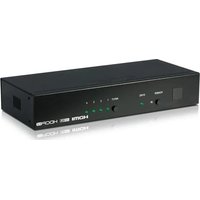
4.1 Front Panel

- Remote control sensor.
- Power LED Indicator/ Power Button: The LED will illuminate when the power is turned on. Press the power button to switch the unit On/Off.
- Input select Button/Indicators: Press the "INPUT" button repeatedly to cycle through the inputs to your required input source. The relevant LED will illuminate to indicate which input source has been selected.
4.2 Rear Panel

-
HDMI output: Connect the HDMI output of the unit to the HDMI input of your display using a HDMI cable.
-
HDMI inputs: Connect your various HDMI sources to the 4 HDMI inputs using HDMI cables.
-
Power: Plug the 5VDC power supply into the unit and connect the adaptor to an AC wall outlet.
5. Remote Control

-
Power: Press to turn the unit On/Off
-
Direct input selector: Press 1, 2, 3 or 4 to select the required input source.
-
These buttons have no function for this model.
6. Connection Diagram
![graph TD A["DVD"] --> B["EL-41SY"] C["HD Receiver"] --> B D["Blu-ray"] --> B E["HD Games Console"] --> B B --> F["LCD"] B --> G["POWER INPUT IN1 IN2 IN3 IN4"] style B fill:#f9f,stroke:#333 style F fill:#ccf,stroke:#333](/content/2026/07/1444952/images/209e5f36cb81fd0509e663fc5eb47cf96d0b1d29aa592f25ce11e2cb74f1173a.jpg)
7. Specifications
| Input Ports 4 x HDMI female ports | |
| HDCP Version v1.1 | |
| Output Port 1 x HDMI female port | |
| HDMI Specification v1.3 | |
| Frequency bandwidth 2.25Gbps | |
| Power Supply 5VDC/2.6A (US/EU standards, CE/FCC/UL Certified) | |
| Dimensions (mm) 200 (W) x 104 (D) x 25(H) | |
| Chassis Colour Black | |
| Chassis Material Aluminium | |
| Operating Temperature Operating from 0°C ~ 48°C | |
| Gross Weight (g) 900 | |
| Net. Weight (g) 600 | |



Brand : CYP
Model : EL-41SY
Category : HDMI switch