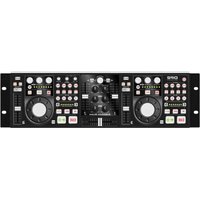
DP2 - Audio Mixer American Audio - Free user manual and instructions
Find the device manual for free DP2 American Audio in PDF.


Pick your language and provide your email: we'll send you a specifically translated version.
| Product Type | 2-Channel DJ Mixer |
| Brand | American Audio |
| Model | DP2 |
| Dimensions (W x D x H) | 12.5 x 8.5 x 2.5 inches (approx.) |
| Weight | 4.5 lbs (approx.) |
| Power Supply | AC 100-240V, 50/60Hz |
| Power Consumption | 15W (approx.) |
| Inputs | 2 x RCA (Line), 2 x RCA (Phono), 1 x Microphone (1/4") |
| Outputs | 2 x RCA (Master), 1 x RCA (Record), 1 x Headphone (1/4") |
| Frequency Response | 20Hz - 20kHz |
| Signal-to-Noise Ratio | > 85dB |
| Total Harmonic Distortion | < 0.05% |
| Channel EQ | 3-band (High, Mid, Low) |
| Crossfader | Replaceable, smooth curve |
| Headphone Cue | Yes, with level control |
| Microphone EQ | 2-band (High, Low) |
| Phono Preamp | Built-in for turntables |
| Output Level | Master: +4dBu balanced/ -10dBV unbalanced |
| Construction | Steel chassis, aluminum faceplate |
| Accessories Included | Power cord, user manual |
| Maintenance & Cleaning | Wipe with dry cloth; avoid liquids. Use contact cleaner for faders if needed. |
| Safety | Class II product; use grounded outlets. Keep away from moisture. |
| Spare Parts & Repairability | Crossfader and knobs available as spare parts. Service by qualified technician. |
Frequently Asked Questions - DP2 American Audio
How do I connect turntables to the DP2?
Use the Phono inputs (RCA) and ensure the ground wire is connected to the grounding terminal. Set the input selector to Phono.
Why is there no sound from the headphones?
Check that the headphone volume knob is turned up. Ensure the Cue button is pressed for the desired channel. Also verify the headphone plug is fully inserted.
Can I use the DP2 with a laptop?
Yes, connect the laptop's audio output to one of the Line inputs using a 3.5mm to RCA cable.
How do I replace the crossfader?
Remove the faceplate screws, lift the faceplate, disconnect the old fader ribbon cable, and install the new fader. Reassemble carefully.
The microphone volume is too low. What can I do?
Turn up the Mic Gain knob on the front panel. Ensure the mic is plugged in securely and the mic's own volume is set appropriately.
What is the power requirement for the DP2?
It operates on AC 100-240V, 50/60Hz. Use the included power cord; do not use a different voltage adapter.
How do I clean the mixer?
Use a soft, dry cloth to wipe the surface. For faders, use a contact cleaner specifically designed for audio equipment. Do not use water or solvents.
Can I record my mix directly?
Yes, connect the Record output to a recording device using RCA cables. The Record output is not affected by the master volume.
The sound distorts at high levels. What's wrong?
Reduce the channel gain and master volume. Ensure the input source isn't clipping. Check that the EQ is not overly boosted.
Where can I find a user manual for the DP2?
The manual is available for free download on American Audio's official website or from third-party manual sites like notice-facile.com.
User questions about DP2 American Audio
0 question about this device. Answer the ones you know or ask your own.
Ask a new question about this device
No questions yet. Be the first to ask one.
Download the instructions for your Audio Mixer in PDF format for free! Find your manual DP2 - American Audio and take your electronic device back in hand. On this page are published all the documents necessary for the use of your device. DP2 by American Audio.
USER MANUAL DP2 American Audio


Manual assistant
Powered by Anthropic
Waiting for your message
Product information
Brand : American Audio
Model : DP2
Category : Audio Mixer