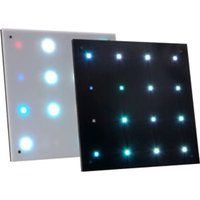
Flash Panel 16 - LED Lighting American Audio - Free user manual and instructions
Find the device manual for free Flash Panel 16 American Audio in PDF.


Pick your language and provide your email: we'll send you a specifically translated version.
| Product Type | DMX-Controlled LED Wash Light |
| Model | Flash Panel 16 |
| Brand | American Audio |
| LED Configuration | 16 x 1W or 3W RGB LEDs (depending on version) |
| Control Protocol | DMX512 (3-pin XLR) |
| DMX Channels | 4, 6, or 8 channels (selectable) |
| Operating Modes | DMX, Master/Slave, Auto, Sound Active |
| Dimensions (approx.) | 10.5 x 8.5 x 4.5 inches (267 x 216 x 114 mm) |
| Weight (approx.) | 3.5 lbs (1.6 kg) |
| Power Supply | AC 100-240V, 50/60Hz via included adapter |
| Power Consumption | 15W typical |
| Housing Material | Aluminum and plastic |
| Beam Angle | 40 degrees |
| Color Spectrum | Red, Green, Blue (RGB) mixing |
| Strobe Rate | 0-20 Hz |
| Safety Features | Built-in safety bracket; CE & RoHS compliance |
| Mounting Options | Floor standing or hanging via included bracket |
| Cooling | Passive (fanless) |
| Accessories Included | Power adapter, DMX cable, user manual |
| Maintenance | Wipe with dry cloth; avoid moisture |
| Spare Parts | Optional replacement LEDs and power supply available |
Frequently Asked Questions - Flash Panel 16 American Audio
How do I connect the Flash Panel 16 to a DMX controller?
Use a 3-pin XLR cable to connect the DMX OUT of your controller to the DMX IN of the panel. Set the panel to DMX mode and assign a starting address using the DIP switches or digital menu.
Can I use this fixture without a DMX controller?
Yes. You can run it in Sound Active mode, where it will respond to music via the built-in microphone, or in Auto mode for pre-programmed shows.
What is the maximum number of units I can daisy-chain?
With a proper DMX signal booster, you can chain up to 32 units. Without a booster, 16 units is recommended to avoid signal degradation.
How do I reset the Flash Panel 16 to factory settings?
Press and hold the 'Mode' button for 3 seconds until the display shows 'rES'. Release, then press 'Enter' to confirm. The unit will reboot.
What should I do if the panel does not respond to DMX?
Check the DMX cable connections and ensure the polarity is correct. Verify that the DMX address is set correctly and not conflicting with other fixtures. Test with a known working cable.
Is the Flash Panel 16 suitable for outdoor use?
No, this fixture is for indoor use only. Exposure to rain or moisture can cause electrical shock or damage.
How do I clean the LEDs?
Use a soft, dry cloth to gently wipe the lens and housing. Do not use chemical cleaners or water. Ensure power is disconnected before cleaning.
What replacement parts are available?
Replacement LEDs (individual or pre-mounted boards) and power adapters can be ordered from American Audio or authorized dealers.
Can I mount this fixture on a tripod?
Yes, the Flash Panel 16 has a built-in bracket with a standard 5/8-inch mount that fits most lighting stands.
Why does the fixture flash randomly in sound mode?
The sound sensitivity may be too high. Decrease the sensitivity by pressing the 'Sound' button multiple times to cycle through levels (L1 to L9). Also, ensure the microphone is not obstructed.
User questions about Flash Panel 16 American Audio
0 question about this device. Answer the ones you know or ask your own.
Ask a new question about this device
No questions yet. Be the first to ask one.
Download the instructions for your LED Lighting in PDF format for free! Find your manual Flash Panel 16 - American Audio and take your electronic device back in hand. On this page are published all the documents necessary for the use of your device. Flash Panel 16 by American Audio.
USER MANUAL Flash Panel 16 American Audio


Manual assistant
Powered by Anthropic
Waiting for your message
Product information
Brand : American Audio
Model : Flash Panel 16
Category : LED Lighting