
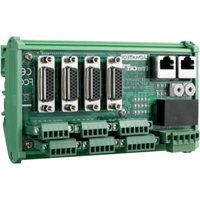
ROM-DB5901 - Electronic board Advantech - Free user manual and instructions
Find the device manual for free ROM-DB5901 Advantech in PDF.


Pick your language and provide your email: we'll send you a specifically translated version.
| Product Type | Embedded Module / Development Board |
| Brand | Advantech |
| Model | ROM-DB5901 |
| Dimensions (W x D x H) | 100 mm x 100 mm x 30 mm |
| Weight | 200 g |
| Power Supply | 12 V DC, 5 W |
| Operating Temperature | -20°C to 70°C |
| Processor | Intel Atom or similar embedded CPU |
| Memory | Up to 8 GB DDR3L |
| Storage | microSD slot, onboard eMMC |
| Connectivity | 2x Gigabit Ethernet, 4x USB 2.0, 2x RS-232/422/485 |
| Expansion | Mini PCIe slot, GPIO header |
| GPIO | 8x programmable digital I/O |
| Display | VGA or HDMI output |
| Audio | Line-out, mic-in via header |
| Operating System Support | Windows 10 IoT, Linux (Yocto, Ubuntu) |
| Maintenance | Keep clean and dry; use compressed air for dust |
| Cleaning | Wipe with a soft, dry cloth; avoid liquids |
| Safety | Use ESD protection when handling; disconnect power before servicing |
| Spare Parts / Repairability | No user-serviceable parts; contact Advantech support |
Frequently Asked Questions - ROM-DB5901 Advantech
What is the Advantech ROM-DB5901?
The ROM-DB5901 is an embedded development board from Advantech, designed for industrial IoT applications. It features an Intel Atom processor, multiple I/O interfaces, and expansion options.
How do I power the ROM-DB5901?
Connect a 12V DC power supply (center positive) to the barrel jack. Ensure the power adapter provides at least 5W. Do not use a higher voltage.
Which operating systems are supported?
The board supports Windows 10 IoT Enterprise and Linux distributions such as Yocto and Ubuntu. Pre-built images may be available from Advantech.
How do I connect peripheral devices?
Use the onboard USB ports for mice, keyboards, or storage. For serial devices, use the RS-232/422/485 connectors. GPIO expansion is available via the 40-pin header.
What is the operating temperature range?
The ROM-DB5901 can operate from -20°C to 70°C (industrial grade), making it suitable for harsh environments.
Can I install additional RAM?
The board has onboard DDR3L memory, typically soldered. Check the specific variant; some models may support up to 8GB, but it is not user-upgradeable.
How do I update the BIOS?
Download the latest BIOS from the Advantech website, copy it to a FAT32 USB drive, and use the BIOS update tool during boot (usually F7 or Del key).
What should I do if the board does not boot?
Check the power supply and connections. Ensure the boot media is properly inserted. Try clearing CMOS by moving the jumper (refer to manual). If still fails, contact support.
Is the ROM-DB5901 RoHS compliant?
Yes, the board is RoHS compliant and meets environmental standards for lead-free manufacturing.
Where can I find the user manual?
The user manual is available for free download from the notice-facile.com website. You can also request a translated version via email.
User questions about ROM-DB5901 Advantech
0 question about this device. Answer the ones you know or ask your own.
Ask a new question about this device
No questions yet. Be the first to ask one.
Download the instructions for your Electronic board in PDF format for free! Find your manual ROM-DB5901 - Advantech and take your electronic device back in hand. On this page are published all the documents necessary for the use of your device. ROM-DB5901 by Advantech.
USER MANUAL ROM-DB5901 Advantech




Manual assistant
Powered by Anthropic
Waiting for your message
Product information
Brand : Advantech
Model : ROM-DB5901
Category : Electronic board