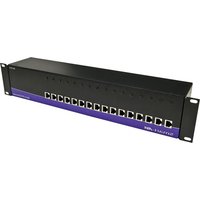
RK-DVX200 - Audio/video extension Smart-AVI - Free user manual and instructions
Find the device manual for free RK-DVX200 Smart-AVI in PDF.


Pick your language and provide your email: we'll send you a specifically translated version.
| Product Type | Audio/Video Extender |
| Brand | Smart-AVI |
| Model | RK-DVX200 |
| Category | Audio/Video Extension |
| Dimensions (W x D x H) | 100 x 70 x 25 mm |
| Weight | 200 g |
| Power Supply | 5V DC, 2A |
| Video Input | 1x HDMI (Type A) |
| Video Output | 1x HDMI (Type A) via Cat5e/6 |
| Audio Input | Embedded HDMI audio |
| Audio Output | Embedded HDMI audio |
| Transmission Type | Single Cat5e/6 UTP |
| Maximum Resolution | 1920x1080 @ 60Hz |
| Maximum Distance | 60 m (Cat6) |
| Connector Types | HDMI (input), RJ45 (output) |
| Supported Protocols | HDMI 1.3, HDCP 1.2 |
| Color | Black |
| Material | Aluminum alloy |
| Operating Temperature | 0°C to 50°C |
| Storage Temperature | -20°C to 60°C |
| Package Contents | Transmitter, Receiver, Power Adapter, User Manual |
| Warranty | 1 Year |
| Maintenance | Keep dry, clean with soft cloth |
| Safety | CE, FCC compliant |
Frequently Asked Questions - RK-DVX200 Smart-AVI
What is the maximum resolution supported by the RK-DVX200?
The RK-DVX200 supports up to 1920x1080 @ 60Hz resolution.
How far can I extend the HDMI signal?
Over a single Cat6 cable, the signal can be extended up to 60 meters.
Does the extender require separate power adapters?
Yes, both the transmitter and receiver require 5V DC power adapters (included).
Can I use Cat5e instead of Cat6?
Yes, but the maximum distance may be reduced. For best performance, use Cat6.
Is the RK-DVX200 compatible with HDCP?
Yes, it supports HDCP 1.2.
What audio formats are supported?
The extender supports embedded HDMI audio, including stereo and multi-channel formats.
How do I connect the device?
Connect the HDMI source to the transmitter, then run a Cat5e/6 cable from the transmitter to the receiver, and connect the receiver to the display.
Does it support 3D or 4K?
No, the RK-DVX200 is designed for 1080p and does not support 3D or 4K.
What LEDs indicate power or signal status?
Both units have a green LED for power and a blue LED for signal status.
Can I use this extender in a daisy-chain setup?
No, this is a point-to-point extender and cannot be daisy-chained.
User questions about RK-DVX200 Smart-AVI
0 question about this device. Answer the ones you know or ask your own.
Ask a new question about this device
No questions yet. Be the first to ask one.
Download the instructions for your Audio/video extension in PDF format for free! Find your manual RK-DVX200 - Smart-AVI and take your electronic device back in hand. On this page are published all the documents necessary for the use of your device. RK-DVX200 by Smart-AVI.
USER MANUAL RK-DVX200 Smart-AVI

Manual assistant
Powered by Anthropic
Waiting for your message
Product information
Brand : Smart-AVI
Model : RK-DVX200
Category : Audio/video extension