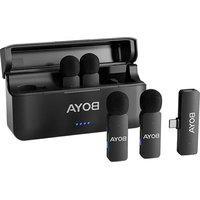
BY-V4U - Microphone BOYA - Free user manual and instructions
Find the device manual for free BY-V4U BOYA in PDF.


Pick your language and provide your email: we'll send you a specifically translated version.
| Product Type | Wireless Microphone System |
| Brand | BOYA |
| Model | BY-V4U |
| Frequency Band | 2.4GHz |
| Operating Range | Up to 50 meters (line of sight) |
| Battery Life | Approximately 6-8 hours |
| Charging Port | USB-C |
| Microphone Type | Lavalier (Lapel) Omnidirectional |
| Number of Channels | 2 (Dual channel transmitter/receiver) |
| Compatibility | Smartphones, Tablets, Cameras with USB-C or Lightning (adapter may be required) |
| Receiver Dimensions | Approx. 50 x 30 x 10 mm |
| Transmitter Dimensions | Approx. 40 x 20 x 10 mm each |
| Weight (Receiver) | Approx. 12 grams |
| Weight (Transmitter each) | Approx. 8 grams |
| Materials | Plastic and metal components |
| Functions | Mute, Volume Control, Noise Reduction |
| Accessories Included | 2 Lavalier microphones, 2 transmitters, 1 receiver, USB-C cable, windshields, carry case |
| Color | Black |
| Warranty | 1 year limited warranty |
Frequently Asked Questions - BY-V4U BOYA
How do I connect the BOYA BY-V4U to my smartphone?
Plug the receiver into your smartphone's USB-C port (or use a Lightning adapter for iPhone). The receiver will automatically pair with the transmitters. Ensure both transmitters are turned on and within range.
How long does the battery last?
The battery life is approximately 6-8 hours on a full charge. Charging time is about 2 hours via USB-C.
What is the operating range of the BY-V4U?
The operating range is up to 50 meters (line of sight) without obstructions. Walls and interference may reduce the range.
Can I use this microphone with a camera?
Yes, if your camera has a USB-C input that supports audio input. Some cameras may require an adapter. Check your camera's specifications.
How do I mute the microphone?
Press the mute button on the transmitter. The LED indicator will change color (usually red) to indicate mute mode.
Does the BY-V4U support noise cancellation?
Yes, it features built-in noise reduction technology to minimize background noise for clearer audio.
Can I use only one transmitter at a time?
Yes, you can use either one or both transmitters. The receiver automatically selects the active channel.
How do I charge the devices?
Use the included USB-C cable to charge the receiver and transmitters. Connect to a standard USB charger (5V/1A). The LED indicators will show charging status.
What devices are compatible?
Compatible with smartphones, tablets, and computers that have a USB-C port and support OTG audio. For Lightning devices, use a Lightning to USB-C adapter.
Is the microphone waterproof?
No, the BY-V4U is not waterproof. Avoid exposure to rain or moisture. Use the included windshields to protect against wind noise.
User questions about BY-V4U BOYA
0 question about this device. Answer the ones you know or ask your own.
Ask a new question about this device
No questions yet. Be the first to ask one.
Download the instructions for your Microphone in PDF format for free! Find your manual BY-V4U - BOYA and take your electronic device back in hand. On this page are published all the documents necessary for the use of your device. BY-V4U by BOYA.
USER MANUAL BY-V4U BOYA
Manual assistant
Powered by Anthropic
Waiting for your message
Product information
Brand : BOYA
Model : BY-V4U
Category : Microphone