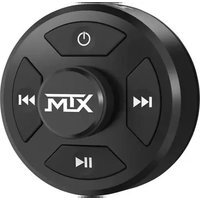
AWBTC - Bluetooth remote MTX Audio - Free user manual and instructions
Find the device manual for free AWBTC MTX Audio in PDF.


Pick your language and provide your email: we'll send you a specifically translated version.
| Product Type | Bluetooth Receiver/Audio Adapter |
| Brand | MTX Audio |
| Model | AWBTC |
| Color | Black |
| Dimensions (W x H x D) | 3.0 x 1.0 x 4.0 inches |
| Weight | 0.2 lbs |
| Power Source | USB-C (5V) or Rechargeable battery |
| Battery Life | Up to 10 hours |
| Bluetooth Version | 5.0 |
| Wireless Range | Up to 33 feet (10 meters) |
| Frequency Response | 20 Hz - 20 kHz |
| Signal-to-Noise Ratio | >90 dB |
| Total Harmonic Distortion | <0.1% |
| Audio Input | Bluetooth, 3.5mm Aux |
| Audio Output | RCA, 3.5mm Headphone Jack |
| Waterproof Rating | IPX5 (splash resistant) |
| Features | Hands-free calling, Music streaming, Volume control |
| Materials | ABS plastic, Metal connectors |
| Certifications | FCC, CE, RoHS |
| Warranty | 1 year limited |
| Included Accessories | USB-C cable, 3.5mm aux cable, User manual |
Frequently Asked Questions - AWBTC MTX Audio
How do I pair the MTX Audio AWBTC with my phone?
Place the device in pairing mode by pressing and holding the power button for 3 seconds until the LED flashes red and blue. Then, on your phone, enable Bluetooth and select AWBTC from the list of available devices.
Can I use this device with multiple speakers?
The AWBTC supports connecting to one audio source at a time. To switch devices, disconnect the current device and pair the new one.
How do I reset the AWBTC to factory settings?
Press and hold the volume up and power button simultaneously for 5 seconds. The LED will flash rapidly, indicating a successful reset.
What is the battery life of the AWBTC?
The battery lasts up to 10 hours on a full charge, depending on volume levels and usage.
How do I charge the device?
Use the included USB-C cable to connect the AWBTC to a USB power source (e.g., computer, wall charger). The LED will turn solid red while charging and green when fully charged.
Is the AWBTC compatible with older Bluetooth versions?
Yes, it is backward compatible with Bluetooth 4.0 and above, but optimal performance is achieved with Bluetooth 5.0 devices.
Can I use the AWBTC while charging?
Yes, you can use the device while it is connected to a power source via USB-C.
What do the LED lights indicate?
Red and blue flashing: Pairing mode. Solid blue: Connected. Solid red: Charging. Flashing red: Low battery.
How do I clean the AWBTC?
Wipe the exterior with a soft, dry cloth. Do not use abrasive cleaners or immerse in water. Ensure all ports are dry before use.
What is the wireless range of the AWBTC?
The range is up to 33 feet (10 meters) in open space. Obstacles like walls may reduce the range.
User questions about AWBTC MTX Audio
0 question about this device. Answer the ones you know or ask your own.
Ask a new question about this device
No questions yet. Be the first to ask one.
Download the instructions for your Bluetooth remote in PDF format for free! Find your manual AWBTC - MTX Audio and take your electronic device back in hand. On this page are published all the documents necessary for the use of your device. AWBTC by MTX Audio.
USER MANUAL AWBTC MTX Audio
Manual assistant
Powered by Anthropic
Waiting for your message
Product information
Brand : MTX Audio
Model : AWBTC
Category : Bluetooth remote