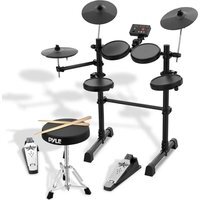
PEDKITPRO100 - Musical instrument Pyle - Free user manual and instructions
Find the device manual for free PEDKITPRO100 Pyle in PDF.


Pick your language and provide your email: we'll send you a specifically translated version.
| Product Type | Electronic Drum Kit |
| Brand | Pyle |
| Model | PEDKITPRO100 |
| Dimensions (Kit) | Approximately 48 x 24 x 12 inches (122 x 61 x 30 cm) |
| Weight | About 25 lbs (11.3 kg) |
| Power Supply | 12V DC 500mA adapter (included) |
| Number of Pads | 5 (3 tom pads, 1 snare pad, 1 crash cymbal pad) plus hi-hat control pedal |
| Sound Module | Built-in with 100+ drum sounds, 10 preset kits |
| Connectivity | 1/4" headphone output, 1/8" auxiliary input, USB-MIDI |
| Pedals | Kick drum pedal and hi-hat control pedal included |
| Frame | Steel tubular frame with adjustable height |
| Display | LED display for kit selection and settings |
| Practice Features | Metronome, record/playback, auxiliary input for play-along |
| Accessories Included | Drumsticks, drum throne, cable harness |
| Materials | Mesh heads on snare and toms, rubber cymbal pads |
| Maintenance | Wipe with dry cloth; avoid liquids; check cable connections periodically |
| Safety | Keep away from water; use only provided power adapter; do not disassemble |
| Spare Parts | Replacement pads, cables, and power adapters available from Pyle or authorized dealers |
| Repairability | User-serviceable parts: pads and cables; module repair by qualified technician |
| General Information | Designed for beginners to intermediate drummers; portable and foldable for easy storage |
Frequently Asked Questions - PEDKITPRO100 Pyle
How do I assemble the Pyle PEDKITPRO100 drum kit?
Refer to the included manual for step-by-step assembly. Typically, you attach the pads to the rack, connect the cables to the module, and plug in the power adapter. Ensure all screws are tightened securely.
Can I connect the drum kit to a computer or tablet?
Yes, the module has a USB-MIDI output. Use a standard USB cable to connect to a computer or tablet for use with music production software or drum learning apps.
What type of headphones should I use?
Any standard headphones with a 1/4 inch plug will work. For better experience, use closed-back headphones to minimize sound bleed.
How do I change the drum kit sound?
Press the 'Kit' button on the module and use the +/- buttons to scroll through the 10 preset kits. The LED display will show the current kit number.
The hi-hat pedal is not working correctly. What should I do?
Check the cable connection to the module. Ensure the pedal is placed on a flat surface. You may need to calibrate the pedal by following the instructions in the manual.
How do I clean the drum pads?
Use a soft, dry cloth to wipe the pads. For tougher dirt, slightly dampen the cloth with water (not wet). Avoid using any solvents or abrasive cleaners.
What is the warranty period for the PEDKITPRO100?
Pyle typically offers a 1-year limited warranty against defects. Check your purchase receipt or contact Pyle support for details.
Can I use my own pedals with this kit?
The kit includes a kick drum pedal and hi-hat pedal. However, you can replace them with standard aftermarket pedals as long as they are compatible with the module's input jacks.
The module doesn't turn on. What could be the problem?
First, ensure the power adapter is properly connected to the module and a working power outlet. Check if the adapter's LED (if present) is lit. If not, try a different outlet or replace the adapter.
How do I record my playing?
Press the 'Record' button on the module to start recording. Play your drum pattern, then press 'Play' to listen back. For more advanced recording, use the USB-MIDI output with a computer.
User questions about PEDKITPRO100 Pyle
0 question about this device. Answer the ones you know or ask your own.
Ask a new question about this device
No questions yet. Be the first to ask one.
Download the instructions for your Musical instrument in PDF format for free! Find your manual PEDKITPRO100 - Pyle and take your electronic device back in hand. On this page are published all the documents necessary for the use of your device. PEDKITPRO100 by Pyle.
USER MANUAL PEDKITPRO100 Pyle
Manual assistant
Powered by Anthropic
Waiting for your message
Product information
Brand : Pyle
Model : PEDKITPRO100
Category : Musical instrument