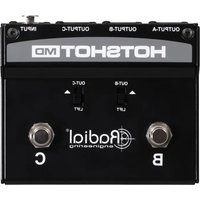
HotShot MD - Commutateur audio Radial Engineering - Free user manual and instructions
Find the device manual for free HotShot MD Radial Engineering in PDF.


Pick your language and provide your email: we'll send you a specifically translated version.
| Product Type | Guitar Footswitch / Amplifier Switcher |
| Brand | Radial Engineering |
| Model | HotShot MD |
| Dimensions (approx.) | 3.5 x 2.5 x 2.0 inches (89 x 64 x 51 mm) |
| Weight (approx.) | 0.5 lb (0.23 kg) |
| Power | Passive (no external power required) |
| Input Connectors | 1/4" TS female (instrument input) |
| Output Connectors | 2 x 1/4" TS female (amp A and amp B outputs) |
| Switching Type | A/B footswitch with true bypass |
| Indicator | LED indicator for active amp |
| Construction | Steel chassis with baked enamel finish |
| Features | Select between two amplifiers; ground lift switch to eliminate hum; isolation transformers for noise rejection |
| Maintenance | Wipe with a dry cloth; do not use solvents. Check connections periodically. |
| Safety | Use only with standard instrument cables; do not expose to moisture or extreme temperatures. |
| Spare Parts / Repairability | Contact Radial Engineering for service or replacement parts; user-serviceable only for cable connections. |
| Warranty | 3-year limited warranty (check with manufacturer) |
| General Information | Designed for silent switching between two guitar amplifiers; compact and road-ready. |
Frequently Asked Questions - HotShot MD Radial Engineering
What is the Radial Engineering HotShot MD used for?
The HotShot MD is a footswitch that lets you toggle between two guitar amplifiers seamlessly, with true bypass and ground lift to eliminate hum.
Does the HotShot MD require power?
No, it is a passive unit; no batteries or external power supply needed.
Can I use the HotShot MD with bass or other instruments?
Yes, it works with any instrument that has a standard 1/4" mono output, such as bass, keyboards, or acoustic guitars with pickups.
How do I connect the HotShot MD?
Plug your instrument into the Input jack, then connect two instrument cables from the Output A and Output B jacks to your two amplifiers.
What is the ground lift switch for?
The Ground Lift switch helps eliminate ground loop hum when using two amplifiers that are plugged into different power outlets.
Is the HotShot MD true bypass?
Yes, it features true bypass switching, ensuring no signal degradation when neither amp is selected (if applicable) or during switching.
Can I use the HotShot MD to switch between two channels of the same amplifier?
No, it is designed to switch between two separate amplifiers. For channel switching, you need a different footswitch.
What kind of cables should I use?
Use high-quality unbalanced 1/4" TS instrument cables for optimum performance and noise rejection.
How do I clean and maintain the HotShot MD?
Wipe the exterior with a soft, dry cloth. Do not use chemical cleaners. Keep the jacks free of dust and debris.
What is the warranty on the HotShot MD?
Radial Engineering offers a 3-year limited warranty against defects in materials and workmanship. Register your product online for coverage.
User questions about HotShot MD Radial Engineering
0 question about this device. Answer the ones you know or ask your own.
Ask a new question about this device
No questions yet. Be the first to ask one.
Download the instructions for your Commutateur audio in PDF format for free! Find your manual HotShot MD - Radial Engineering and take your electronic device back in hand. On this page are published all the documents necessary for the use of your device. HotShot MD by Radial Engineering.
USER MANUAL HotShot MD Radial Engineering
Manual assistant
Powered by Anthropic
Waiting for your message
Product information
Brand : Radial Engineering
Model : HotShot MD
Category : Commutateur audio