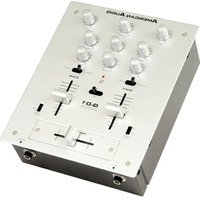
Q-D1 - Audio Mixer American Audio - Free user manual and instructions
Find the device manual for free Q-D1 American Audio in PDF.


Pick your language and provide your email: we'll send you a specifically translated version.
| Product Type | DJ Mixer / Audio Controller |
| Brand | American Audio |
| Model | Q-D1 |
| Dimensions | Approx. 12.6 x 8.7 x 2.8 inches (32 x 22 x 7 cm) |
| Weight | Approx. 4.2 lbs (1.9 kg) |
| Power Supply | AC 100-240V, 50/60Hz (external adapter) |
| Power Consumption | 15 Watts |
| Audio Inputs | 2x RCA (Line), 1x 1/4" (Mic) |
| Audio Outputs | 1x RCA (Master), 1x 1/4" (Headphones) |
| Frequency Response | 20 Hz - 20 kHz |
| Signal-to-Noise Ratio | ≥ 90 dB |
| Equalizer | 3-band EQ (Bass, Mid, Treble) per channel |
| Crossfader | Replaceable, metal shaft |
| Main Functions | Mixing, EQ adjustment, cue monitoring, microphone input |
| Maintenance | Clean with soft dry cloth; avoid liquids |
| Safety Features | Grounding pin, auto power-off after inactivity |
| Spare Parts Available | Crossfader, knobs, power adapter (contact support) |
| Reparability | Modular design; user-replaceable crossfader |
| Country of Origin | China |
| Certification | CE, FCC |
Frequently Asked Questions - Q-D1 American Audio
How do I connect the Q-D1 to my speakers?
Use the Master Output (RCA) to connect to powered speakers or an amplifier. Ensure the mixer is powered off while making connections.
What type of power adapter does the Q-D1 use?
It uses an external AC adapter (100-240V input) with a barrel connector. Use only the adapter supplied by American Audio.
Can I connect a microphone?
Yes, the Q-D1 has a 1/4" microphone input with volume control. It is suitable for dynamic microphones.
How do I replace the crossfader?
The crossfader is user-replaceable. Remove the faceplate screws, unplug the old fader, and install a new one. Ensure the device is unplugged.
The sound is distorted. What should I check?
Check the input levels and ensure they are not clipping. Also verify that the master volume is set appropriately. Try different cables.
Does the Q-D1 work with turntables?
It is designed for line-level sources. For turntables without a built-in preamp, you need a separate phono preamp.
How do I clean the Q-D1?
Use a soft, dry cloth to wipe the surface. Do not use liquid cleaners or sprays. Keep the device away from dust.
What is the warranty period?
American Audio typically offers a 1-year limited warranty from the date of purchase. Contact customer support for details.
Can I use the Q-D1 with a laptop?
Yes, it can be used with a laptop via an external audio interface. Connect the interface’s outputs to the Q-D1’s line inputs.
The power LED does not light up. What could be wrong?
First, check the power adapter connection and try a different outlet. If still off, the adapter may be faulty; replace it with an original part.
User questions about Q-D1 American Audio
0 question about this device. Answer the ones you know or ask your own.
Ask a new question about this device
No questions yet. Be the first to ask one.
Download the instructions for your Audio Mixer in PDF format for free! Find your manual Q-D1 - American Audio and take your electronic device back in hand. On this page are published all the documents necessary for the use of your device. Q-D1 by American Audio.
USER MANUAL Q-D1 American Audio


Manual assistant
Powered by Anthropic
Waiting for your message
Product information
Brand : American Audio
Model : Q-D1
Category : Audio Mixer