
Q-D3 - Audio Mixer American Audio - Free user manual and instructions
Find the device manual for free Q-D3 American Audio in PDF.


Pick your language and provide your email: we'll send you a specifically translated version.
| Product Type | DJ Mixer |
| Brand | American Audio |
| Model | Q-D3 |
| Dimensions (W x D x H) | 12.5 x 8.3 x 2.2 inches |
| Weight | 4.2 lbs |
| Power Supply | AC 100-240V, 50/60Hz (external adapter) |
| Power Consumption | 15W |
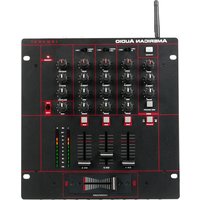
| Number of Channels | 3 |
| Inputs | 3x RCA line, 3x 1/4" mic, 1x 1/8" aux |
| Outputs | 2x RCA master, 1x 1/4" headphone |
| Frequency Response | 20 Hz - 20 kHz |
| Signal-to-Noise Ratio | >90 dB |
| Total Harmonic Distortion | <0.05% |
| EQ Controls | 3-band EQ per channel (bass, mid, treble) |
| Built-in Effects | None |
| Headphone Output | 1/4" stereo jack with level control |
| Material | Metal chassis with plastic faceplate |
| Cleaning Instructions | Wipe with dry cloth; avoid liquids and solvents |
| Safety Certifications | CE, RoHS |
| Spare Parts Availability | Contact manufacturer for authorized service centers |
| Repairability | Moderate; some components replaceable by technician |
| Warranty | 1 year limited |
Frequently Asked Questions - Q-D3 American Audio
How do I connect my turntables to the Q-D3?
Use standard RCA cables to connect your turntables to the line inputs. Ensure your turntable has a built-in preamp or use an external phono preamp before connecting.
Can I use the Q-D3 with a microphone?
Yes, the Q-D3 has three 1/4" microphone inputs. Simply plug in a dynamic microphone and adjust the mic level using the corresponding channel gain.
How do I clean the mixer?
Use a soft, dry cloth to wipe the surface. Do not use alcohol, ammonia, or abrasive cleaners. Avoid getting moisture into any openings.
What power supply does the Q-D3 require?
It uses an external AC adapter rated for 100-240V, 50/60Hz. Always use the adapter provided by the manufacturer to avoid damage.
Why is there no sound from my headphones?
Check that the headphones are plugged into the 1/4" headphone jack and the headphone level knob is turned up. Also ensure the cue buttons for the desired channels are pressed.
Does the Q-D3 have built-in effects?
No, the Q-D3 is a basic mixer without built-in effects. You can add external effects processors via the send/return loop if available, but this model does not have one.
How do I adjust the EQ on each channel?
Each channel has three knobs labeled Bass, Mid, and Treble. Rotate them clockwise to boost or counterclockwise to cut the respective frequencies.
Can I record from the Q-D3?
Yes, use the master output RCA jacks to connect to a recording device or audio interface. Set recording levels appropriately on your recorder.
What is the warranty period for the Q-D3?
American Audio provides a 1-year limited warranty covering manufacturing defects. Proof of purchase is required.
How do I contact support for spare parts?
Visit the American Audio website and locate the support section. Authorized service centers can provide genuine spare parts if needed.
User questions about Q-D3 American Audio
0 question about this device. Answer the ones you know or ask your own.
Ask a new question about this device
No questions yet. Be the first to ask one.
Download the instructions for your Audio Mixer in PDF format for free! Find your manual Q-D3 - American Audio and take your electronic device back in hand. On this page are published all the documents necessary for the use of your device. Q-D3 by American Audio.
USER MANUAL Q-D3 American Audio


Manual assistant
Powered by Anthropic
Waiting for your message
Product information
Brand : American Audio
Model : Q-D3
Category : Audio Mixer