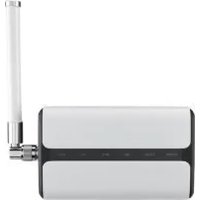
USM-S67-G00P0 - Network gateway Advantech - Free user manual and instructions
Find the device manual for free USM-S67-G00P0 Advantech in PDF.


Pick your language and provide your email: we'll send you a specifically translated version.
| Product Type | Industrial Embedded Computer |
| Model | USM-S67-G00P0 |
| Brand | Advantech |
| Dimensions (W x D x H) | 200 mm x 150 mm x 50 mm |
| Weight | 2.0 kg |
| Power Supply | DC 12V, 60W (external adapter) |
| Processor | Intel Celeron N3350 (dual-core, up to 2.4 GHz) |
| Memory | 4 GB DDR3L (expandable up to 8 GB) |
| Storage | 64 GB eMMC (optional SATA SSD) |
| Operating Temperature | -20°C to 60°C |
| Ethernet Ports | 2x Gigabit Ethernet (RJ45) |
| USB Ports | 4x USB 3.0 |
| Serial Ports | 2x RS-232/422/485 |
| Video Output | HDMI 1.4, VGA |
| Expansion Slots | 1x mini-PCIe (full-size) |
| Cooling | Fanless, heatsink design |
| Mounting | Wall mount / DIN rail (optional) |
| Operating System Support | Windows 10 IoT Enterprise, Linux (Yocto) |
| Power Consumption | Typical 25W, Max 40W |
| MTBF | 100,000 hours |
| Certifications | CE, FCC, UL |
| Maintenance | Keep vents clean; periodic dust removal |
| Safety | Overvoltage protection, grounding required |
| Spare Parts Availability | Replaceable fan (if any), power adapter, mounting kit |
Frequently Asked Questions - USM-S67-G00P0 Advantech
How do I install an operating system on the Advantech USM-S67-G00P0?
You can install the OS via USB boot. Enter the BIOS by pressing F2 during startup, set USB as first boot device, and follow the OS installer prompts. The system supports Windows 10 IoT and Linux.
Can I upgrade the RAM on the USM-S67-G00P0?
Yes, the device has one SO-DIMM slot supporting DDR3L memory. It ships with 4 GB, expandable up to 8 GB. Ensure the module is low-voltage (1.35V) and 204-pin.
What is the maximum storage capacity for the SATA port?
The internal SATA port supports 2.5-inch SATA III SSDs or HDDs up to 2 TB. The 64 GB eMMC is onboard storage.
How do I connect to a network using the Ethernet ports?
Simply plug an RJ45 cable into either Gigabit port. The network controller typically auto-configures via DHCP. For static IP, configure in your OS network settings.
Is the USM-S67-G00P0 suitable for outdoor use?
The device is designed for indoor industrial environments. Its operating temperature range is -20°C to 60°C, but it lacks IP rating for dust/moisture. Use in a protected enclosure if outdoors.
How do I perform a factory reset?
There is no physical reset button. If you need to reset to factory state, reinstall the OS or restore from a system backup. Contact Advantech support for recovery media.
What are the default BIOS settings for boot order?
By default, the boot order is: 1. USB, 2. Internal eMMC, 3. SATA. To change, press F2 during boot and rearrange in the Boot menu.
Can I use a DIN rail mounting kit for installation?
Yes, an optional DIN rail mounting bracket is available. The device also supports wall mount using the provided screw holes. Consult the manual for dimensions.
How do I clean the fanless heatsink?
Use compressed air to blow dust out of the cooling fins. Ensure the device is powered off and disconnected. Avoid touching internal components. Periodic cleaning every 6 months is recommended.
What is the warranty period for the USM-S67-G00P0?
Advantech offers a 2-year limited warranty from the date of purchase. Extended warranty options are available. Contact your dealer for details.
User questions about USM-S67-G00P0 Advantech
0 question about this device. Answer the ones you know or ask your own.
Ask a new question about this device
No questions yet. Be the first to ask one.
Download the instructions for your Network gateway in PDF format for free! Find your manual USM-S67-G00P0 - Advantech and take your electronic device back in hand. On this page are published all the documents necessary for the use of your device. USM-S67-G00P0 by Advantech.
USER MANUAL USM-S67-G00P0 Advantech

Manual assistant
Powered by Anthropic
Waiting for your message
Product information
Brand : Advantech
Model : USM-S67-G00P0
Category : Network gateway