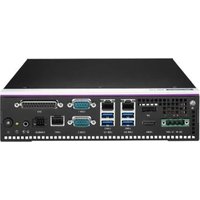
AIR-310 - Computer Advantech - Free user manual and instructions
Find the device manual for free AIR-310 Advantech in PDF.


Pick your language and provide your email: we'll send you a specifically translated version.
| Product Type | Industrial Embedded Computer |
| Dimensions | 240 mm x 165 mm x 56 mm |
| Weight | 2.5 kg |
| Power Supply | 12V DC input |
| Processor | Intel Core i5/i7 8th/9th Gen |
| Memory | 8GB/16GB DDR4 (max 32GB) |
| Storage | 1x M.2 SSD, 1x 2.5" SATA HDD/SSD |
| Operating System | Windows 10/11, Linux |
| Ethernet | 2x Gigabit LAN (Intel I210) |
| USB Ports | 4x USB 3.0, 2x USB 2.0 |
| Serial Ports | 2x RS-232/422/485 |
| Video Output | 1x HDMI, 1x VGA |
| Expansion Slots | 1x PCIe Mini Card (full-size) |
| Mounting | Wall-mount / DIN-rail kit |
| Cooling | Fanless, heatsink |
| Operating Temperature | -20°C to 60°C |
| Certifications | CE, FCC, RoHS |
Frequently Asked Questions - AIR-310 Advantech
How do I power on the AIR-310?
Connect the 12V DC power adapter to the device, then press the power button located on the front panel. The LED will illuminate when powered on.
Can I install Windows 10 on this device?
Yes, the AIR-310 supports Windows 10/11 and various Linux distributions. You can install via USB or DVD drive with the appropriate drivers from Advantech's website.
How do I access the BIOS settings?
During boot, press the DEL or F2 key repeatedly to enter the BIOS setup. Navigate using keyboard arrows and change settings as needed.
What are the network configuration options?
The AIR-310 has two Gigabit Ethernet ports. Configure IP addresses via the operating system's network settings or use BIOS for PXE boot options.
How do I connect serial devices?
Use the RS-232/422/485 ports. Configure the mode via BIOS or jumpers on the board. Install the appropriate serial drivers for your OS.
Can I mount the device on a DIN rail?
Yes, the AIR-310 includes a DIN-rail mounting kit. Attach the bracket to the rear of the device and clip it onto the rail securely.
Is the AIR-310 fanless?
Yes, it features a fanless design with a large heatsink for silent operation and reliability in dusty environments.
Where can I download drivers and manuals?
Visit the Advantech support website, enter model AIR-310, and download the latest drivers, BIOS updates, and user manuals.
How do I clean the device?
Disconnect power and use a dry, soft cloth to wipe the exterior. Avoid liquids. Clean the heatsink fins with compressed air if needed.
What is the warranty period?
Advantech typically offers a 2-year warranty for the AIR-310. For exact terms, refer to the purchase agreement or contact support.
User questions about AIR-310 Advantech
0 question about this device. Answer the ones you know or ask your own.
Ask a new question about this device
No questions yet. Be the first to ask one.
Download the instructions for your Computer in PDF format for free! Find your manual AIR-310 - Advantech and take your electronic device back in hand. On this page are published all the documents necessary for the use of your device. AIR-310 by Advantech.
USER MANUAL AIR-310 Advantech


Manual assistant
Powered by Anthropic
Waiting for your message
Product information
Brand : Advantech
Model : AIR-310
Category : Computer