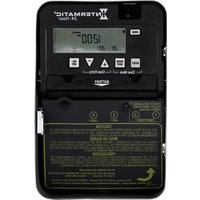
ET1105C - Electronic timer switch INTERMATIC - Free user manual and instructions
Find the device manual for free ET1105C INTERMATIC in PDF.


Pick your language and provide your email: we'll send you a specifically translated version.
| Product Type | Programmable Electronic Timer |
| Brand | Intermatic |
| Model | ET1105C |
| Voltage | 120 VAC, 60 Hz |
| Maximum Load | 15 Amps, 1800 Watts (Resistive) |
| Number of Programs | 7-Day Programmable with up to 12 On/Off Events per Day |
| Display Type | Backlit LCD Display |
| Battery Backup | CR123A or Equivalent (Provides Program Retention During Power Outages) |
| Dimensions | Approximately 4.5 x 2.5 x 1.5 inches |
| Weight | Approximately 0.5 lbs |
| Operating Temperature | 32°F to 125°F (0°C to 52°C) |
| Enclosure Material | High Impact Plastic |
| Mounting | Wall Box or Surface Mount (Compatible with Standard Electrical Boxes) |
| Wiring | Single-Pole or 3-Way Compatible (Follow Manual) |
| Certifications | UL Listed, CSA Certified |
| Warranty | Limited 1-Year Warranty |
| Included Accessories | Mounting Screws, Wire Nuts, Quick Start Guide |
| Recommended Cleaning | Wipe with a Soft, Dry Cloth; Do Not Use Solvents |
| Repair and Parts | Replace Battery (CR123A) for Program Backup; No User-Serviceable Parts Inside |
Frequently Asked Questions - ET1105C INTERMATIC
How do I reset the ET1105C timer to factory settings?
Press and hold the RESET button (usually located on the side or back) for 5 seconds using a paper clip. The display will show default settings.
What type of battery does the ET1105C use for backup?
It uses a CR123A lithium battery. When the battery is low, the timer may lose programming during a power outage. Replace the battery annually.
How do I set the current time and day on the Intermatic ET1105C?
Press the SET button until the time flashes. Use the + and - buttons to adjust hours and minutes. Press SET again for day, then use +/- to select day. Press MODE to exit.
Can the ET1105C control both lights and motors?
Yes, but the load must not exceed 15 Amps. For inductive loads like motors, derate to 80% (12 Amps) for reliable operation.
Why does my timer not turn off at the programmed time?
Check that the manual override is not engaged. The timer is in ‘ON’ mode if the display shows a solid circle. Also verify that the schedule is correctly programmed and the battery is not dead.
How do I program multiple on/off events?
Press PROG button. Select a program number (1-12). Set the time and day using SET and +/-. Choose ON or OFF. Repeat for each event. Press MODE to save and exit.
Does the ET1105C work with 3-way switches?
Yes, it is 3-way compatible when wired according to the manual with compatible three-way dimmers or switches. Ensure traveler wires are connected correctly.
The display shows random numbers – what should I do?
This indicates a power surge or depleted backup battery. Perform a reset (press RESET) and reprogram. Replace the CR123A battery if needed.
How to override the timer manually?
Press the ON button to turn device on manually (until next programmed off time). Press OFF to turn off manually (until next programmed on time). The override is indicated by a blinking icon.
Are replacement batteries included?
No, the CR123A battery is not included but is widely available. Install a new battery with the positive (+) terminal facing the correct direction as indicated in the battery compartment.
User questions about ET1105C INTERMATIC
0 question about this device. Answer the ones you know or ask your own.
Ask a new question about this device
No questions yet. Be the first to ask one.
Download the instructions for your Electronic timer switch in PDF format for free! Find your manual ET1105C - INTERMATIC and take your electronic device back in hand. On this page are published all the documents necessary for the use of your device. ET1105C by INTERMATIC.
USER MANUAL ET1105C INTERMATIC


Manual assistant
Powered by Anthropic
Waiting for your message
Product information
Brand : INTERMATIC
Model : ET1105C
Category : Electronic timer switch