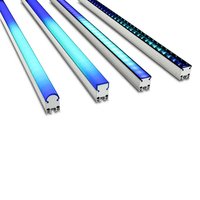
Exterior PixLine 20 - LED Lighting MARTIN - Free user manual and instructions
Find the device manual for free Exterior PixLine 20 MARTIN in PDF.


Pick your language and provide your email: we'll send you a specifically translated version.
| Product Type | Outdoor LED Pixel Bar |
| Dimensions (W x H x D) | 1000 x 100 x 150 mm |
| Weight | 8.5 kg |
| Power Consumption | 200 W |
| Input Voltage | 100-240 V AC, 50/60 Hz |
| Ingress Protection | IP65 |
| LED Type | RGBW (Red, Green, Blue, White) |
| Number of Pixels | 20 |
| Pixel Pitch | 50 mm |
| Control Protocols | DMX512, Art-Net, sACN |
| Beam Angle | 120° |
| Operating Temperature Range | -20°C to +50°C |
| Housing Material | Die-cast aluminum with tempered glass |
| Mounting | Floor, wall, or truss via included brackets |
| Maintenance | Clean with soft damp cloth; avoid solvents |
| Safety | Use grounded power outlet; do not expose to rain when unsealed |
| Warranty | 2 years limited |
Frequently Asked Questions - Exterior PixLine 20 MARTIN
What is the Exterior PixLine 20 used for?
The Exterior PixLine 20 is an outdoor-rated LED pixel bar designed for architectural lighting, stage effects, and dynamic color displays. It features 20 RGBW pixels for individual control.
How do I connect the PixLine 20 to a DMX controller?
Use a standard 5-pin DMX cable to connect the fixture's DMX input to your controller. Set the DMX address via the onboard OLED display or RDM. The fixture supports DMX512, Art-Net, and sACN.
Can the PixLine 20 be used in wet conditions?
Yes, it has an IP65 rating so it is dust-tight and protected against water jets. However, ensure all connectors are properly sealed for outdoor use.
What power supply is required?
The fixture accepts 100-240 V AC, 50/60 Hz. A PowerCon TRUE1 compatible power cable is included. Maximum power consumption is 200 W.
How do I replace a damaged LED?
Individual LEDs are not user-replaceable. Contact Martin service for module replacement. The fixture is designed for easy access to the LED board by a qualified technician.
What is the pixel pitch?
The pixel pitch is 50 mm, which provides a smooth visual effect at typical viewing distances.
Can I daisy-chain multiple PixLine 20 units?
Yes, you can link multiple units using DMX cables. The fixture has both DMX in/thru ports. For power, each unit must be separately powered unless using a power distribution system.
What accessories are available?
Optional accessories include mounting brackets, gel frames, and lens filters. Check the Martin website for compatible parts.
How do I clean the PixLine 20?
Use a soft, damp cloth to wipe the housing and lens. Do not use abrasive cleaners or solvents, and avoid pressure washing.
Is the PixLine 20 compatible with Art-Net?
Yes, it supports Art-Net and sACN over Ethernet. Connect via the RJ45 port to a network switch or directly to a lighting console.
User questions about Exterior PixLine 20 MARTIN
0 question about this device. Answer the ones you know or ask your own.
Ask a new question about this device
No questions yet. Be the first to ask one.
Download the instructions for your LED Lighting in PDF format for free! Find your manual Exterior PixLine 20 - MARTIN and take your electronic device back in hand. On this page are published all the documents necessary for the use of your device. Exterior PixLine 20 by MARTIN.
USER MANUAL Exterior PixLine 20 MARTIN


Manual assistant
Powered by Anthropic
Waiting for your message
Product information
Brand : MARTIN
Model : Exterior PixLine 20
Category : LED Lighting