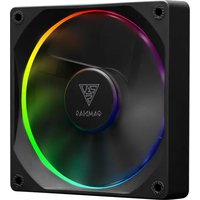
Aeolus M3-1201 - Fan Gamdias - Free user manual and instructions
Find the device manual for free Aeolus M3-1201 Gamdias in PDF.


Pick your language and provide your email: we'll send you a specifically translated version.
| Product Type | Case Fan |
| Model | Aeolus M3-1201 |
| Brand | Gamdias |
| Fan Size | 120 mm |
| Fan Speed | 800 - 1800 RPM (estimated) |
| Airflow | Up to 72 CFM (estimated) |
| Noise Level | 18 - 30 dBA (estimated) |
| Bearing Type | Hydraulic or Rifle Bearing (estimated) |
| Rated Voltage | 12 V DC |
| Power Connector | 4-pin PWM |
| LED Lighting | None (likely non-RGB version) |
| Dimensions (W x H x D) | 120 mm x 120 mm x 25 mm |
| Weight | Approximately 140 g |
| Main Functions | Cooling, airflow enhancement, static pressure optimized for heatsinks or radiators |
| Installation | Screw mount compatible with standard 120 mm fan mounts |
| Maintenance and Cleaning | Periodically remove dust with compressed air or soft brush; do not use liquids. |
| Safety Instructions | Disconnect power before installation; avoid contact with rotating blades; keep away from moisture. |
| Spare Parts and Repairability | Fan is non-serviceable; replacement recommended if defective. |
Frequently Asked Questions - Aeolus M3-1201 Gamdias
How do I install the Aeolus M3-1201 fan?
Mount the fan using the provided screws into standard 120mm mounting holes. Ensure airflow direction matches your case orientation (arrow on frame indicates airflow direction). Connect the 4-pin PWM cable to a motherboard fan header.
Is the fan compatible with my motherboard?
The fan uses a standard 4-pin PWM connector, compatible with most motherboards. It can also run on 3-pin headers but will operate at full speed.
How can I control the fan speed?
If connected to a 4-pin PWM header, speed is controlled by the motherboard BIOS or software. For manual control, use a fan controller or a PWM splitter.
Does the fan come with RGB lighting?
No, the Aeolus M3-1201 is a non-RGB fan. It does not have any LED lighting features.
What is the noise level of this fan?
The fan produces approximately 18-30 dBA depending on speed, making it suitable for quiet operation at lower RPMs.
How do I clean the fan?
Turn off the system and unplug the fan. Use compressed air to blow out dust from the blades and frame. Avoid using water or cleaning solvents.
Can I use this fan for liquid cooling radiators?
Yes, the fan provides good static pressure and is suitable for radiators or heatsinks up to medium thickness.
What is the power consumption of this fan?
Typical power consumption is around 1.2W at maximum speed, drawing 0.1A from the 12V supply.
Is the fan covered by warranty?
Standard warranty is typically 2 years from date of purchase, covering manufacturing defects. Check with your retailer for specific terms.
My fan is making unusual noises. What should I do?
First, check for loose screws or cable interference. If noise persists, the bearing may be failing. Contact Gamdias support for a possible replacement under warranty.
User questions about Aeolus M3-1201 Gamdias
0 question about this device. Answer the ones you know or ask your own.
Ask a new question about this device
No questions yet. Be the first to ask one.
Download the instructions for your Fan in PDF format for free! Find your manual Aeolus M3-1201 - Gamdias and take your electronic device back in hand. On this page are published all the documents necessary for the use of your device. Aeolus M3-1201 by Gamdias.
USER MANUAL Aeolus M3-1201 Gamdias
Manual assistant
Powered by Anthropic
Waiting for your message
Product information
Brand : Gamdias
Model : Aeolus M3-1201
Category : Fan