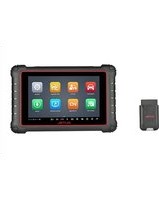
MaxiCOM MK900-BT - Car scanner Autel - Free user manual and instructions
Find the device manual for free MaxiCOM MK900-BT Autel in PDF.


Pick your language and provide your email: we'll send you a specifically translated version.
| Product Type | Automotive Diagnostic Tablet |
| Brand | Autel |
| Model | MaxiCOM MK900-BT |
| Dimensions (approx.) | 300 x 190 x 50 mm (11.8 x 7.5 x 2.0 in) |
| Weight (approx.) | 1.2 kg (2.6 lb) |
| Power Supply | 12V DC via OBD II cable or external AC adapter |
| Battery | Rechargeable Li-ion, 3.7V / 5000 mAh |
| Processor | Quad-core ARM Cortex-A72, 1.8 GHz |
| Operating System | Android 10 |
| RAM | 4 GB |
| Storage | 64 GB internal, expandable via microSD |
| Display | 10.1-inch TFT LCD, 1280 x 800 touchscreen |
| Connectivity | Bluetooth 5.0, Wi-Fi 802.11 a/b/g/n/ac, USB 2.0 Type-C |
| Protocol Support | OBD-II, CAN, KWP2000, ISO9141, J1850 PWM/VPW, and more |
| Main Functions | Diagnostic trouble code (DTC) reading/clearing, live data graph, active test, special functions (DPF regeneration, TPMS, EPB, SAS reset), coding, remote support |
| Coverage | Supports domestic and imported vehicles (1996 and newer OBD2) |
| Software Update | Via Wi-Fi, one-year free updates included |
| Maintenance | Clean with soft dry cloth; avoid moisture and extreme temperatures |
| Safety | Use in well-ventilated area; do not connect to AC mains during vehicle operation |
| User Manual | 119 pages, available in PDF (English) |
Frequently Asked Questions - MaxiCOM MK900-BT Autel
How do I update the software on my Autel MaxiCOM MK900-BT?
Connect the device to a stable Wi-Fi network, then go to Settings > Update. The device will check for updates automatically. Follow on-screen instructions to download and install.
Note: Initial one year of free updates is included; after that, a subscription may be required.
Note: Initial one year of free updates is included; after that, a subscription may be required.
Is the MaxiCOM MK900-BT compatible with my car?
The MK900-BT supports all OBD2-compliant vehicles (1996 and newer in US, 2001+ for gasoline in EU). It covers most domestic, Asian, and European makes. However, for specific models, verify coverage on Autel's official website or consult the vehicle support list.
How do I perform a DPF regeneration?
Navigate to Diagnostics > Special Functions > DPF Regen. Follow the on-screen prompts. Ensure the vehicle is in a well-ventilated area, engine running, and all safety instructions are adhered to.
Note: Some vehicles may require a subscription or additional software package.
Note: Some vehicles may require a subscription or additional software package.
What should I do if the device freezes or crashes?
Try a forced restart: press and hold the power button for 10 seconds until the screen goes off and the device reboots. If the issue persists, perform a factory reset via Settings > Backup & Reset (backup data first). Contact Autel support if needed.
Can I use the scanner without a vehicle connection?
The device operates as a tablet without connection, but diagnostic functions require connection to a vehicle's OBD2 port via the included cable or Bluetooth adapter. You can still browse stored reports, watch tutorials, or access settings offline.
How long does the battery last?
With normal use (wireless diagnostics, screen at moderate brightness), the battery lasts approximately 4 to 6 hours. Charging time is about 3 hours using the included AC adapter.
What types of reports can I generate?
After a diagnostic session, you can generate DTC reports, live data graphs, and health summaries. Reports are saved in PDF format and can be printed or emailed directly from the device.
How do I connect the scanner to a vehicle?
Plug the OBD2 cable into the vehicle's diagnostic port (usually under the dashboard). Turn the ignition to ON (engine off). On the device, select Diagnostics > Auto Connect. The tool will automatically detect the protocol and establish communication.
Is the device suitable for professional workshops?
Yes, the MK900-BT offers comprehensive diagnostics, bi-directional controls, and special functions like TPMS, SAS, EPB, and coding, making it suitable for professional use. It also supports remote assistance for collaboration.
How do I get the user manual in a different language?
Visit the manual download page on notice-facile.com, select your desired language from the dropdown, provide your email, and the translated manual will be sent to you. The original PDF is available in English with 119 pages.
User questions about MaxiCOM MK900-BT Autel
0 question about this device. Answer the ones you know or ask your own.
Ask a new question about this device
No questions yet. Be the first to ask one.
Download the instructions for your Car scanner in PDF format for free! Find your manual MaxiCOM MK900-BT - Autel and take your electronic device back in hand. On this page are published all the documents necessary for the use of your device. MaxiCOM MK900-BT by Autel.
USER MANUAL MaxiCOM MK900-BT Autel
Manual assistant
Powered by Anthropic
Waiting for your message
Product information
Brand : Autel
Model : MaxiCOM MK900-BT
Category : Car scanner