Classic 36-Inch - Fan Levoit - Free user manual and instructions
Find the device manual for free Classic 36-Inch Levoit in PDF.


| Product Type | Floor Fan |
| Brand | Levoit |
| Model | Classic 36-Inch |
| Size (Blade Diameter) | 36 inches (91 cm) |
| Height | 54.5 inches (138.4 cm) |
| Width | 16.5 inches (41.9 cm) |
| Depth | 16.5 inches (41.9 cm) |
| Weight | 12.1 lbs (5.5 kg) |
| Power Source | 120V AC, 60Hz |
| Power Consumption | 50 Watts |
| Speed Settings | 3 speeds (Low, Medium, High) |
| Oscillation | 90° wide-angle oscillation |
| Timer | Up to 7.5 hours |
| Remote Control | Included (battery CR2025) |
| Material | ABS plastic and metal stand |
| Blade Material | ABS plastic |
| Airflow | Up to 4,200 CFM |
| Noise Level | 35-55 dB depending on speed |
| Safety Features | Tip-over switch, overheat protection, fused plug |
| Cleaning | Removable front grille for blade cleaning; wipe with damp cloth |
| Replacement Parts | Blades, motor, remote available via Levoit support |
| Warranty | 2-year limited warranty |
Frequently Asked Questions - Classic 36-Inch Levoit
User questions about Classic 36-Inch Levoit
0 question about this device. Answer the ones you know or ask your own.
Ask a new question about this device
Download the instructions for your Fan in PDF format for free! Find your manual Classic 36-Inch - Levoit and take your electronic device back in hand. On this page are published all the documents necessary for the use of your device. Classic 36-Inch by Levoit.
USER MANUAL Classic 36-Inch Levoit
Questions or Concerns?
Please contact us Mon–Fri, 9:00 am–5:00 pm PST/PDT at support@levoit.com or at (888) 726-8520.
Table of Contents
| Package Contents | 2 |
| Specifications | 2 |
| Safety Information | 3 |
| Getting to Know Your Tower Fan | 6 |
| Controls & Display | 7 |
| Remote Control | 7 |
| Getting Started | 8 |
| Using Your Tower Fan | 9 |
| Care & Maintenance | 11 |
| Troubleshooting | 12 |
| Warranty Information | 14 |
| Customer Support | 15 |
Package Contents
1 x Tower Fan
2x Base
1 x Remote Control
1 x Quick Start Guide
1 x User Manual
Specifications
| Model LTF-F361-WUS | |
| Power Supply | AC 120V, 60Hz |
| Rated Power 39W | |
| Timer 1–12 hr | |
| Fuse 2.5 Amp, 125V(3.6 x 10 mm) | |
| Dimensions 6.5 | x 6.5 x 36.2 in /16.5 x 16.5 x 92 cm |
| Weight 8.5 lb / 3.9 kg | |
READ AND SAVE THESE INSTRUCTIONS
SAFETY INFORMATION
To reduce the risk of fire, electric shock, or other injury, follow all instructions and safety guidelines.
General Safety
- Only use your tower fan as described in this manual.
- Do not use your tower fan outdoors.
- To protect against electric shock, do not immerse the tower fan cord, plug, or housing in water or spray with liquids.
- Do not place the tower fan in a window. Keep your tower fan away from water and wet or damp areas.
- Keep your tower fan away from open flames, heat sources, or other heating and cooking appliances.
- Do not use where combustible gases, vapors, metallic dust, aerosol (spray) products, or fumes from industrial oil are present.
- Do not place anything into any opening on the tower fan.
- Do not use with any openings blocked; keep free of dust, lint, hair, and anything that may reduce airflow.
- Avoid contact with moving fan parts.
- Do not hang or mount the tower fan on a wall or ceiling.
- Only use the tower fan on a dry and level surface.
- Close supervision is necessary when the tower fan is used by or near children.
- Children should be supervised to ensure that they do not play with the tower fan.
- Children should be supervised to ensure they do not insert fingers or objects into the vent openings.
- Children should not clean or perform maintenance on the tower fan without supervision.
- Keep the inside of the tower fan dry. To prevent moisture buildup, avoid placing in rooms with major temperature changes.
- Unplug the tower fan when not in use for an extended period of time.
- Do not use other items or third-party parts as replacement parts for this tower fan.
- Do not use your tower fan if it is damaged or not working correctly, or if the cord or plug is damaged. Do not try to repair it yourself. Contact Customer Support (see page 15).
- WARNING: To reduce the risk of fire or electric shock, do not use this tower fan with any solid-state speed controls (such as a dimmer switch).
- This tower fan is not to be used by persons (including children) with reduced physical, sensory, or mental capacities, or lack of experience and knowledge, unless they have been given supervision or instruction concerning the use of the appliance by a person responsible for their safety.
- Not for commercial or industrial use. Household use only.
Power Cord & Fuse
- Your tower fan has a polarized plug (one prong is wider than the other), which fits into a polarized outlet only one way. If the plug does not fit, reverse the plug. If it still does not fit, do not use the plug in that outlet. Do not alter the plug in any way.
- Turn off the tower fan before removing the plug from the outlet. To unplug, grab the plug and pull from the outlet. Never pull from the power cord.
- Keep the tower fan near the outlet it is plugged into. The use of an extension cord is not recommended.
- Always turn the tower fan off and unplug it when not in use and before moving, cleaning, or servicing the fan.
- Never place the cord near any heat source.
- Do not cover the cord with a rug, carpet, or other covering. Do not place the cord under furniture or appliances.
- To avoid a tripping hazard, keep the cord out of areas where people walk often. Place the cord where it will not be tripped over and safely coil the cord.
- A loose fit between the AC outlet and plug may cause overheating and a distortion of the plug. Contact a qualified electrician to replace a loose or worn outlet.
- Your tower fan has a fuse built into the plug for overload protection. If the tower fan is overloaded or short-circuits, the fuse will blow. To replace the fuse, see Replacing the Fuse, page 11.
- If the replacement fuse blows, a short-circuit may be present. Please contact Customer Support (see page 15).
- If the power cord is damaged, it must be replaced by Arovast Corporation or similarly qualified persons in order to avoid an electric or fire hazard. Please contact Customer Support (see page 15).
- Your tower fan should only be used with 120V, 60Hz electrical systems. Do not plug into another type of outlet.
Electromagnetic Fields (EMF)
Your Levoit tower fan complies with all standards regarding electromagnetic fields (EMF). If handled properly and according to the instructions in this user manual, the appliance is safe to use based on scientific evidence available today.
This product contains a coin/button battery.

WARNING: CHEMICAL BURN HAZARD.
KEEP OUT OF REACH OF CHILDREN.

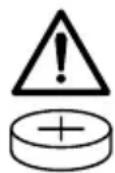
Swallowing can lead to chemical burns, perforation of soft tissue, and death. Severe burns can occur within 2 hours of ingestion. Seek medical attention immediately.
- Place sticky tape around both sides of the battery and dispose of it immediately in an outdoor trashcan or recycle safely;
- Store spare batteries securely;
• Empty recycling units on a regular basis; - Use non-transparent containers to keep the batteries out of view.
SAFETY INFORMATION (CONT.)
Unfortunately, it is not obvious when a button or coin battery is stuck in a child's esophagus (food pipe). The child might:
- Cough, gag or drool a lot;
- Appear to have a stomach upset or a virus;
- Be sick;
- Point to their throat or stomach;
- Have pain in their abdomen, chest, or throat;
- Be tired or lethargic;
- Be quieter or more clingy than usual or otherwise “not themselves”;
- Lose their appetite or have a reduced appetite;
- Not want to eat solid food / be unable to eat solid food.
These sorts of symptoms vary or fluctuate, with the pain increasing and then subsiding.
A specific symptom to button and coin battery ingestion is vomiting fresh (bright red) blood. If a child does this, seek immediate medical help.
The lack of clear symptoms is why it is important to be cautious with “flat” or spare button or coin batteries in the home and the products that contain them. Be aware that even used button or coin batteries may cause injury.
GETTING TO KNOW YOUR TOWER FAN
A. Control Panel
B. LED Display
C. Vents
D. Power Cord
E. Remote Control
F. Back Cover
G. Base
Control Panel
H. Oscillate Button
I. Fan Mode Button
J. Advanced Sleep Button
K. Timer Button
L. Fan Speed Button
M. On/Off Button
LED Display
N. Normal Fan Mode Indicator
O. Advanced Sleep Mode Indicator
P. Fahrenheit Indicator
Q. Sound Off Indicator
R. Auto Mode Indicator
S. Turbo Mode Indicator
T. Hour Indicator
U. Oscillate Indicator


CONTROLS & DISPLAY

On/Off Button
- Tap to turn the tower fan on/off.

Fan Mode Button
- Tap to cycle through fan modes: Normal Fan, Turbo, and Auto (see Fan Modes, page 9).
- Press and hold for 3 seconds to turn selection sounds on/off.

Timer Button
- Tap to cycle through timer options from 1–12 hours.
- Press and hold to quickly cycle through options in increments of 1 hour.
REMOTE CONTROL
The remote control can be used to control any of the tower fan's functions from a distance. The remote must be within 16 ft / 5 m of the tower fan to work.
Note:
- Remove the plastic tab from the remote control's battery compartment before using.
• To replace the battery, see page 11.

Sound Off Button (Remote Only)
- Press to turn selection sounds on/off.

Advanced Sleep Button
- Tap to turn Advanced Sleep Mode on/off (see Advanced Sleep Mode, page 10).

Oscillate Button
- Tap to turn oscillation on/off.
- The tower fan has a 90° angle of oscillation.

Fan Speed Button
- Tap to cycle through fan speeds from 1 (low) to 5 (high).

GETTING STARTED
- Remove all packaging.
- Snap the two pieces of the base together. [Figure 1.1]
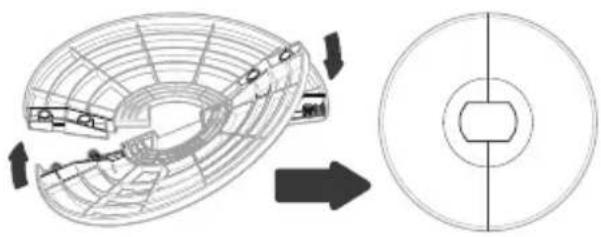
Figure 1.1
- Unscrew the plastic nut from underneath the tower fan. [Figure 1.2]

Figure 1.2
- Secure the base to the tower fan with the plastic nut. [Figure 1.3]
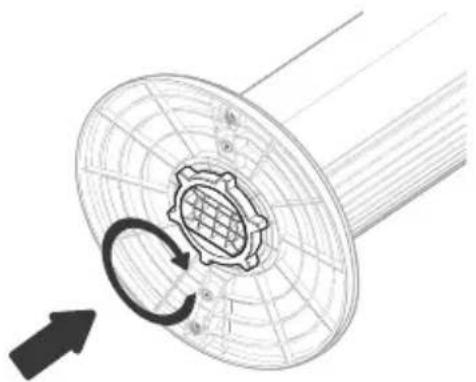
Figure 1.3
- Place the tower fan on a flat, stable surface such as the floor.
- When using the tower fan, allow at least 15 inches / 38 cm of clearance from the front of the tower fan. Keep away from anything that would block air flow, such as curtains. [Figure 1.4]

Figure 1.4
USING YOUR TOWER FAN
- Plug in and tap to turn on the tower fan. The fan will start on low.
- The display will show "01" and will turn on for 5 seconds.

- Then, the display will show the current room temperature for 15 seconds.
-
Tap to change fan speed from 1 (low) to 5 (high).
-
Optionally, tap to select a different fan mode, or tap to turn Advanced Sleep Mode on/off.
Fan Modes
Tap 98o cycle through fan modes: Normal Fan, Turbo, and Auto.
Normal Fan Mode
Use Normal Fan Mode to manually control the tower fan's functions, such as fan speed, oscillation, and timer.
- This is the tower fan's default mode.
• will show on the display.
Turbo Mode
Use Turbo Mode with air conditioning to quickly circulate air in your home.
-
Tap and select Turbo Mode. will show on the display.
-
The tower fan automatically starts oscillating and operates at fan speed 5.
-
When the room temperature drops 5° F, the fan speed will decrease to 3, then the tower fan will enter Auto Mode and automatically adjust fan speed according to the room temperature.
Auto Mode
Use Auto Mode for automatic fan speed adjustments according to the room temperature.
-
Tap and select Auto Mode. w(A) show on the display.
-
The starting fan speed is determined by the current room temperature.
| Room Temperature | Fan Speed |
| 70°–73°F 1 | |
| 73°–77°F 2 | |
| 77°–80°F 3 | |
| 80°–86°F 4 | |
| >86°F 5 |
Note: The max ambient working temperature is 104° F.
- Optionally, tap to manually adjust the fan speed while in Auto Mode. The tower fan will then operate according to the following logic:
A. If the temperature increases 5° F, the fan speed will increase one level.
B. If the temperature decreases 5° F, the fan speed will decrease one level.
Advanced Sleep Mode
Advanced Sleep Mode is an optimized sleep mode that takes into account the stages before you sleep, during sleep, and as you wake up.
- Tap to turn Advanced Sleep Mode on. Will show on the display.
A. After 5 seconds, the display will turn off and selection sounds will be disabled.
B. The starting fan speed is determined by your current fan speed when you select Advanced Sleep Mode.
-
After 1 hour, the tower fan will decrease fan speed as the room temperature stabilizes.
-
The tower fan then begins oscillating and enters Auto Mode. This automatically adjusts the fan speed according to the fluctuating room temperature as you sleep and wake up.
A. If the temperature increases 5° F, the fan speed will increase one level.
B. If the temperature decreases 5° F, the fan speed will decrease one level.
- Tap 2 to turn Advanced Sleep Mode off.
Auto Display Off
Turn on Auto Display Off if you would like the display to automatically turn off when there is no operation.
- Press and hold for 3 seconds to turn on Auto Display Off.
- After 60 seconds of no operation, the display will automatically turn off (except in Advanced Sleep Mode).
- Tap any button to temporarily turn the display back on. If you don't tap another button, the display will turn back off after 60 seconds.
- Press and hold for 3 seconds to turn off Auto Display Off.
Standby Mode
- The tower fan is in Standby Mode when it is turned off, but plugged in.
- Tap to turn the tower fan on.
Memory Function
When the tower fan is in standby or turned off and unplugged, it will remember all its previous settings, except for timer.
CARE & MAINTENANCE
Cleaning the Tower Fan
- Unplug before cleaning.
- Wipe the outside of the tower fan with a soft, dry cloth. If necessary, wipe the housing with a damp cloth, then immediately dry.
- Use a vacuum, duster, or compressed air to clean the inside of the tower fan.
- If necessary, use a screwdriver to remove the back cover and clean the inside of the tower fan. [Figure 2.1]
Note:
• Make sure the tower fan is turned off before removing the back cover.
• Clean the internal parts with a dry cloth.
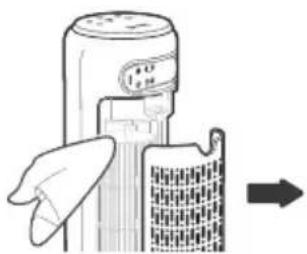
Figure 2.1
- Do not clean with abrasive chemicals or flammable cleaning agents.
Replacing the Remote Control Battery
- Insert a coin/button battery into the slot and rotate counterclockwise to remove the battery compartment [Figure 2.2].
- Remove the old battery.
- Replace with a new 3V CR2025 battery. Make sure the polarities match.
- Replace the battery compartment.


Figure 2.2
Replacing the Fuse
- Unplug the tower fan. Grab the plug and pull from the outlet. Never pull from the power cord.

Figure 2.3
- Open the fuse cover on the plug by sliding the fuse cover toward the metal prongs. [Figure 2.3]
- Carefully remove the blown fuse with tweezers or a small tool. Make sure not to break the glass fuse.
- Risk of fire: Only
replace the fuse with a 2.5 Amp, 125V fuse (3.6 x 10 mm). Do not use any other type of fuse. [Figure 2.4]
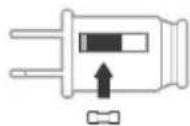
Figure 2.4
- Slide the fuse cover closed.
Note: If the replacement fuse blows, a short-circuit may be present. Please contact Customer Support (see page 15).
CAUTION: RISK OF FIRE
Do not replace the plug if it is damaged. If the plug is damaged in any way, stop using the tower fan and contact Customer Support (see page 15).
Storage
If not using the tower fan for an extended period of time, cover the tower fan and store in a cool, dry place to avoid moisture damage.
TROUBLESHOOTING
| Problem Possible Solution | |
| Tower fan will not turn on or respond to button controls. | Plug in the tower fan. |
| Check to see if the power cord is damaged. If so, stop using the tower fan and contact Customer Support (see page 15). | |
| Plug the tower fan into a different outlet. | |
| Tower fan may be malfunctioning. Contact Customer Support (see page 15). | |
| Tower fan makes an unusual noise while the fan is on. | Make sure the tower fan is operating on a hard, flat, level surface. |
| Tower fan may be damaged, or a foreign object may be inside. Stop using the tower fan and contact Customer Support (see page 15). Do not try to repair the tower fan. | |
| Tower fan randomly turns off. | Tower fan is malfunctioning. Stop using the tower fan and contact Customer Support (see page 15). |
If your problem is not listed, please contact Customer Support (see page 15).
FEDERAL COMMUNICATION COMMISSION INTERFERENCE STATEMENT - PART 15
This device complies with Part 15 of the FCC Rules. Operation is subject to the following two conditions:
- This device may not cause harmful interference, and
- This device must accept any interference received, including interference that may cause undesired operation.
NOTE: This equipment has been tested and found to comply with the limits for a Class B digital device, pursuant to Part 15 of the FCC Rules. These limits are designed to provide reasonable protection against harmful interference in a residential installation. This equipment generates, uses and can radiate radio frequency energy and, if not installed and used in accordance with the instructions, may cause harmful interference to radio communications. However, there is no guarantee that interference will not occur in a particular installation. If this equipment does cause harmful interference to radio or television reception, which can be determined by turning the equipment off and on, the user is encouraged to try to correct the interference by one or more of the following measures:
- Reorient or relocate the receiving antenna.
- Increase the separation between the equipment and receiver.
- Connect the equipment into an outlet on a circuit different from that to which the receiver is connected.
- Consult the dealer or an experienced radio/TV technician for help.
FCC Caution: Any changes or modifications not expressly approved by the party responsible for compliance could void the user's authority to operate this equipment.
FCC SDOC SUPPLIER'S DECLARATION OF CONFORMITY
Arovast Corporation hereby declares that this equipment is in compliance with the FCC requirements. The declaration of conformity may be consulted in the support section of our website, accessible from www.levoit.com
WARRANTY INFORMATION
| Product Name | Classic 36-Inch Tower Fan |
| Model | LTF-F361-WUS |
| Date of Purchase | |
| Order ID |
Levoit Limited Product Warranty
Register your products at https://warranty.levoit.com/warranty to stay up to date with important product information such as product updates, limited warranties, usage and maintenance recommendations, and notifications concerning safety warnings or product recalls. Registration is not required to claim your limited warranty.
Two (2) Year Limited Consumer Product Warranty
Arovast Corporation (“Arovast”) warrants that the product shall be free from defects in material and workmanship for a period of 2 years from the date of original purchase (“Limited Warranty Period”), provided the product was used in accordance with its use and care instructions (e.g., in the intended environment and under normal circumstances).
Your Limited Warranty Benefits
During the Limited Warranty Period and subject to this limited Warranty Policy, Arovast will, in its sole and exclusive discretion, either (i) refund the purchase price if the purchase was made directly from the online Levoit store, (ii) repair any defects in material or workmanship, (iii) replace the product with another product of equal or greater value, or (iv) provide store credit in the amount of the purchase price.
Who is Covered?
This limited warranty extends only to the original consumer purchaser of the product and is not transferable to any subsequent owner of the product, regardless of whether the product transferred ownership during the specified term of the limited warranty. The original consumer purchaser must provide verification of the defect or malfunction and proof of the date of purchase to claim the Limited Warranty Benefits.
Be Aware of Unauthorized Dealers or Sellers
This limited warranty does not extend to products purchased from unauthorized dealers or sellers. Arovast's limited warranty only extends to products purchased from authorized dealers or sellers that are subject to Arovast's quality controls and have agreed to follow its quality controls. Please be aware, products purchased from an unauthorized website or dealer may be counterfeit, used, defective, or may not be designed for use in your country. You can protect yourself and your products by making sure you only purchase from Arovast or its authorized dealers.
If you have any questions about a specific seller, or if you think you may have purchased your product from an unauthorized seller, please contact our Customer Support Team via support@levoit.com.
What's Not Covered?
- Normal wear and tear, including parts that might wear out over time (e.g., batteries, filters, cleaning brush, essential oil pads, etc.).
- If the proof-of-purchase has been altered in any way or is made illegible.
- If the model number, serial number or production date code on the product has been altered, removed or made illegible.
- If the product has been modified from its original condition.
- If the product has not been used in accordance with directions and instructions in the user manual.
- Damages caused by connecting peripherals, additional equipment or accessories other than those recommended in the user manual.
- Damages or defects caused by accident, abuse, misuse, or improper or inadequate maintenance.
- Damages or defects caused by service or repair of the product performed by an unauthorized service provider or by anyone other than Arovast.
- Damages or defects occurring during commercial use, rental use, or any use for which the product is not intended.
- If the unit has been damaged, including but not limited to damage by animals, lightning, abnormal voltage, fire, natural disaster, transportation, dishwasher, or water (unless the user manual expressly states that the product is dishwasher-safe).
- Incidental and consequential damages.
- Damages or defects exceeding the cost of the product.
Claiming Your Limited Warranty Service in 5 Simple Steps:
- Make sure your product is within the specified limited warranty period.
- Make sure you have a copy of the invoice and order ID or proof-of-purchase.
- Make sure you have your product. DO NOT dispose of your product before contacting us.
- Contact our Customer Support Team via support@levoit.com
- Once our Customer Support Team has approved your request, please return the product with a copy of the invoice and order ID.
Sole and Exclusive Remedy
THE FOREGOING LIMITED WARRANTY CONSTITUTES AROVAST CORPORATION'S EXCLUSIVE LIABILITY, AND YOUR SOLE AND EXCLUSIVE REMEDY, FOR ANY BREACH OF ANY WARRANTY OR OTHER NONCONFORMITY OF THE PRODUCT COVERED BY THIS LIMITED PRODUCT WARRANTY STATEMENT. THIS LIMITED WARRANTY IS EXCLUSIVE, AND IN LIEU OF ALL OTHER WARRANTIES. NO EMPLOYEE OF
WARRANTY INFORMATION (CONT.)
AROVAST CORPORATION OR ANY OTHER PARTY IS AUTHORIZED TO MAKE ANY WARRANTY IN ADDITION TO THE LIMITED WARRANTY IN THIS LIMITED PRODUCT WARRANTY STATEMENT.
Disclaimer of Limited Warranties
TO THE FULLEST EXTENT PROVIDED BY APPLICABLE LAW, EXCEPT AS WARRANTED IN THIS LIMITED PRODUCT WARRANTY POLICY, AROVAST CORPORATION PROVIDES THE PRODUCTS YOU PURCHASE FROM AROVAST CORPORATION "AS IS" AND AROVAST CORPORATION HEREBY DISCLAIMS ALL WARRANTIES OF ANY KIND, WHETHER EXPRESS OR IMPLIED, STATUTORY, OR OTHERWISE, INCLUDING BUT NOT LIMITED TO ANY WARRANTIES OF MERCHANTABILITY, NON-INFRINGEMENT, AND FITNESS FOR PARTICULAR PURPOSE.
Limitations of Liability
TO THE FULLEST EXTENT PROVIDED BY APPLICABLE LAW, IN NO EVENT WILL AROVAST CORPORATION, ITS AFFILIATES, OR THEIR LICENSORS, SERVICE PROVIDERS, EMPLOYEES, AGENTS, OFFICERS, OR DIRECTORS BE LIABLE FOR:
(a) DAMAGES OF ANY KIND ARISING OUT OF OR IN CONNECTION WITH PRODUCTS PURCHASED FROM AROVAST CORPORATION IN EXCESS OF THE PURCHASE PRICE PAID BY THE PURCHASER FOR SUCH PRODUCTS, OR
(b) INDIRECT, SPECIAL, INCIDENTAL, CONSEQUENTIAL, OR PUNITIVE DAMAGES EVEN IF AROVAST CORPORATION OR ONE OF ITS SUPPLIERS HAS BEEN ADVISED OF THE POSSIBILITY OR LIKELIHOOD OF SUCH DAMAGES.
AND REGARDLESS OF WHETHER CAUSED BY TORT (INCLUDING NEGLIGENCE), BREACH OF CONTRACT, OR OTHERWISE. OUR LIABILITY SHALL UNDER NO CIRCUMSTANCES EXCEED THE ACTUAL AMOUNT PAID BY YOU FOR THE DEFECTIVE PRODUCT, NOR SHALL WE UNDER ANY CIRCUMSTANCES BE LIABLE FOR ANY CONSEQUENTIAL, INCIDENTAL, SPECIAL OR PUNITIVE DAMAGES OR LOSSES, WHETHER DIRECT OR INDIRECT.
EXCEPT AS COVERED BY THIS LIMITED PRODUCT WARRANTY STATEMENT, AROVAST CORPORATION SHALL NOT BE LIABLE FOR COSTS ASSOCIATED WITH THE REPLACEMENT OR REPAIR OF PRODUCTS PURCHASED FROM IT, INCLUDING, BUT NOT LIMITED TO, LABOR, INSTALLATION, OR OTHER COSTS INCURRED BY THE USER AND, IN PARTICULAR, ANY COSTS RELATING TO THE REMOVAL OR REPLACEMENT OF ANY PRODUCT.
OTHER RIGHTS YOU MAY HAVE
SOME JURISDICTIONS DO NOT ALLOW FOR: (1) EXCLUSION OF IMPLIED WARRANTIES; (2) LIMITATION ON THE DURATION OF IMPLIED WARRANTIES; AND/OR (3) EXCLUSION OR LIMIATION OF INCIDENTAL OR CONSEQUENTIAL DAMAGES; SO THE DISCLAIMERS IN THIS POLICY MAY NOT APPLY TO YOU. IN THESE
JURISDICTIONS YOU HAVE ONLY THE IMPLIED WARRANTIES THAT ARE EXPRESSLY REQUIRED TO BE PROVIDED IN ACCORDANCE WITH APPLICABLE LAW. THE LIMITATIONS OF WARRANTIES, LIABILITY, AND REMEDIES APPLY TO THE MAXIMUM EXTENT PERMITTED BY LAW.
ALTHOUGH THIS LIMITED WARRANTY GIVES YOU SPECIFIC LEGAL RIGHTS, YOU MAY HAVE OTHER RIGHTS IN YOUR JURISDICTION. THIS STATEMENT OF LIMITED WARRANTY IS SUBJECT TO APPLICABLE LAWS THAT APPLY TO YOU AND THE PRODUCT. PLEASE REVIEW THE LAWS IN YOUR JURISDICTION TO UNDERSTAND YOUR RIGHTS FULLY.
CHANGES TO THIS POLICY
We may change the terms and availability of this limited warranty at our discretion, but any changes will not be retroactive.
This warranty is made by:
Arovast Corporation
1202 N. Miller St., Suite A
Anaheim, CA 92806
CUSTOMER SUPPORT
If you have any questions or concerns about your new product, please contact our helpful Customer Support Team.
Arovast Corporation
1202 N. Miller St., Suite A
Anaheim, CA 92806
Email: support@levoit.com
Toll-Free: (888) 726-8520
Support Hours
Mon–Fri, 9:00 am–5:00 pm PST/PDT
*Please have your order invoice and order ID ready before contacting Customer Support.
lěvoit®

/Levoit

/LevoitLifestyle

/Levoit

/LevoitLifestyle

/LevoitLifestyle

Levoit.com


- QUESTIONS OR CONCERNS
- TABLE OF CONTENTS
- PACKAGE CONTENTS
- SPECIFICATIONS
- READ AND SAVE THESE INSTRUCTIONS
- SAFETY INFORMATION
- GENERAL SAFETY
- POWER CORD & FUSE
- ELECTROMAGNETIC FIELDS (EMF)
- THIS PRODUCT CONTAINS A COIN/BUTTON BATTERY
- SAFETY INFORMATION (CONT.)
- GETTING TO KNOW YOUR TOWER FAN
- CONTROL PANEL
- LED DISPLAY
- CONTROLS & DISPLAY
- ON/OFF BUTTON
- FAN MODE BUTTON
- TIMER BUTTON
- REMOTE CONTROL
- NOTE
- SOUND OFF BUTTON (REMOTE ONLY)
- ADVANCED SLEEP BUTTON
- OSCILLATE BUTTON
- FAN SPEED BUTTON
- GETTING STARTED
- USING YOUR TOWER FAN
- FAN MODES
- NORMAL FAN MODE
- TURBO MODE
- AUTO MODE
- ADVANCED SLEEP MODE
- AUTO DISPLAY OFF
- STANDBY MODE
- MEMORY FUNCTION
- CARE & MAINTENANCE
- CLEANING THE TOWER FAN
- REPLACING THE REMOTE CONTROL BATTERY
- REPLACING THE FUSE
- CAUTION: RISK OF FIRE
- STORAGE
- TROUBLESHOOTING
- FEDERAL COMMUNICATION COMMISSION INTERFERENCE STATEMENT - PART 15
- FCC SDOC SUPPLIER'S DECLARATION OF CONFORMITY
- WARRANTY INFORMATION
- LEVOIT LIMITED PRODUCT WARRANTY
- TWO (2) YEAR LIMITED CONSUMER PRODUCT WARRANTY
- YOUR LIMITED WARRANTY BENEFITS
- WHO IS COVERED
- BE AWARE OF UNAUTHORIZED DEALERS OR SELLERS
- WHAT'S NOT COVERED
- CLAIMING YOUR LIMITED WARRANTY SERVICE IN 5 SIMPLE STEPS
- SOLE AND EXCLUSIVE REMEDY
- WARRANTY INFORMATION (CONT.)
- DISCLAIMER OF LIMITED WARRANTIES
- LIMITATIONS OF LIABILITY
- OTHER RIGHTS YOU MAY HAVE
- CHANGES TO THIS POLICY
- CUSTOMER SUPPORT
- AROVAST CORPORATION
- SUPPORT HOURS
- LĚVOIT®
Brand : Levoit
Model : Classic 36-Inch
Category : Fan