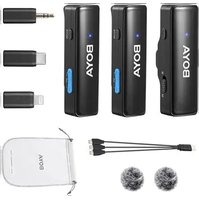
Boyalink A2 - Microphone BOYA - Free user manual and instructions
Find the device manual for free Boyalink A2 BOYA in PDF.


Pick your language and provide your email: we'll send you a specifically translated version.
| Product Type | Wireless Microphone System |
| Brand | BOYA |
| Model | Boyalink A2 |
| Microphone Type | Lavalier / Clip-on |
| Transmission Type | 2.4 GHz Digital Wireless |
| Operating Range | Up to 50 meters (line of sight) |
| Frequency Response | 20 Hz – 20 kHz |
| Signal-to-Noise Ratio | ≥ 80 dB |
| Battery Type (Transmitter) | Built-in Lithium-ion, 3.7V |
| Battery Life | Approx. 6-8 hours |
| Charging | USB-C (5V/1A) |
| Dimensions (Transmitter) | 45 x 25 x 12 mm |
| Weight (Transmitter) | 12 g |
| Receiver Type | Portable / Camera-mountable |
| Receiver Output | 3.5mm TRS (unbalanced) & USB-C (digital) |
| Compatible Devices | Cameras, smartphones, tablets, computers |
| Main Functions | Audio recording, live streaming, vlogging, interviews |
| Cleaning & Maintenance | Wipe with dry soft cloth; store in dry place |
| Safety | Do not expose to liquids; avoid extreme temperatures |
| Spare Parts & Repairability | Contact BOYA support for replacement parts |
Frequently Asked Questions - Boyalink A2 BOYA
How do I pair the transmitter with the receiver?
Turn on both devices. The Boyalink A2 should automatically pair within a few seconds. If not, press the pairing button on both units simultaneously.
What is the operating range of the microphone?
The range is up to 50 meters in open line-of-sight conditions. Walls and obstacles may reduce the range.
How long does the battery last?
The built-in battery provides approximately 6-8 hours of continuous use. Charging time is about 2 hours.
Can I use the microphone with a smartphone?
Yes, via a compatible adapter (sold separately) or with the USB-C output on the receiver for digital devices.
How do I clean the microphone?
Use a soft, dry cloth to wipe the exterior. Avoid using liquids. Store in a cool, dry place when not in use.
Does the microphone have noise cancellation?
The Boyalink A2 features basic background noise reduction, but it is not a dedicated noise-canceling microphone.
What is included in the box?
The package includes the transmitter, receiver, USB-C charging cable, windshields, and a carry pouch.
Can I use two transmitters with one receiver?
No, the Boyalink A2 is designed for single-transmitter operation only.
How do I reset the microphone?
Hold the power button for 10 seconds until the LED flashes rapidly. Release and turn on again.
Is the microphone compatible with wireless camera systems?
Yes, it can connect to cameras with a 3.5mm microphone input using the included TRS cable.
User questions about Boyalink A2 BOYA
0 question about this device. Answer the ones you know or ask your own.
Ask a new question about this device
No questions yet. Be the first to ask one.
Download the instructions for your Microphone in PDF format for free! Find your manual Boyalink A2 - BOYA and take your electronic device back in hand. On this page are published all the documents necessary for the use of your device. Boyalink A2 by BOYA.
USER MANUAL Boyalink A2 BOYA
Manual assistant
Powered by Anthropic
Waiting for your message
Product information
Brand : BOYA
Model : Boyalink A2
Category : Microphone