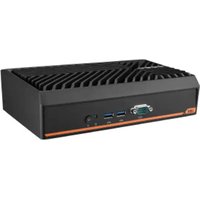
UBX-210K - Computer Advantech - Free user manual and instructions
Find the device manual for free UBX-210K Advantech in PDF.


Pick your language and provide your email: we'll send you a specifically translated version.
| Product Type | Embedded Box Computer |
| Brand | Advantech |
| Model | UBX-210K |
| Dimensions (W x D x H) | 200 mm x 150 mm x 50 mm |
| Weight | 1.5 kg |
| Power Supply | 12V DC, 3A |
| Power Consumption | 36W max |
| Processor | Intel Atom x5-E3930 |
| Memory | 4GB DDR4 |
| Storage | 64GB eMMC |
| Operating System | Windows 10 IoT Enterprise |
| Main Functions | Data acquisition, industrial control, edge computing |
| Interfaces | 2x Gigabit Ethernet, 2x USB 3.0, 1x HDMI, 1x RS-232/422/485 |
| Mounting | Wall or DIN-rail mountable |
| Operating Temperature | 0°C to 50°C |
| Storage Temperature | -20°C to 70°C |
| Enclosure Material | Aluminum alloy |
| Cooling | Fanless, passive cooling |
| Maintenance and Cleaning | Use dry cloth, avoid liquids; periodic dust removal from vents |
| Safety | CE, FCC Class A; use only provided power adapter |
| Spare Parts and Repairability | Contact Advantech support for spare parts; no user-serviceable parts inside |
| General Information | Designed for harsh industrial environments; low power consumption |
Frequently Asked Questions - UBX-210K Advantech
How do I connect the UBX-210K to a network?
Use the two Gigabit Ethernet ports on the front panel. Connect an Ethernet cable from your network switch to either port. The device supports auto MDI/MDIX, so crossover cables are not required.
What power supply does the UBX-210K require?
The device requires a 12V DC power supply with a minimum current of 3A. Use only the provided power adapter or an equivalent certified supply.
Can I mount the UBX-210K on a DIN rail?
Yes, the UBX-210K supports both wall mounting and DIN-rail mounting. A DIN-rail mounting kit is included in the package. Follow the instructions in the manual for proper installation.
How do I install the operating system?
The UBX-210K comes with Windows 10 IoT Enterprise pre-installed. If you need to reinstall, boot from a USB flash drive containing the OS image. Press F12 during startup to select the boot device.
What is the maximum RAM upgrade?
The UBX-210K supports up to 8GB DDR4 memory via one SO-DIMM slot. Ensure you use DDR4 2133 MHz modules.
How do I reset the BIOS to default?
To reset BIOS settings, power off the device, remove the battery for 30 seconds, then reinsert. Alternatively, you can enter BIOS setup by pressing Del during boot and select 'Load Optimized Defaults'.
What do I do if the device overheats?
The UBX-210K has fanless passive cooling. Ensure proper airflow around the device. Check that the ambient temperature is within 0°C to 50°C. If overheating persists, reduce the workload or improve ventilation.
How can I clean the UBX-210K?
Disconnect power before cleaning. Use a soft, dry cloth to wipe the exterior. Do not use any liquids or solvents. For persistent dirt, a slightly damp cloth with water may be used, but ensure no moisture enters the device.
Is the UBX-210K compatible with Linux?
Yes, the UBX-210K supports Linux operating systems such as Ubuntu. However, drivers for some peripherals (e.g., serial ports) may need manual installation. Refer to Advantech's Linux support page for details.
Where can I find the latest user manual?
The latest user manual and technical documentation can be downloaded from Advantech's official website: www.advantech.com. Navigate to the support section for model UBX-210K.
User questions about UBX-210K Advantech
0 question about this device. Answer the ones you know or ask your own.
Ask a new question about this device
No questions yet. Be the first to ask one.
Download the instructions for your Computer in PDF format for free! Find your manual UBX-210K - Advantech and take your electronic device back in hand. On this page are published all the documents necessary for the use of your device. UBX-210K by Advantech.
USER MANUAL UBX-210K Advantech


Manual assistant
Powered by Anthropic
Waiting for your message
Product information
Brand : Advantech
Model : UBX-210K
Category : Computer