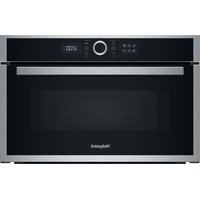
HMD44MXUK - Microwave Oven HOTPOINT - Free user manual and instructions
Find the device manual for free HMD44MXUK HOTPOINT in PDF.


Pick your language and provide your email: we'll send you a specifically translated version.
| Product Type | Microwave Oven |
| Brand | Hotpoint |
| Model | HMD44MXUK |
| Capacity | 25 L |
| Power Output | 900 W |
| Dimensions (W x D x H) | 485 x 400 x 310 mm |
| Weight | 12 kg |
| Power Supply | 230 V / 50 Hz |
| Control Type | Digital touch panel with rotary dial |
| Display | LED digital display |
| Power Levels | 10 levels (including defrost) |
| Timer | Up to 95 minutes |
| Cooking Modes | Microwave, auto cook menus, defrost by weight/time |
| Turntable | Yes, 315 mm diameter |
| Child Lock | Yes |
| Interior Light | Yes |
| Cleaning | Easy-clean interior coating; wipe with damp cloth |
| Safety Features | Door interlock system, overheating protection |
| Energy Class | A |
| Noise Level | 55 dB(A) |
| Warranty | 2 years |
Frequently Asked Questions - HMD44MXUK HOTPOINT
How do I set the clock on my Hotpoint HMD44MXUK microwave?
Press the Clock button, then use the rotary dial to set the hour and minute. Confirm by pressing Clock again.
How to use the defrost function?
Press the Defrost button, enter the weight using the dial, then press Start. The microwave will automatically adjust time and power.
What power levels are available?
There are 10 power levels: 10 (high) to 1 (low). Use the Power button to cycle through levels before starting.
How do I clean the microwave?
Unplug the microwave. Wipe the interior with a damp cloth and mild detergent. Avoid abrasive cleaners. Clean the turntable and roller ring separately.
How to activate the child lock?
Press and hold the Stop/Clear button for 3 seconds until a beep sounds and the lock icon appears. Repeat to disable.
Why is my microwave not heating?
Check that the door is fully closed. Ensure you have set a cooking time and power level. If the problem persists, the magnetron may be faulty; contact customer support.
The turntable is not turning. What should I do?
Ensure the turntable is correctly placed on the coupling. Remove any obstructions. If the motor is faulty, a replacement may be needed.
How do I set a specific cooking time?
Use the rotary dial to set the desired time (up to 95 minutes). Then press Start. You can also press Power to adjust power level first.
Can I use metal containers in this microwave?
No, metal containers can cause arcing and damage the microwave. Use only microwave-safe glass, ceramic, or plastic.
How to reset the microwave?
If the appliance malfunctions, unplug it for 60 seconds and plug it back in. Press Stop/Clear to cancel any program.
User questions about HMD44MXUK HOTPOINT
0 question about this device. Answer the ones you know or ask your own.
Ask a new question about this device
No questions yet. Be the first to ask one.
Download the instructions for your Microwave Oven in PDF format for free! Find your manual HMD44MXUK - HOTPOINT and take your electronic device back in hand. On this page are published all the documents necessary for the use of your device. HMD44MXUK by HOTPOINT.
USER MANUAL HMD44MXUK HOTPOINT


Manual assistant
Powered by Anthropic
Waiting for your message
Product information
Brand : HOTPOINT
Model : HMD44MXUK
Category : Microwave Oven