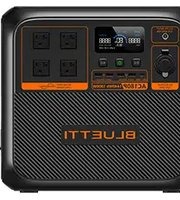
AC180P - Power bank BLUETTI - Free user manual and instructions
Find the device manual for free AC180P BLUETTI in PDF.


| Product Type | Portable Power Station |
| Brand | BLUETTI |
| Model | AC180P |
| Battery Capacity | 1152 Wh (LiFePO₄) |
| AC Output | 2 × 120V/240V, 1800W (surge 3600W) |
| USB Outputs | 2 × USB-A (5V/3A), 2 × USB-C (100W PD) |
| DC Output | 1 × 12V/10A (cigarette lighter), 1 × 12V/10A (DC5521) |
| Solar Charging | Up to 500W, MPPT |
| AC Charging | 1200W max, 0-80% in 45 min (fast charge) |
| Car Charging | 12V/24V, up to 200W |
| Dimensions | 380 × 260 × 255 mm |
| Weight | 12.5 kg |
| Display | LCD touchscreen |
| App Control | BLUETTI app (Wi-Fi/Bluetooth) |
| Battery Chemistry | LiFePO₄ (≥3500 cycles) |
| Operating Temperature | -20°C to 40°C |
| Safety Features | BMS, overcharge, overdischarge, short circuit, temperature protection |
| Maintenance | Keep dry, charge every 3 months, avoid deep discharge |
| Warranty | 24 months (extendable) |
| Certifications | UL, FCC, CE, RoHS |
Frequently Asked Questions - AC180P BLUETTI
User questions about AC180P BLUETTI
0 question about this device. Answer the ones you know or ask your own.
Ask a new question about this device
Download the instructions for your Power bank in PDF format for free! Find your manual AC180P - BLUETTI and take your electronic device back in hand. On this page are published all the documents necessary for the use of your device. AC180P by BLUETTI.
USER MANUAL AC180P BLUETTI
Portable Power Station
User Manual
Please read this manual carefully before use and keep it for future reference.

Warning
- Charge the unit before first use.
- Do not use solar panels with open circuit voltage higher than 60V. Solar input voltage range for the unit is DC 12V\~60V.
- Charge the unit when the SoC drops below 5%. If the SoC drops to 0, power off the unit and charge it for at least 30mins before restarting.
- The unit is for off-grid use only. Do not connect its AC output to the grid.
- If not used for more than 3 months, charge the unit to 40%\~60% SoC and store it with the power off. For optimum battery life, discharge and charge the unit every 3 months.
Thank You!
Thank you for making BLUETTI a part of your family.
From the very beginning, BLUETTI has tried to stay true to a sustainable future through green energy storage solutions for both indoor and outdoor use while delivering an exceptional eco-friendly experience for our homes and our world. That's why BLUETTI makes its presence in 70+ countries and is trusted by millions of customers across the globe.

Contents
1 Safety Instructions 05
1.1 General Safety 05
1.2 Handling 07
1.3 Storage and Usage 07
2 What's In The Box 08
3 Product Overview 10
3.1 Diagram 10
3.2 Specifications 11
4 Operating Instructions 12
4.1 Buttons 12
4.2 LCD Screen 14
4.3 Charging 15
4.4 Discharging 17
4.5 BLUETTI App 18
5 Appendix 19
5.1 FAQs 19
5.2 Troubleshooting 20
5.3 Abbreviations 21
5.4 FCC Warning 21
5.5 Important Instructions 23
1. Safety Instructions
Read this manual for instructions on the proper use and safety information for the unit.
Follow the warnings and instructions marked on the unit and its accessories.
Pay attention to the "Instruction", "Caution", "Warning" and "Danger" symbols in this manual, and follow the instructions carefully to avoid injury or damage.
The Safety Requirements provided herein are for illustrative purposes that include but are not limited to those listed in this manual. Actual operation shall comply with all applicable safety standards.
If you have any questions, feel free to contact BLUETTI support or your local BLUETTI dealers.
1.1. General Safety
• Always operate or store the unit in the conditions specified in this manual.
- The installation and ambient conditions must comply with the regulations in the relevant international, national or regional standards.
- Unauthorized disassembly, alteration of the equipment or modification of the software code is not allowed.
⚠ BLUETTI shall not be liable for the following circumstances:
- Equipment damage caused by force majeure, such as earthquake, fire, storm, flood, mudslide, etc.
- Damage or loss during transportation.
- Damage caused by storage conditions that do not meet the requirements specified in this manual.
- Damage to the hardware or data of the equipment due to customer negligence, improper operation or intentional damage.
- Damage to the system caused by a third party or the customer, including handling and installation that does not meet the requirements specified in this manual.
- This product is not suitable for providing electrical service for equipment and machines that are highly dependent on the reliability of electrical power supply and that involve personal safety, such as atomic energy, aviation, medical, etc. Poweroak will not be held responsible for any personal safety accidents, fire accidents, equipment failures, etc. caused by using this product to supply power to the above equipment and machines.
- Damage caused by adjustment, alteration or removal of identification marks.
To avoid danger, please regulate the operation in the following manner:
- Do not install, use and maintain the unit in adverse weather conditions such as lightning, rain, snow and strong breezes (including but not limited to handling and operating the unit, plugging and unplugging signal connections to outdoor facilities, working at height, outdoor installations, etc.).
· Always turn off the power source before starting any electrical work.
- Do not clean the unit with water.
- Do not disassemble, modify, tamper with or repair the unit on your own.
- Regularly inspect the unit and its accessories for damage or deterioration.
- Use a tester to check for the presence of dangerous voltage before touching any conductor or terminal.
- If the unit's shell is cracked during transportation or use, do not use it and contact BLUETTI support or your local BLUETTI dealers.
- Use a dry powder extinguisher if the unit catches fire.
- In case of fire, EVACUATE the building or affected area immediately, activate the closest FIRE ALARM system and CALL 9-1-1 or your local emergency phone number.
- Use genuine cables and accessories provided by BLUETTI.
- Keep the unit away from heat sources or high temperatures, and do not expose it to direct sunlight.
- Do not store the unit with flammable liquids, gases, or explosive materials.
- Make sure the area where you are using the unit is well ventilated and spacious.
- Do not block or cover the vents of the unit as this may cause irreversible damage to it.
- Use the unit for its intended purpose and avoid stacking objects on top of it during storage or use.
- Do not move the unit during operation as the vibrations and shocks associated with movement may cause damage to the internal hardware.
- In case of malfunction, turn off the unit immediately and contact BLUETTI support or your local BLUETTI dealers if this manual cannot adequately explain the malfunction to you.
- Do not place the unit on an unstable or inclined surface.
- Do not insert foreign objects into any port and vent of the unit.
- Keep away from children and pets.
- It's recommended to grounded this product (via the grounding terminal) before operation.
Connect a grounding cable (recommended 14AWG (1.5mm²) /105°C/yellow-green color) to the grounding terminal of AC180P. Fasten the grounding screw (M5*10) to fix the cable.

Legal and Regulatory Requirements
- The transportation, wiring and maintenance shall comply with all applicable laws, regulations and standards.
- User-provided materials and tools required shall meet the requirements specified in applicable laws, regulations and relevant standards.
1.2. Handling
Use mechanical assistance as needed (e.g. trolleys and adjustable height workbenches).
Recommended number of people based on the weight of product
| Weight | Number of people |
| <18kg | 1 |
| 18kg~32kg | 2 |
| 32kg~55kg | 3 |
| >55kg | 4 or a cart |
1.3. Storage and usage
- When not using the unit for over 3 months, charge it to 40% to 60% SoC to keep it in optimal condition.
- Before storing the unit, power it off and remove all electrical connections from it.
- Store the unit in a cool and dry place. The ideal temperature range is 10°C to 30°C . The unit can be safely charged and discharged at temperatures of -20°C to 40°C . However, it's NOT recommended to store the unit in harsh temperatures for extended periods of time.
- Fully cycle the unit every 6 months to maintain the battery's health.
⚠️ If the SoC drops to 0 (during operation or upon startup), take the following actions to safely restart the unit:
1) Shut down immediately.
2) Charging with in 48 hours.
3) Battery should be kept at an ambient temperature of 5° C to 35° C for 6 hours before charging.
It is recommended to charge the unit via an AC source. If charging via solar energy, ensure that your solar system provides an output of more than 100W.
BLUETTI shall not be liable for any equipment damage caused by the violation of above instructions.
2. What's In The Box
Standard Packaging
| Item Picture Qty. | ||
| Portable Power Station |  | 1 |
| AC Charging Cable (16AWG, 1800mm) | 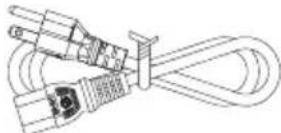 | 1 |
| Car Charging Cable (16AWG, 720mm) |  | 1 |
| Solar Charging Cable (16AWG, 1500mm) |  | 1 |
| Grounding screw (M5*10) |  | 1 |
| User Manual |  | 1 |
Optional
(Available on official BLUETTI website)
Item Picture
TYPE-C Cable (5A/100W, 2m)

Cigarette Lighter to 5521 Cable (For 12V devices with 5521 port, such as routers, cameras, etc.)

Cigarette Lighter to Clamp Cable (Charging lead-acid battery via the cigarette lighter port)

Lead-acid battery charging cable (DC7909)

3. Product Overview
3.1 Diagram
BLUETTI AC180P is a portable power station with 1800W pure sine wave inverter and 1440Wh LiFePO 4 battery, perfect for camping, van life and more. In addition to 4 AC output ports and 5 USB ports (4 USB-A and 1 USB-C), it also has a 12V/10A cigarette lighter port for your vehicle devices and a wireless charging pad to run compatible electronics, your phone, headphone, Bluetooth speaker, just to name a few. As for recharging, AC180P takes up to 1440W AC input and 500W DC input, so you're able to fully charge it in a few hours. It also supports BLUETTI app control - with the Bluetooth connectivity, you can monitor everything that's happening inside and optimize your power usage to your preference.

① DC Input
② DC Power Button
③ LCD Screen
④ Power Button
⑤ AC Power Button
⑥ Wireless Charging Pad
⑦ AC Output
⑧ Grounding Pole(Grounding screw: M5*10)
⑨ AC Input Fuse
⑩ AC Input
⑪ Cigarette Lighter Port
⑫ USB-C Port
⑬ USB-A Port
3.2 Specifications
| Model AC180P | ||||
| Area | JP US CN | EU/UK/AU | ||
| Battery Capacity | 1440Wh | |||
| Cell Type | LiFePO4 | |||
| Net Weight | About 16kg/35.27lbs | |||
| Dimensions (L*W*H) | 340mm x 247mm x 317mm/13.39in×9.72in×12.48in | |||
| Charging Temperature | 0°C~40°C/32°F~104°F | |||
| Discharging Temperature | -20°C~40°C (35°C~40°C: @1500W Max.) -4°F~104°F (95°F~104°F: @1500W Max.) (When SOC is 100%, the discharge power at 35°C~40°C can be greater than 1500W, but it may trigger over temperature protection) | |||
| Storage Temperature | -20°C~40°C/-4°F~104°F | |||
| Working Humidity | 10%~90% | |||
| AC Output | ||||
| Power | 1800W in total | |||
| Voltage | 100VAC | 120VAC | 220VAC | 230VAC |
| Current | 18A | 15A | 8.2A | 7.8A |
| Frequency | 50/60Hz | |||
| DC Output | ||||
| Cigarette Lighter Port | 12VDC/10A | |||
| USB-A | Channel 1: 2 ports,15W in total(5V/3A) Channel 2: 2 ports,15W in total(5V/3A) | |||
| USB-C (Type-C) | 5/9/12/15/20VDC, 3A; 20VDC, 5A(With E-Marker chip built in) | |||
| Wireless Charging | 5W/7.5W/10W/15W | |||
| AC Input | ||||
| Voltage | 100VAC | 120VAC | 220VAC | 230VAC |
| Max. Current | 15A | 15A | 10A | 10A |
| Frequency | 50/60Hz | |||
| UPS | Switching time ≤20ms Test the function before use to avoid risk of data loss. | |||
| Power | 1440W Max. @10°C~30°C/50°F~86°F | |||
| DC Input | ||||
| Interface | DC7909 | |||
| Power | 500W/10A Max. | |||
| Voltage | 12V-60VDC | |||
4. Operating Instructions
DANGER: This device is intended to be used indoors only. Do not use outdoors.
4.1 Buttons
BLUETTI AC180P has PWR button, AC power button and DC power button.

4.1.1. Power ON/OFF
- Press the PWR button to start the AC180P. When AC180P is on, press this button to turn on/off the LCD screen. Press and hold the button for more than 2 seconds to turn off the AC180P.
- Press the DC power button to turn on/off the DC output (cigarette lighter, USB, wireless charging).
- Press the AC power button to turn on/off the AC output.
4.1.2.Settings
- Setting mode: When the screen is on and the AC output is off, press and hold the AC and DC power buttons for about 2 seconds to enter Setting mode.
- Frequency switching: The current output frequency (50Hz/60Hz) is displayed in the lower right corner of the screen. Under Setting mode, press the AC power button to switch the frequency.
- Power Lifting mode: The Power Lifting mode is disabled by default. To enable it, press and hold the AC power button for about 2s in Setting Mode, or turn it on directly in the BLUETTI app. When enabled, the icon 🔔 is displayed on the screen. In this mode, the AC180P can run high drain pure resistive loads* (≤2700W) while its rated output power remains 1800W.
Note: The Power Lifting mode is not available when charging AC180P via an AC source like a wall outlet or generator. The AC source will bypass the inverter and supply power directly to connected AC loads.
- Grid Enhancement mode: By default, the Grid Enhancement mode is disabled. Please turn it on directly in the BLUETTI app. This mode ensures that the AC180P has a stable and continuous AC input, as it allows AC180P to adapt to voltage fluctuations and waveform distortion of an AC source.
Note: Turn off the Grid Enhancement mode when using AC180P as a UPS. In this mode, the UPS takes longer to switch over and may be unable to provide instant emergency power to connected devices.
- ECO mode: When operating on ECO mode, the AC/DC output will automatically turn off if the AC180P is bearing low or no load for a while.
When enabled, the ECO icon is displayed on the screen. Under Setting mode, press the DC power button turn it
| Output | Power | Duration |
| AC output | 15W-30W | 1, 2, 3, 4 hours |
| DC output | 5W-10W | 1, 2, 3, 4 hours |
- Press the AC and DC power buttons at the same time to exit Setting mode.
Note: If you do not perform any operation in 1 minute, AC180P will exit Setting mode automatically and no changes will be saved.
- Check the error code: Press the AC and DC power buttons at the same time for about 2 seconds, and then hold the AC power button to check the current error code (e.g. E001).
4.2. LCD Screen

① DC Input
⑧ Input power
⑮ Remaining time indicator
② Bluetooth
⑨ Battery capacity
⑯ Power Lifting mode
③ Wireless charging
⑩ Output power
⑰ AC indicator
④ Fan
⑪ AC frequency
⑱ DC indicator
⑤ ECO Mode
⑫ Temperature anomaly alert
⑲ AC input connected
⑥ Turbo charging
⑬ Short circuit alert
⑦ Low voltage alert
⑭ Overload alert
| LCD Instructions | |
| Startup | LCD lights up |
| Shutdown | LCD lights off |
| Overload | OVERLOAD flashes |
| Short circuit | SHORT flashes |
| Charging | displays |
| Turbo Charging | displays |
| ECO mode enabled | ECO displays |
| Battery low | displays |
| Abnormal temperature | TEMP flashes |
| AC Input | GRID displays |
| DC Input | displays |
| Bluetooth connected | displays |
| AC output enabled | AC displays |
| DC output enabled | DC displays |
| Power Lifting mode enabled | displays |
4.3 Charging
AC180P supports four charging methods: AC, solar, car(cigarette lighter) and generator.
4.3.1. AC Charging (Wall Outlet)
Simply plug the AC180P into the standard wall outlet and start charging.
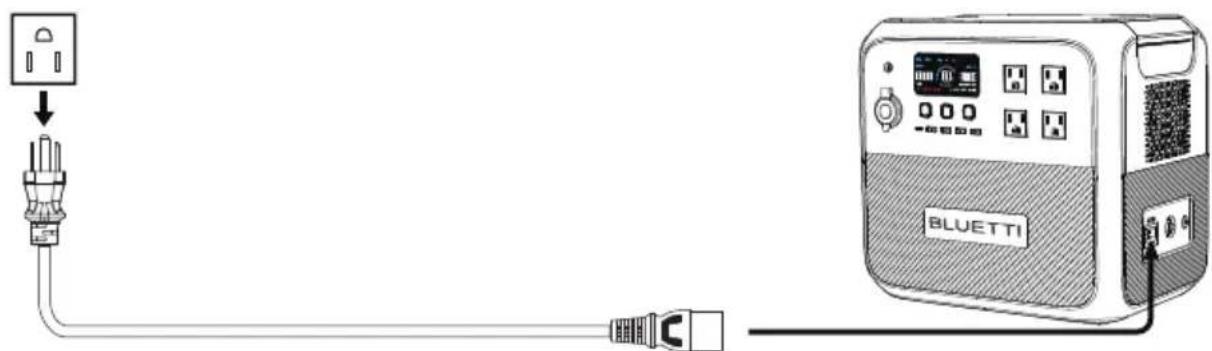
AC180P supports Turbo/Standard/Silent charging modes. It's set to standard charging by default, while the Turbo and silent modes can be enabled in BLUETTI app. BLUETTI's AC charging mode guide is as follows:
1) Turbo charging comes in handy when you need AC180P to be replenished in short time.
2) Standard charging is more friendly to AC180P's battery.
3) Silent charging gives you quiet, low-power operation for long battery life.
4.3.2.Solar Charging
Connect the solar panels (in series or parallel) to AC180P via the solar charging cable.
Note: Please make sure your solar panels comply with:
Voc: 12V-60V Input Current: 10A Max. Input Power: 500W Max.

Warning: The open circuit voltage of solar panels cannot exceed 60V, otherwise it will damage the device(Note:It's not covered in the warranty)
4.3.3.Car Charging
Connect the AC180P to vehicle's 12V cigarette lighter port via the car charging cable.

Warning: Cigarette lighter must be completely plugged in, otherwise it may cause safety risks.
4.3.4.Generator Charging
Connect the AC180P to generator via the AC charging cable.

4.4 Discharging
The operation time of AC180P is subject to many factors, such as ambient temperature, discharge rate, battery capacity, altitude, load characteristics, etc.
4.4.1.AC Output
AC180P has 4 AC output ports (2 ports for EU version), providing a total of up to 1800W AC power. It also can handle a surge of 2700W.
4.4.2.DC Output
• 12V/10A cigarette lighter port
- USB-C (PD 100W)
• USB-A (30W in total, 15W Max.)
- Wireless charging pad (15W Max.)
4.4.3. Estimated Operation Time
Depending on the connected power loads, there are two different scenarios to calculate the operation time of AC180P.
- If the AC180P is applied to a high power load, such as a 600W product.
Operation time (estimated) = Battery capacity (Wh) × DoD × η ÷ (load power)
- If applied to a small power load like a 40W product.
Operation time (estimated) = Battery capacity (Wh) × DoD × η ÷ (load power+self-consumption of AC180P)
Note:
1) The self-consumption of AC180P is about 15W.
2) Load power and operation time are measured in watts and hours.
3) DoD refers to depth of discharge. AC180P works at 90% DoD for longer battery life. η is the conversion efficiency of the inverter, which is larger than 85% for AC180P.
E.g. If you have a 40W refrigerator, you can run it for about 20 hours.
Operation time = 1440Wh x 90% x 85% ÷ (40W+15W) ≈20 hours.
Note: Low temperature and excessive loads could greatly impact the battery capacity and reduces its normal operation time.
4.5 BLUETTI App
Scan the QR code below or search "BLUETTI" in the App Store or Google Play to download the BLUETTI app.


AC180P supports Bluetooth connection. Once connected, the AC180P can be accessed and controlled on a mobile phone or other smart devices. For more details, please refer to BLUETTI APP INSTRUCTIONS.
5. Appendix
5.1 FAQs
Q1: How do I know whether my devices will work well with this product?
A: Please evaluate the total constant load of your devices. If it doesn't exceed the Max. output power of AC180P (1800W), you can use this power station to run your devices. Note: Some devices with built-in motor/compressor may start at 2-4 times the rated power, which can easily overload the AC180P.
Q2: Can I use third-party solar panels to charge this product?
A: Yes, you can. Make sure your solar panels have an open circuit voltage of 12V-60V and have the MC4 connectors. Please do NOT mix different types of solar panels. Note: Time required for one full charge depends on weather condition, the sunshine intensity and the angle of solar panels.
Q3: Can it charge and discharge at the same time?
A: Yes. It supports pass-through charging. AC180P comes with the premium LiFePO4 battery and proprietary Battery Management System to ensure that it can charge and discharge at the same time.
Q4: What is ECO mode and can I turn it off?
A: ECO mode helps save power, and you can turn it on or off on the screen. When operating on ECO mode, the AC/DC output will automatically turn off if the AC180P is bearing low or no load for a while. You can set the power threshold of AC output and DC output to 15-30W /5-10W, respectively, for 1, 2, 3, or 4 hours.
Q5: Why is the charging power often too low?
A: AC180P has a built-in intelligent BMS that automatically adjusts the charging power in response to the battery temperature and SoC, thus protecting the battery and extending its service life.
Q6: Can I make the AC180P less noisy when charging?
A: Yes. Select "Silent" for AC charging in the BLUETTI app. Please refer to 4.3.1 AC Charging for more details.
Q7: When should I use the Grid Enhancement mode?
A: This mode is handy when charging the AC180P via an unstable AC source, such as an unreliable grid or generator. E.g. If you change the generator's output while charging the AC180P, the voltage dip will also cause the charge to fail.
5.2 Troubleshooting
| Error Code | Error Description | Troubleshooting |
| E001 | Inverter overload | Check if the power of connected devices is too high. |
| E003 | Inverter short circuit | Check if the connected devices are damaged. |
| E065 | Cigarette lighter output short circuit | Check if the power of connected devices is too high. |
| E068 | Cigarette lighter overtemperature | Wait a few minutes and try again. |
| E085 | Charging temperature too high | Wait for the battery to cool down before charging. |
| E086 | Charging temperature too low | Recommended charging temperature: 0°C~40°C. |
| E087 | Discharging temperature too high | Wait for the battery to cool down before discharging. |
| E088 | Discharging temperature too low | Recommended discharging temperature: -20°C~40°C. |
| E033 | PV Input overvoltage | Ensure the PV input voltage is in the range of 12V~60VDC. |
| Others | Contact BLUETTI technical support. |
5.3 Abbreviations
• MPPT: Maximum Power Point Tracking
- SoC: State of Charge
• UPS: Uninterruptible Power Supply
• AC: Alternating Current
- DC: Direct Current
• PV: Photovoltaic (Solar Panels)
- DoD: Depth of Discharge
5.4 FCC Warning
This equipment has been tested and found to comply with the limits for a Class B digital device, pursuant to part 15 of the FCC Rules. These limits are designed to provide reasonable protection against harmful interference in a residential installation. This equipment generates, uses and can radiate radio frequency energy and, if not installed and used in accordance with the instructions, may cause harmful interference to radio communications. However, there is no guarantee that interference will not occur in a particular installation. If this equipment does cause harmful interference to radio or television reception, which can be determined by turning the equipment off and on, the user is encouraged to try to correct the interference by one or more of the following measures:
—Reorient or relocate the receiving antenna.
—Increase the separation between the equipment and receiver.
—Connect the equipment into an outlet on a circuit different from that to which the receiver is connected.
—Consult the dealer or an experienced radio/TV technician for help.
FCC RF Exposure Warning Statement:
This equipment.complies with FCC radiation exposure limits set forth for an uncontrolled environment. This equipment shall be installed and operated with minimum distance 20cm between the radiator & body
Please note that changes or modifications of this product is not expressly approved by the party responsible for compliance could void the user's authority to operate the equipment
IC
This device contains licence-exempt transmitter(s)/receiver(s) that comply with Innovation, Science and Economic Development Canada's licence-exempt RSS(s). Operation is subject to the following two conditions:
(1) This device may not cause interference.
(2) This device must accept any interference, including interference that may cause undesired operation of the device.
Radio Frequency Exposure Statement for IC
This equipment complies with IC exposure limits set forth for an uncontrolled environment. This equipment shall be installed and operated with minimum distance 10cm between the radiator & body.
This Class B digital apparatus complies with Canadian ICES-003.
5.5 Important Instructions
INSTRUCTIONS PERTAINING TO RISK OF FIRE, ELECTRIC SHOCK, OR INJURY TO PERSONS
IMPORTANT SAFETY INSTRUCTIONS, SAVE THESE INSTRUCTIONS
WARNING – When using this product, basic precautions should always be followed, including the following:
a) Read all the instructions before using the product.
b) To reduce the risk of injury, close supervision is necessary when the product is used near children.
c) Do not put fingers or hands into the product. DO NOT insert foreign objects into any ports of the machine. Please operate it carefully and keep children away from it.
d) Use of an attachment not recommended or sold by power pack manufacturer may result in a risk of fire, electric shock, or injury to persons.
e) To reduce risk of damage to the electric plug and cord, pull the plug rather than the cord when disconnecting the power pack.
f) Do not use a battery pack or appliance that is damaged or modified. Damaged or modified batteries may exhibit unpredictable behavior resulting in fire, explosion or risk of injury.
g) Do not operate the power pack with a damaged cord or plug, or a damaged output cable.
h) DO NOT attempt to replace the internal battery or any other component of the equipment by anyone other than authorized personnel. There are no end-user service-able components. Do not disassemble the power pack, take it to a qualified service person when service or repair is required. Incorrect reassembly may result in a risk of fire or electric shock.
i) To reduce the risk of electric shock, unplug the power pack form the outlet before attempting any instructed servicing.
j) WARNING – RISK OF EXPLOSIVE GASES. To reduce risk of battery explosion, follow these instructions and those published by battery manufacturer and manufacturer of any equipment you intend to use in vicinity of the battery. Review cautionary marking on these products and on engine.
k) PERSONAL PRECAUTIONS
1) Wear complete eye protection and clothing protection. Avoid touching eyes while working near battery.
2) NEVER smoke or allow a spark or flame in vicinity of battery or engine.
3) Be extra cautious to reduce risk of dropping a metal tool onto battery. It might spark or short-circuit battery or other electrical part that may cause explosion.
I) When charging the internal battery, work in a well ventilated area and do not restrict ventilation in any way.
m) Under abusive conditions, liquid may be ejected from the battery; avoid contact. If contact accidentally occurs, flush with water. If liquid contacts eyes, additionally seek medical help. Liquid ejected from the battery may cause irritation or burns.
n) DO NOT place the power station near heat sources. It is prohibited to place the equipment in an environment with flammable, explosive gas, or smoke. It is also prohibited to operate the equipment in this environment. Donot expose a power pack to fire or excessive temperature. Exposure to fire or temperature above 130° C may cause explosion.
o) Have servicing performed by a qualified repair person using only identical replacement parts. This will ensure that the safety of the product is maintained.
p) DO NOT operate in wet conditions. If the equipment becomes wet, please let the unit dry completely before using.
q) Please ensure proper ventilation while in use and do not obstruct fanopenings. Inadequate ventilation may cause permanent damage to equipment.
r) DO NOT stack anything on top of the power station while in storage or while in use. DO NOT move the unit while operating as vibrations and sudden impacts may lead to poor connections to the hardware inside.
s) In case of fire, only a dry powder fire extinguisher is suitable for the product.
DANGER: This device is intended to be used indoors only. Do not use outdoors.
GROUNDING INSTRUCTIONS
This product must be grounded. If it should malfunction or breakdown, grounding provides a path of least resistance for electric current to reduce the risk of electric shock. This product is equipped with a cord having an equipment grounding conductor and a grounding plug. The plug must be plugged into an outlet that is properly installed and grounded in accordance with all local codes ordinances.
WARNING – Improper connection of the equipment grounding conductor is able to result in a risk of electric shock. Check with a qualified electrician if you are in doubt as to whether the product is properly grounded. Do not modify the plug provided with the product – if it will not fit the outlet, have a proper outlet installed by a qualified electrician.
CONSIGNES DE SÉCURITÉ IMPORTANTES
For more information, please visit:
Web: https://www.bluettipower.com

@ BLUETTI Support
@ BLUETTI Official

@ bluetti_inc

@bluetti.inc

@bluetti_official

service@bluettipower.com
SHENZHEN POWEROAK NEWENER CO., LTD.
Address: F19, BLD No.1, Kaidaer, Tongsha Rd
No.168, Xili Street, Nanshan, Shenzhen, China
USA Agent
Company name: BLUETTI POWEROAK INC
Address: 6185 S VALLEY VIEW BLVD STE D LAS VEGAS
NEVADA 89118 United States
FRN: 0033559824
Contact Name: Qiyao Li
Telephone No: +1-512-966-1898 1
Email: liqy@bluetti.com
Customer Service
Tel: 800-200-2980 (Monday to Sunday 9:00-17:00)
Mail: sale@bluettipower.com (Pre-sales),
service@bluettipower.com (After-sales)

Thank you for choosing BLUETTI. Please read the terms and conditions and fill in the warranty card. This card, together with your proof of purchase, entitles you to the service of the product under the terms of this warranty. The warranty period starts from the date of product receipt.
| Item | Warranty Period |
| Main unit (including batteries) | 60 months* |
| Solar panel | 12 months |
| Accessories (adapter/cable/others) | 12 months |
* Only applies to products purchased directly from the official BLUETTI website. If you purchased the product from other channels, the warranty is valid for 24 months. However, you can register for BLUETTI VIP on the official website to get a free warranty extension.
The warranty does not cover:
- Issues arising after the warranty period has expired;
- Damage resulting from improper use, maintenance, or storage, contrary to the user manual;
- Unauthorized disassembly, repair, or modifications;
• Damage caused by force majeure events.

Valid Proof of Purchase
01 Order No. of purchases made through authorized platforms.
02 Sales invoice or order confirmation email that clearly shows the description of the product, its price and sales channel.
03 The defective item's serial number (usually on the bottom of the product) and/or visible proof (eg. Short video) depicting the defect will be required.

How to Return/Replace/Repair
01 Contact us for a Return Merchandise Authorization (RMA) Number. We will not accept returned items without prior authorization and RMA.
02 Write the RMA number in the form below and on the outer package of the parcel.
03 Send the defective product to our local warehouse.
Warranty Policy
| Customer Name: Date: | |||
| Compay(optional): | |||
| Address: | City: State: Zip: | ||
| Phone: | Fax: | ||
| Email Address: | |||
| Purchase From: |
| Name of Tech Support Spoken To: |
| RMA #: |
| Model Name: | |
| Serial #: | |
| Purchase Date: | |
| Problem Description: |

BLUETTI
[Figure]
L
Certificate
Inspector:
QC: ____


- PORTABLE POWER STATION
- USER MANUAL
- WARNING
- THANK YOU
- CONTENTS
- 1 SAFETY INSTRUCTIONS 05
- 2 WHAT'S IN THE BOX 08
- 3 PRODUCT OVERVIEW 10
- 4 OPERATING INSTRUCTIONS 12
- 5 APPENDIX 19
- SAFETY INSTRUCTIONS
- GENERAL SAFETY
- ⚠ BLUETTI SHALL NOT BE LIABLE FOR THE FOLLOWING CIRCUMSTANCES
- TO AVOID DANGER, PLEASE REGULATE THE OPERATION IN THE FOLLOWING MANNER
- LEGAL AND REGULATORY REQUIREMENTS
- HANDLING
- STORAGE AND USAGE
- WHAT'S IN THE BOX
- OPTIONAL
- ITEM PICTURE
- PRODUCT OVERVIEW
- 3.1 DIAGRAM
- 3.2 SPECIFICATIONS
- OPERATING INSTRUCTIONS
- 4.1 BUTTONS
- POWER ON/OFF
- 4.1.2.SETTINGS
- LCD SCREEN
- 4.3 CHARGING
- AC CHARGING (WALL OUTLET)
- 4.3.2.SOLAR CHARGING
- 4.3.3.CAR CHARGING
- 4.3.4.GENERATOR CHARGING
- 4.4 DISCHARGING
- 4.4.1.AC OUTPUT
- 4.4.2.DC OUTPUT
- ESTIMATED OPERATION TIME
- NOTE
- 4.5 BLUETTI APP
- APPENDIX
- 5.1 FAQS
- 5.2 TROUBLESHOOTING
- 5.3 ABBREVIATIONS
- 5.4 FCC WARNING
- FCC RF EXPOSURE WARNING STATEMENT
- IC
- 5.5 IMPORTANT INSTRUCTIONS
- GROUNDING INSTRUCTIONS
- CONSIGNES DE SÉCURITÉ IMPORTANTES
- FOR MORE INFORMATION, PLEASE VISIT
- USA AGENT
- CUSTOMER SERVICE
- THE WARRANTY DOES NOT COVER
- VALID PROOF OF PURCHASE
- HOW TO RETURN/REPLACE/REPAIR
- BLUETTI
- CERTIFICATE
Brand : BLUETTI
Model : AC180P
Category : Power bank