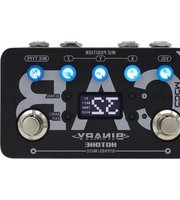
Binary IR Cab - Guitar amplifier Hotone - Free user manual and instructions
Find the device manual for free Binary IR Cab Hotone in PDF.


Pick your language and provide your email: we'll send you a specifically translated version.
| Product Type | Guitar Amplifier / IR Cab Simulator |
| Brand | Hotone |
| Model | Binary IR Cab |
| Dimensions | Approx. 150 x 100 x 50 mm (5.9 x 3.9 x 2.0 in) |
| Weight | Approx. 0.5 kg (1.1 lb) |
| Power Supply | 9V DC center negative, 300 mA (recommended) |
| Input | 1/4 inch TS high impedance |
| Outputs | 1/4 inch TS, XLR balanced, Headphone (3.5mm) |
| IR Loading | Supports 3rd party impulse responses (up to 1024 samples / 48 kHz) |
| Built-in IRs | 15 preloaded cabinet simulations |
| Presets | 15 user preset slots |
| Controls | Volume knob, IR selector, Preset push button |
| USB Port | USB Type-C for firmware update and IR import |
| Construction | Aluminum chassis with powder coating |
| Maintenance | Wipe with a dry, lint-free cloth; avoid solvents |
| Safety | Do not expose to water or extreme temperatures; use only recommended adapter |
| Spare Parts / Repairability | Not user-serviceable; contact Hotone support for repairs |
| Included Accessories | USB cable, user manual (downloadable) |
Frequently Asked Questions - Binary IR Cab Hotone
What is the Hotone Binary IR Cab?
It is a compact guitar amplifier simulator and IR cab loader that allows you to load custom impulse responses for realistic cabinet emulation.
How do I load custom IR files?
Connect the device to your computer via the USB Type-C port and use the Binary IR Editor software (available on Hotone's website) to transfer IR files.
What power supply is required?
It requires a 9V DC centre-negative power supply with at least 300 mA current. A standard guitar pedal power supply works.
Can I use it with a real guitar amp?
Yes, it can be used in an effects loop or as a load box for silent recording. However, it is not intended to replace a speaker load for tube amps without proper attenuation.
How many presets are available?
It has 15 user preset slots and 15 built-in IRs that can be overwritten.
What outputs does it have?
It features a 1/4 inch TS output, an XLR balanced output for direct to PA, and a headphone output for silent practice.
Is there a software editor?
Yes, the Binary IR Editor is available for Windows and macOS to manage presets and import IR files.
What is the maximum IR length supported?
It supports IR files up to 1024 samples at 48 kHz sample rate.
How do I update the firmware?
Firmware updates are done via the USB port using the Binary IR Editor. Visit Hotone's website for the latest firmware.
Is it compatible with all guitar pickups?
Yes, the input is high impedance and works with passive and active pickups. For active pickups, ensure the power supply is sufficient.
User questions about Binary IR Cab Hotone
0 question about this device. Answer the ones you know or ask your own.
Ask a new question about this device
No questions yet. Be the first to ask one.
Download the instructions for your Guitar amplifier in PDF format for free! Find your manual Binary IR Cab - Hotone and take your electronic device back in hand. On this page are published all the documents necessary for the use of your device. Binary IR Cab by Hotone.
USER MANUAL Binary IR Cab Hotone
Manual assistant
Powered by Anthropic
Waiting for your message
Product information
Brand : Hotone
Model : Binary IR Cab
Category : Guitar amplifier