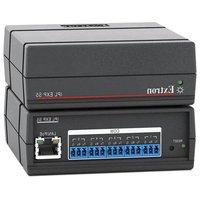
IPL EXP S5 - Interface de contrôle électronique Extron - Free user manual and instructions
Find the device manual for free IPL EXP S5 Extron in PDF.


Pick your language and provide your email: we'll send you a specifically translated version.
| Product Type | IP Link Expansion Module |
| Model | IPL EXP S5 |
| Brand | Extron |
| Dimensions (H x W x D) | 1.7 in x 17.0 in x 6.0 in (4.3 cm x 43.2 cm x 15.2 cm) |
| Weight | 1.4 lbs (0.64 kg) |
| Power Supply | External, 12 V DC, 1 A |
| Power Consumption | 6 Watts |
| Enclosure Type | Metal, rack-mountable, 1U high |
| Network Connector | RJ-45, 10/100 Mbps |
| Serial Ports | 2 RS-232, 1 RS-232/422/485 |
| IR Ports | 2 IR output, 1 IR input |
| Relay Ports | 2 relays, 3.5 mm terminal block |
| Digital I/O | 4 digital input/output |
| Control Protocol | Extron IP Link, SIS |
| Operating Temperature | 32 to 122 F (0 to 50 C) |
| Storage Temperature | -4 to 158 F (-20 to 70 C) |
| Humidity | 10% to 90% non-condensing |
| Regulatory Compliance | CE, FCC Class A, c-UL, UL |
| Included Accessories | Power supply, rack brackets, rubber feet |
| Maintenance | Wipe with dry cloth; no liquid cleaners |
Frequently Asked Questions - IPL EXP S5 Extron
How do I reset the IPL EXP S5 to factory defaults?
Press and hold the recessed Reset button on the front panel for 5 seconds until the LEDs flash. The unit will reboot with factory settings.
What is the default IP address of the device?
The factory default IP address is 192.168.254.254. You can change it via the web interface or Extron Device Discovery Tool.
Can I connect this module directly to a computer?
Yes, use a standard Ethernet cable. Ensure your computer is on the same subnet (e.g., 192.168.254.x) to access the web interface.
How many devices can I control with the IPL EXP S5?
The module provides 2 RS-232 serial ports, 2 IR outputs, 2 relays, and 4 digital I/O, allowing control of multiple devices like projectors, screens, and AV switches.
What software is needed to configure the unit?
Use Extron Global Configurator or Simple Instruction Set (SIS) commands via Telnet/SSH. The built-in web interface also provides basic setup.
Does the IPL EXP S5 support Power over Ethernet (PoE)?
No, the unit requires an external 12 V DC power supply (included). PoE is not supported.
How do I update the firmware?
Download the latest firmware from the Extron website. Upload via the web interface under Firmware Update or use Extron Firmware Loader.
What is the purpose of the front panel LEDs?
The Power LED indicates supply status, Link LED shows network connection, and Data LED blinks during activity. Refer to the manual for detailed meanings.
Can I rack-mount the unit?
Yes, the IPL EXP S5 is 1U high and includes rack brackets for standard 19-inch racks. Attach the brackets using the screws provided.
How do I connect a serial device?
Use a DB9 male-to-female null modem cable (Extron part #70-155-01) for RS-232. Wire the terminal block for RS-422/485. Refer to the pinout in the manual.
User questions about IPL EXP S5 Extron
0 question about this device. Answer the ones you know or ask your own.
Ask a new question about this device
No questions yet. Be the first to ask one.
Download the instructions for your Interface de contrôle électronique in PDF format for free! Find your manual IPL EXP S5 - Extron and take your electronic device back in hand. On this page are published all the documents necessary for the use of your device. IPL EXP S5 by Extron.
USER MANUAL IPL EXP S5 Extron


Manual assistant
Powered by Anthropic
Waiting for your message
Product information
Brand : Extron
Model : IPL EXP S5
Category : Interface de contrôle électronique