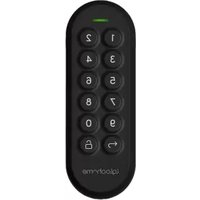
Keypad - Smart Home igloohome - Free user manual and instructions
Find the device manual for free Keypad igloohome in PDF.


| Product Type | Smart Home Keypad |
| Brand | igloohome |
| Model | Keypad |
| Dimensions (H x W x D) | Approx. 120 mm x 60 mm x 20 mm |
| Weight | Approx. 150 g (including batteries) |
| Power Source | 4x AA Alkaline batteries |
| Battery Life | Up to 1 year under normal use |
| Connectivity | Bluetooth 4.0 or higher |
| Keypad Type | Touch-sensitive numeric keypad |
| Number of PIN Codes | Up to 200 unique PIN codes |
| App Compatibility | igloohome App (iOS/Android) |
| Access Sharing | Via app or time-limited PIN codes |
| Operating Temperature | -20°C to 55°C |
| Water Resistance | IP54 rated (splash resistant) |
| Installation | Surface mount with included screws or adhesive |
| Security Features | Anti-tamper alarm, encrypted communication |
| Maintenance | Clean with soft dry cloth; replace batteries as needed |
| Spare Parts Available | Battery cover, mounting plate (contact support) |
| Repairability | Battery replacement user-serviceable; other repairs by professionals |
| Warranty | 2 years limited warranty |
Frequently Asked Questions - Keypad igloohome
User questions about Keypad igloohome
0 question about this device. Answer the ones you know or ask your own.
Ask a new question about this device
Download the instructions for your Smart Home in PDF format for free! Find your manual Keypad - igloohome and take your electronic device back in hand. On this page are published all the documents necessary for the use of your device. Keypad by igloohome.
USER MANUAL Keypad igloohome
Installers & User guide Keypad.
Welcome!
This guide will get you up and running with your Keypad.
In the meantime, you should follow us on Facebook and Youtube!


Visit our YoutubeLike us on Fac

Table of Contents
What's Included 4
Specifications 5
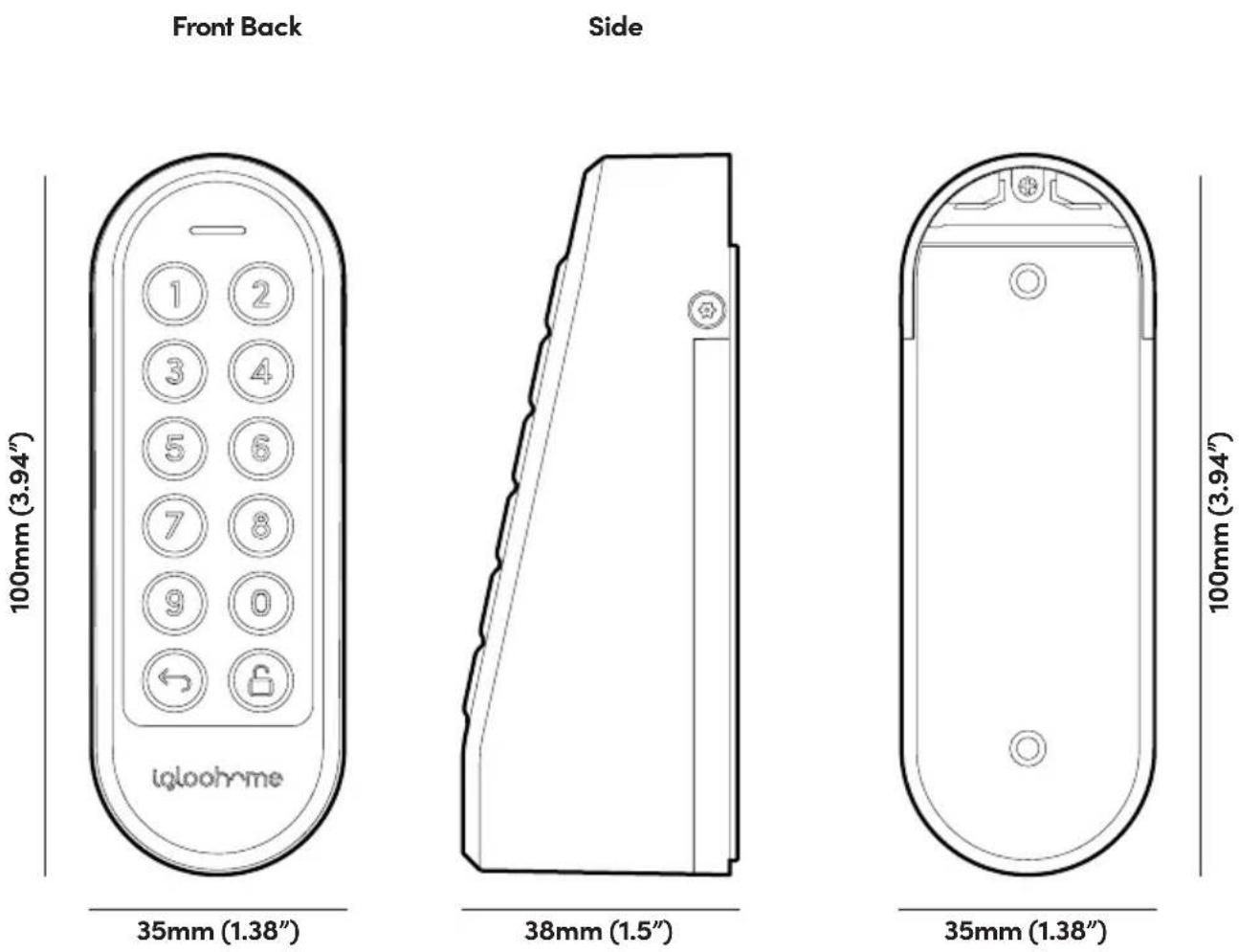
Keypad Anatomy 6
Features 7
Installing / Replacing Batteries 9
App Onboarding 10
Installation Instructions 11
Unlocking 14
Locking 15
Keypad Behavior 16
Compatible igloohome Locks 17
Audio and LED Indications 18
Troubleshoot 29
What's Included
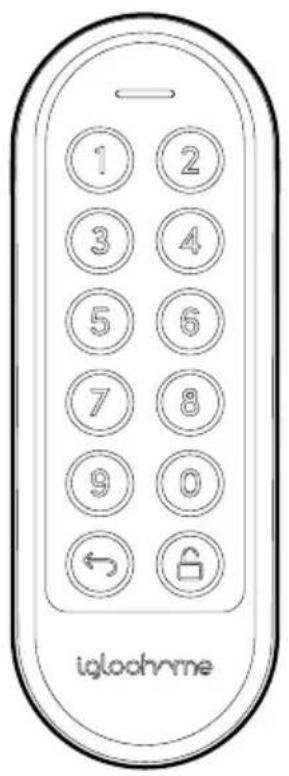
Keypad

Mounting Plate (with adhesive tape)

Torx Screws x2

Torx Screwdriver
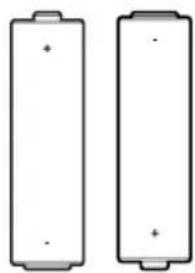
AA Alkaline Batteries x2

Mounting Screws and Anchors

Battery Cover Screw x1
Specifications
Model Keypad
Battery Type 2 x AA* Alkaline Batteries
Battery Life Up to 12 months
Operation Temp -20°C to 50°C
IP Rating IP66
Material ABS, PC, Silicone
* DO NOT USE: Heavy Duty, Eveready, GP, or rechargeable batteries. Duracell, Energizer and Panasonic alkaline batteries recommended. Please note that using better batteries will improve the performance and lifespan of the keypad.
User Guide
Keypad Anatomy
Front

Back

Features
Lock / Unlock

Master PIN Code
The Keypad unlocks with a permanent Master PIN Code.

User PIN Code
The igloohome mobile app can generate multiple types of User Pin codes, e.g. One-Time, Permanent, Recurring & Duration.

Manual Relock
User can press and hold the "unlock" icon on the keypad to trigger manual locking on all linked locks.
Battery

Low Battery Alert
An intuitive audio and LED alert will prompt you to change the batteries when it runs low.
Features
Security / Alarms
Security Lockout
Keypad is disabled after several incorrect access attempts to ensure your property is always secure. User can configure number of incorrect attempts to trigger lockout.

Activity Logs
PIN Code entries will be logged in the app. PIN Code activity logs are updated when the Keypad is synced with the app.

Decoy PIN Code
Heighten security and throw off onlookers by entering random digits before your actual PIN code.
Others

Compatible across multiple locks
The Keypad is compatible with selected igloohome locks.

Pairs up to 5 locks
Unlock multiple devices simultaneously with one PIN code.
*Selected lock models are listed in specifications.

Volume Control
Volume is adjustable to your preference. Select from 0 (mute) to 5 (loudest).
Installing/Replacing Batteries
1 Remove the screw and pull out the battery cover.
2 Install or replace with 2 new AA alkaline batteries.


3 Put the battery cover back and secure with the screw.


App Onboarding
1 Register as a Lock User
a) Download the igloohome app from App store / Play store.
b) Create an account and login.
3 Pairing
The Keypad is designed to work with igloohome locks. Please ensure you have paired your locks to your igloohome account before starting the pairing process for your Keypad.
a) Under go to [Add and Manage], select [Keypads], and tap the [+] sign at the top right corner and follow the instructions.
Creating a link between the Keypad and lock(s)
a) Follow the steps shown in the app after the pairing process is completed.
Alternatively,
b) Go to [Settings], tap on [Linked Locks & Devices], and tap the [+] sign to create a link between your Keypad and locks.

Installation Instructions

Ensure keypad has batteries


Peel off the backing of the adhesive on the back of the mounting plate.
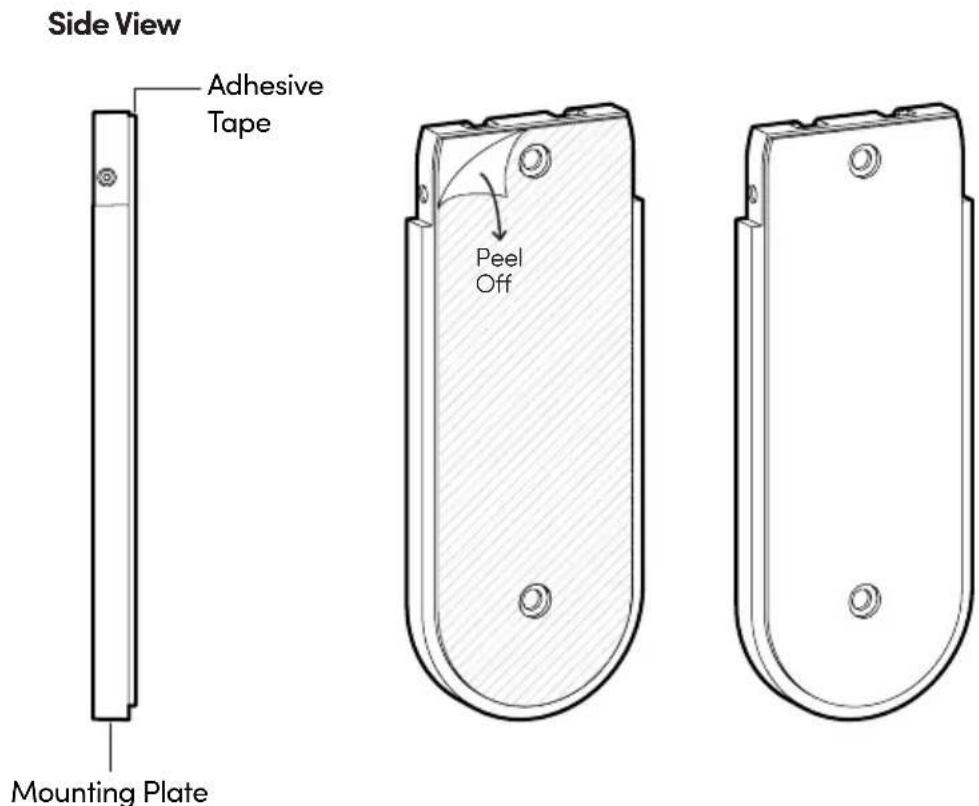

Mounting the Keypad
Press the mounting plate against the wall/surface where you want to install the Keypad. Ensure the location is within Bluetooth range of the locks you intend to pair it with.
*Before mounting, it is recommended that the Keypad is paired and tested with the locks you want to link to, at the desired installation location.
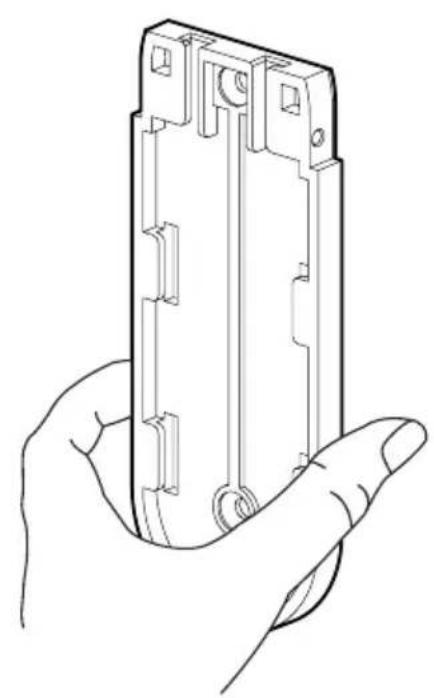

Drill the mounting bracket into the wall with the provided screw and screw anchor.


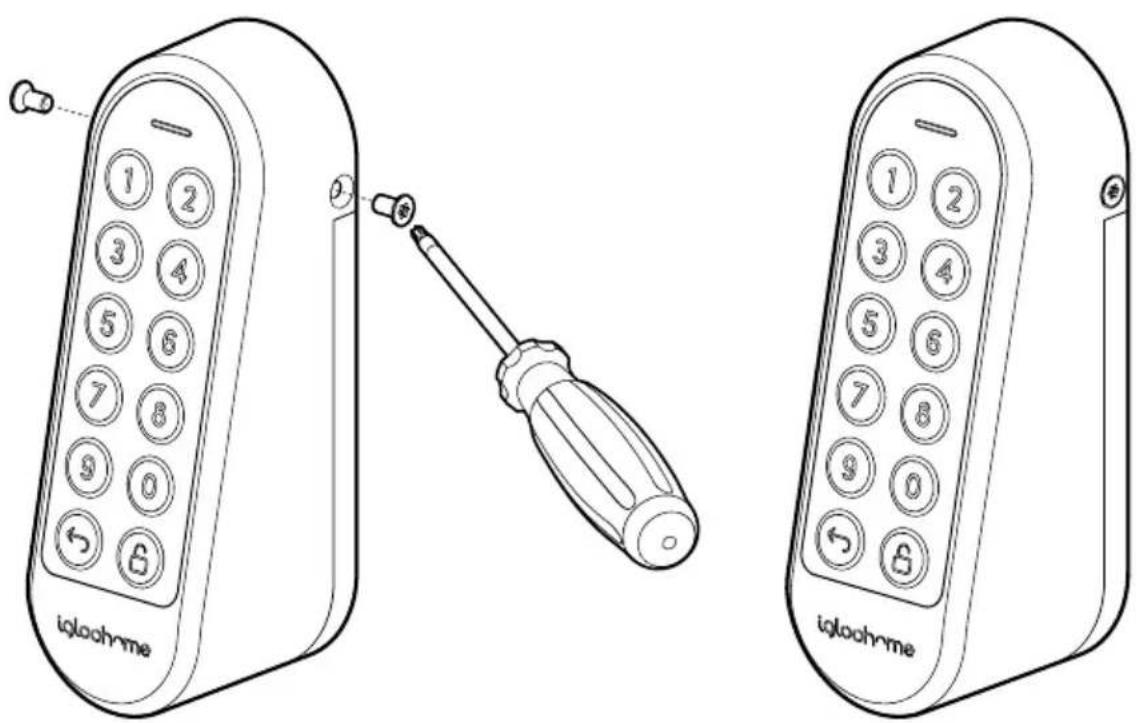
Slide the Keypad onto the mounting plate.


Secure the Keypad to the mounting plate with the Torx screws and Torx screwdriver provided.
Unlocking

Unlock
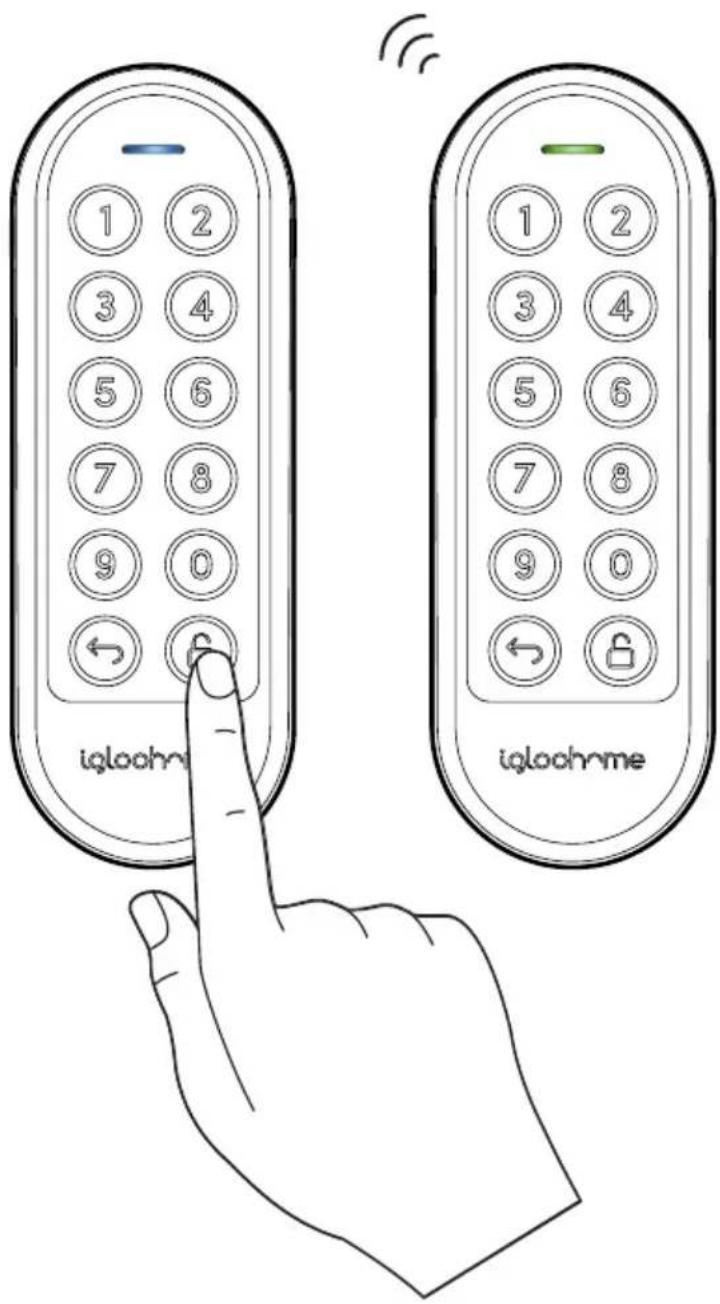
- Key in a valid PIN code (with or without decoy digits), followed by the 🔊 button. LED indicator will start flashing blue.
- Paired lock(s) within Bluetooth range (up to 5) will unlock, and LED Indicator will turn green with 4 short ascending tones.


Locking

Lock
- Press and hold the 🔒 button on the Keypad until LED Indicator starts flashing blue.
- Paired lock(s) within Bluetooth range (up to 5) will lock once the LED Indicator turns green with a single beep.
Keypad Behaviour
1 Security Lockout
After several invalid PIN code entries on the keypad, the security alarm will be triggered and the keypad will be not any PINs for a period of time.
| Security Lockout | |
| Triggered by | 5 consecutive PIN Code attempts by default (Configurable via the igloohome app) |
| Disable By | After 1 / 5 / 10 Minutes |
| Behaviour | Keypad will not accept any PINs and the keypad will flash when it is pressed. |
| Duration | Please refer to table below |
| Triggered Security Alarm Security Lockout | ||
| 1st Time | 30 Sec | 1 Min |
| 2nd Time | 60 Sec | 5 Min |
| 3rd and Consecutive Time | 90 Sec | 10 Min |
Compatible igloohome Locks
| Lock Maximum | Keypad to lock distance* |
| Retrofit Lock Less than 10m | |
| Deadbolt 2S Metal Grey Less than 8m | |
| Keybox 3 Less than 4m | |
| Mortise 2/2+ Less than 10m | |
| Push-Pull Mortise Less than 10m | |
| Rim Lock for Metal Gates Less than 8m | |
| Padlock Less than 1m | |
| Other lock models | If you lock model is not shown here, please contact our support team for more information. |
*NOTE: The distances provided are for reference only and will vary based on actual operating conditions such as physical obstacles and interference from other electronic devices.
Audio and LED Indications
| Actions Indications | |
| Bluetooth Connection | LED Indicator flashes Blue |
| Successfully unlock/lock all paired locks | Ascending 4 fast tonesand flash Green LED 2 times |
| Unsuccessful unlock/lock of all paired locks / Error | Descending 4 short tonesand solid Red LED for 4 seconds |
| Incorrect PIN Code 4 short beeps and flash Red LED 2 times | |
| Security Lockout Alarm | Low-high siren for 30 /60 / 90 seconds |
| Security Lockout Deactivated | 2 long beeps |
| Low Battery Alert | When Keypad is woken up:If battery is below 20% -2 sets of 2 short beeps with pulsing Red LEDIf battery is below 10% -4 sets of 2 short beeps with pulsing Red LED |
| Hard Reset / Unpair | Descending 3 slow tones |
| Successful Pairing | Ascending 3 fast tones |
Troubleshoot

Paired locks are not unlocking when valid PIN Code is used
- Check that the locks you are unlocking are linked to the Keypad in the app.
- Ensure Keypad is within Bluetooth range of the locks with minimal obstruction between devices.
- Check battery levels of the locks you are unlocking.
Compliance
This device complies with part 15 of the FCC Rules. Operation is subject to the following two conditions: (1) this device may not cause harmful interference, and (2) this device must accept any interference received, including interference that may cause undesired operation.
Any changes or modifications not expressly approved by the party responsible for compliance could void the user's authority to operate the equipment.
NOTE: This equipment has been tested and found to comply with the limits for a Class B digital device, pursuant to Part 15 of the FCC Rules. These limits are designed to provide reasonable protection against harmful interference in a residential installation. This equipment generates, uses and can radiate radio frequency energy and, if not installed and used in accordance with the instructions, may cause harmful interference to radio communications. However, there is no guarantee that interference will not occur in a particular installation.
If this equipment does cause harmful interference to radio or television reception, which can be determined by turning the equipment off and on, the user is encouraged to try to correct the interference by one or more of the following measures:
- Reorient or relocate the receiving antenna.
- Increase the separation between the equipment and receiver.
- Connect the equipment into an outlet on a circuit different from that to which the receiver is connected.
- Consult the dealer or an experienced radio/TV technician for help.
This equipment complies with FCC radiation exposure limits set forth for an uncontrolled environment. This equipment should be installed and operated with a minimum distance of 20 cm between the radiator and your body.

- INSTALLERS & USER GUIDE KEYPAD
- WELCOME
- TABLE OF CONTENTS
- WHAT'S INCLUDED
- SPECIFICATIONS
- USER GUIDE
- KEYPAD ANATOMY
- FEATURES
- LOCK / UNLOCK
- MASTER PIN CODE
- USER PIN CODE
- MANUAL RELOCK
- BATTERY
- LOW BATTERY ALERT
- SECURITY / ALARMS
- SECURITY LOCKOUT
- ACTIVITY LOGS
- DECOY PIN CODE
- OTHERS
- COMPATIBLE ACROSS MULTIPLE LOCKS
- PAIRS UP TO 5 LOCKS
- VOLUME CONTROL
- INSTALLING/REPLACING BATTERIES
- APP ONBOARDING
- 1 REGISTER AS A LOCK USER
- 3 PAIRING
- INSTALLATION INSTRUCTIONS
- MOUNTING THE KEYPAD
- SLIDE THE KEYPAD ONTO THE MOUNTING PLATE
- SECURE THE KEYPAD TO THE MOUNTING PLATE WITH THE TORX SCREWS AND TORX SCREWDRIVER PROVIDED
- UNLOCKING
- UNLOCK
- LOCKING
- LOCK
- KEYPAD BEHAVIOUR
- 1 SECURITY LOCKOUT
- COMPATIBLE IGLOOHOME LOCKS
- AUDIO AND LED INDICATIONS
- TROUBLESHOOT
- PAIRED LOCKS ARE NOT UNLOCKING WHEN VALID PIN CODE IS USED
- COMPLIANCE
Brand : igloohome
Model : Keypad
Category : Smart Home