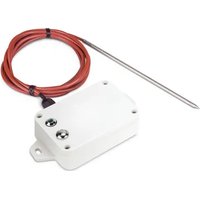
LS200-PT - Electronic sensor Planet - Free user manual and instructions
Find the device manual for free LS200-PT Planet in PDF.


| Product Type | Network Switch |
| Model | LS200-PT |
| Brand | Planet |
| Ports | 8x 10/100/1000 Mbps RJ-45 |
| Switching Capacity | 16 Gbps |
| MAC Address Table | 8K entries |
| Jumbo Frame Support | 9K bytes |
| Power Supply | 100-240V AC, 50/60Hz |
| Power Consumption | 10W max |
| Dimensions (W x D x H) | 200 x 120 x 44 mm |
| Weight | 0.8 kg |
| Operating Temperature | 0°C to 40°C |
| Storage Temperature | -10°C to 70°C |
| Relative Humidity | 10% to 90% non-condensing |
| LED Indicators | Power, Link/Act, Speed per port |
| Mounting | Desktop or wall-mountable |
| Cooling | Fanless |
| Certifications | CE, FCC, RoHS |
| Warranty | 2 years |
Frequently Asked Questions - LS200-PT Planet
User questions about LS200-PT Planet
0 question about this device. Answer the ones you know or ask your own.
Ask a new question about this device
Download the instructions for your Electronic sensor in PDF format for free! Find your manual LS200-PT - Planet and take your electronic device back in hand. On this page are published all the documents necessary for the use of your device. LS200-PT by Planet.
USER MANUAL LS200-PT Planet
2.2.1 Battery Installation 29
2.2.2 Magnetic Mounting or Wall Mounting 30
2.3.2 Precautions 31
3. Preparation 39
3.1 Requirements 39
3.2 LoRaWAN Gateway Setup 39
3.2.1 LoRa Frequency Setting....39
3.2.2 LoRaWAN Setting....40
3.2.3 Setting Up of LoRa Connection via ABP Decryption 41
3.3 Connecting to PLANET NMS-AIoT....42
4. Customer Support 45
Copyright
Copyright (C) 2025 PLANET Technology Corp. All rights reserved.
The products and programs described in this User's Manual are licensed products of PLANET Technology, This User's Manual contains proprietary information protected by copyright, and this User's Manual and all accompanying hardware, software, and documentation are copyrighted.
No part of this User's Manual may be copied, photocopied, reproduced, translated, or reduced to any electronic medium or machine-readable form by any means, electronic or mechanical including photocopying, recording, or information storage and retrieval systems, for any purpose other than the purchaser's personal use, and without the prior express written permission of PLANET Technology.
Disclaimer
PLANET Technology does not warrant that the hardware will work properly in all environments and applications, and makes no warranty and representation, either implied or expressed, with respect to the quality, performance, merchantability, or fitness for a particular purpose.
PLANET has made every effort to ensure that this User's Manual is accurate. PLANET disclaims liability for any inaccuracies or omissions that may have occurred. Information in this User's Manual is subject to change without notice and does not represent a commitment on the part of PLANET. PLANET assumes no responsibility for any inaccuracies that may be contained in this User's Manual. PLANET makes no commitment to update or keep current the information in this User's Manual, and reserves the right to make improvements and/or changes to this User's Manual at any time without notice.
If you find information in this manual that is incorrect, misleading, or incor we would appreciate your comments and suggestions.
FCC Compliance Statement
This Equipment has been tested and found to comply with the limits for a Class A digital device, pursuant to Part 15 of the FCC rules. These limits are designed to provide reasonable protection against harmful interference in a residential installation. This equipment can radiate radio frequency energy and, if not installed and used in accordance with the instructions, may cause harmful interference to radio communications.
However, there is no guarantee that interference will not occur in a particular installation. If this equipment does cause harmful interference to radio or television reception, which can be determined by turning the equipment off and on,
is encouraged to try to correct the interference by one or more of the following measures:
- Reorient or relocate the receiving antenna.
- Increase the separation between the equipment and receiver.
- Connect the equipment into an outlet on a circuit different from that to which the receiver is connected.
- Consult the dealer or an experienced radio/TV technician for help.
CE mark Warning
CE This equipment is compliant with Class A of CISPR 32. In a residential environment this equipment may cause radio interference.
WEEE
To avoid the potential effects on the environment and human health result of the presence of hazardous substances in electrical and electronic equipment, end users of electrical and electronic equipment should understand the meaning of the crossed-out wheeled bin symbol. Do not dispose of WEEE as unsorted municipal waste and have to collect such WEEE separately.
Trademarks
The PLANET logo is a trademark of PLANET Technology. This documentation may refer to numerous hardware and software products by their trade names. In most, if not all cases, these designations are claimed as trademarks or registered trademarks by their respective companies.
Revision
User's Manual of PLANET LoRaWAN Sensors
Model: LS100 series (LS100-WL, LS100-PIR, LS100-DW, LS100-CO, and LS100-SMK) and LS200 series (LS200-TH, LS200-PT, LS200-TC, LS200-RF, LS200-LG, LS200-CM3, LS200-CM, LS200-PM25, LS200-VOC, LS200-MF8 and LS250-PLUG)
Rev.: 1.1 (January 2025)
Part No. EM-LS100 Series_ LS200 Series v1.1
1. Product Introduction
Thank you for purchasing PLANET LoRaWAN Sensor, LS series. The descriptions of these models are as follows:
EU868
| LS100-WL-EU868 IP65 | LoRaWAN Water Leak Sensor (EU868 Sub 1G) |
| LS100-PIR-EU868 | IP30 LoRaWAN Indoor Occupancy Sensor (Occupancy/Light/ Temperature -20~55 degrees C, EU868 Sub 1G) |
| LS100-DW-EU868 IP30 | LoRaWAN Door and Window Sensor (EU868 Sub 1G) |
| LS100-CO-EU868 | IP20 LoRaWAN CO Detector (High-Temperature Alarm, EU868 Sub 1G) |
| LS100-SMK-EU868 | IP20 LoRaWAN Smoke Detector (High-Temperature Alarm, EU868 Sub 1G) |
| LS200-TH-EU868 | IP65 LoRaWAN Indoor Temperature and Humidity Sensor (-20~55 degrees C, EU868 Sub 1G) |
| LS200-PT-EU868 | IP65 LoRaWAN Product Temperature Sensor (PT1000 Needle Probe -70~200 degrees C, EU868 Sub 1G) |
| LS200-TC-EU868 | IP65 LoRaWAN Machine Temperature Sensor (Thermocouple -40~125 degrees C, EU868 Sub 1G) |
| LS200-RF-EU868 | IP65 LoRaWAN Refrigerator Temperature and Humidity Sensor (-40~55 degrees C, EU868 Sub 1G) |
| LS200-LG-EU868 IP65 | LoRaWAN Light Level Sensor (EU868 Sub 1G) |
| LS200-CM3-EU868 | IP53 LoRaWAN 3-phase Current Meter (3 x 75A Clamp-On CT, EU868 Sub 1G) |
| LS200-CM-EU868 | IP53 LoRaWAN 1-phase Current Meter (150A Clamp-On CT, EU868 Sub 1G) |
| LS200-PM25-EU868 | IP30 LoRaWAN PM2.5 Sensor (PM2.5/Temperature/Humidity -20~55 degrees C, EU868 Sub 1G) |
| LS200-VOC-EU868 | IP65 LoRaWAN TVOC Sensor (TVOC/Temperature/Humidity -20~55 degrees C, EU868 Sub 1G) |
| LS200-MK8-EU868 | LoRaWAN Temperature/Humidity/PIR/Tilt/Vibration/Reed Switch/ Light/Glass Break Sensor (-20~55 degrees C, US915 Sub 1G) |
| LS250-PLUG-EU868 IP20 | LoRaWAN Power Plug with Power Meter (EU868 Sub 1G) |
US915
| LS100-WL-US915 IP65 | LoRaWAN Water Leak Sensor (US915 Sub 1G) |
| LS100-PIR-US915 | IP30 LoRaWAN Indoor Occupancy Sensor (Occupancy/Light/ Temperature -20~55 degrees C, US915 Sub 1G) |
| LS100-DW-US915 IP30 | LoRaWAN Door and Window Sensor (US915 Sub 1G) |
| LS100-CO-US915 | IP20 LoRaWAN CO Detector (High-Temperature Alarm, US915 Sub 1G) |
| LS100-SMK-US915 | IP20 LoRaWAN Smoke Detector (High-Temperature Alarm, US915 Sub 1G) |
| LS200-TH-US915 | IP65 LoRaWAN Indoor Temperature and Humidity Sensor (-20~55 degrees C, US915 Sub 1G) |
| LS200-PT-US915 | IP65 LoRaWAN Product Temperature Sensor (PT1000 Needle Probe -70~200 degrees C, US915 Sub 1G) |
| LS200-TC-US915 | IP65 LoRaWAN Machine Temperature Sensor (Thermocouple -40~125 degrees C, US915 Sub 1G) |
| LS200-RF-US915 | IP65 LoRaWAN Refrigerator Temperature and Humidity Sensor (-40~55 degrees C, US915 Sub 1G) |
| LS200-LG-US915 IP65 | LoRaWAN Light Level Sensor (US915 Sub 1G) |
| LS200-CM3-US915 | IP53 LoRaWAN 3-phase Current Meter (3 x 75A Clamp-On CT, US915 Sub 1G) |
| LS200-CM-US915 | IP53 LoRaWAN 1-phase Current Meter (150A Clamp-On CT, US915 Sub 1G) |
| LS200-PM25-US915 | IP30 LoRaWAN PM2.5 Sensor (PM2.5/Temperature/Humidity -20~55 degrees C, US915 Sub 1G) |
| LS200-VOC-US915 | IP65 LoRaWAN TVOC Sensor (TVOC/Temperature/Humidity -20~55 degrees C, US915 Sub 1G) |
| LS200-MK8-US915 | LoRaWAN Temperature/Humidity/PIR/Tilt/Vibration/Reed Switch/ Light/Glass Break Sensor (-20~55 degrees C, US915 Sub 1G) |
| LS250-PLUG-US915 IP20 | LoRaWAN Power Plug with Power Meter (US915 Sub 1G) |
"LoRaWAN Sensor" mentioned in the manual refers to the above models.
1.1 Package Contents
The package should contain the following:
| Model Package | Contents |
| LS100-WL LoRaWAN | Water Leak Sensor x 1 |
| LS100-PIR LoRaWAN | Indoor Occupancy Sensor x 1 |
| LS100-DW LoRaWAN | Door and Window Sensor x 1 |
| LS100-CO LoRaWAN | CO Detector x 1 |
| LS100-SMK LoRaWAN | Smoke Detector x 1 |
| LS200-TH LoRaWAN | Indoor Temperature and Humidity Sensor x 1 |
| LS200-PT LoRaWAN | Product Temperature Sensor x 1 |
| LS200-TC LoRaWAN | Machine Temperature Sensor x 1 |
| LS200-RF LoRaWAN | Refrigerator Temperature and Humidity Sensor x 1 |
| LS200-LG LoRaWAN | Light Level Sensor x 1 |
| LS200-CM3 LoRaWAN | 3-phase Current Meter x 1 |
| LS200-CM LoRaWAN | 1-Phase Current Meter x 1 |
| LS200-PM25 LoRaWAN | PM2.5 Sensor x 1 |
| LS200-VOC | LoRaWAN TVOC Sensor x 1 |
| LS200-MK8 | LoRaWAN Temperature/Humidity/PIR/Tilt/Vibration/Reed Switch/Light/ Glass Break Sensor x 1 |
| LS250-PLUG | LoRaWAN Power Plug with Power Meter x 1 |

Note
If any of the above items are missing, please contact your dealer immediately.
1.2 Overview
Build a Smart IoT Environment with Fabulous LoRaWAN Sensors
PLANET LS100 and LS 200 LoRaWAN sensors are intended for environmental monitoring and data collection. Data such as temperature, humidity, illumination,
and ingress/egress all impact the status of a facility or a device, whether it is a motor, a refrigeration unit, or even the networking gear itself. Sensors in the LS series mostly have IP65 and IP67 ratings, allowing them to be deployed in outdoor and industrial indoor environments. The number of sensors deployed depends on network requirements. The sensor(s) cam monitor a wide variety of conditions, including humidity, leak detection, room temperature, machine temperature, product temperature, ingress and egress, lighting, occupancy and asset location. These battery-operated sensors with no wiring required are easy to install in any place.


LoRa and LoRaWAN Wireless Technology
LoRa is a low-power wide-area network (LPWAN) technology designed for long-range data transmission. The LoRaWAN protocol standardizes device communication, making IoT applications more efficient and easy to deploy. LoRa can achieve a range of up to 3 miles (5 kilometers) in urban areas and over 6 miles (10 kilometers) in rural areas with a clear line of sight. The range varies based on factors like frequency, environment, antenna design, and power. Its low power consumption
enables battery-powered devices to run for years, depending on usage.
LoRaWAN uses a star topology, ideal for gathering small data from many low-powered devices. Its open protocol supports various applications, transmitting data efficiently via gateways. The LS series is optimized for LoRa IoT, offering power use, high reliability, and long-range communication, perfect for efficient collection.
Expanding Capabilities with PLANET Industrial LoRa Node Controllers
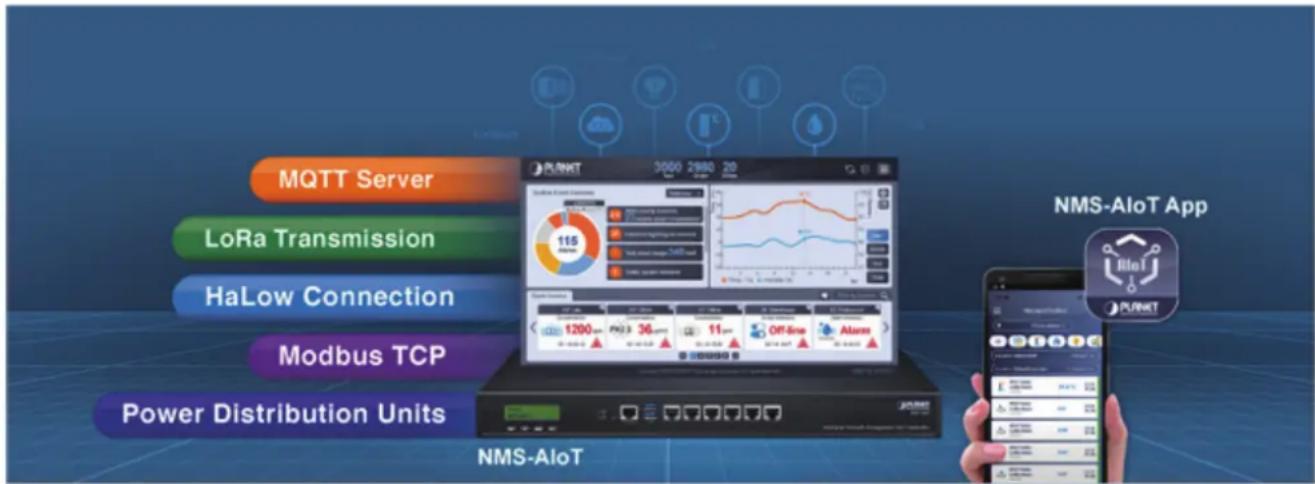
The integration of PLANET LS100/LS200 Sensor series into the NMS-AIoT platform enhances the system's capabilities by enabling seamless connectivity via LoRa, HaLow, and wireless, or wired options. This allows the LS100/LS200 Sensor series to contribute to real-time data collection and AI-driven insights for applications in smart cities, agriculture, and industrial environments, strengthening the platform's overall ecosystem.
The NMS-AIoT platform enables comprehensive integration of diverse devices, such as sensors, RS485/Modbus systems, and PDUs, through flexible connectivity options.
This unified architecture supports environmental data collection and AI process empowering applications like smart cities, precision agriculture, and intelligent manufacturing.
LoRaWAN-based Sensor
PLANET LoRaWAN LS100/LS200 Sensor series is fully compatible with standard LoRaWAN gateways like PLANET LCG-300 series, supporting the LoRaWAN class A. It is ideal for large-scale IoT applications, including building automation, smart metering, HVAC systems, agriculture, and more. The sensor facilitates the seamless integration of multiple sensors, making it a perfect choice for retrofitting leg assets into IoT-enabled systems.
■ Environmental Sensors:
● Temperature and Humidity
LS200-TH IP65 LoRaWAN Indoor Temperature and Humidity Sensor
- Water Leakage
LS100-WL IP65 LoRaWAN Water Leak Sensor
- Light Detection
LS200-LG IP65 LoRaWAN Light Level Sensor
Gas
LS200-VOC IP65 LoRaWAN TVOC Sensor
LS200-PM25 IP30 LoRaWAN PM2.5 Sensor
LS100-CO IP20 LoRaWAN CO Detector
- Smoke
LS100-SMK IP20 LoRaWAN Smoke Detector
■ Device Sensors:
● Temperature and Humidity Sensing
LS200-PT IP65 LoRaWAN Product Temperature Sensor
LS200-TC IP65 LoRaWAN Machine Temperature Sensor
LS200-RF IP65 LoRaWAN Refrigerator Temperature and Humidity Sensor
• Security Monitoring
LS100-PIR IP30 LoRaWAN Indoor Occupancy Sensor
LS100-DW IP30 LoRaWAN Door and Window Sensor
● Power and Current Monitoring
LS200-CM3 IP53 LoRaWAN 3-phase Current Meter
LS200-CM IP53 LoRaWAN 1-phase Current Meter
LS250-PLUG IP20 LoRaWAN Power Plug with Power Meter
- Multi-function
LS200-MF8 IP30 LoRaWAN Temperature/Humidity/PIR/Tilt/Vibration/Reed Switch/Light/Glass Break Sensor
1.3 Features
Key Features
LS100-WL
● Water Leak Sensor
IP65 rating
- LoRaWAN™ Class A compatible
LS100-PIR
● Indoor Occupancy Sensor (Occupancy/Light/Temperature)
IP30 rating
- LoRaWAN™ Class A compatible
LS100-DW
● Door and Window contact Sensor
IP30 rating
- LoRaWAN™ Class A compatible
LS100-CO
- Indoor CO Detector
● High Temperature Alarm (> 60 °C)
- Alarming Bell
- LoRaWAN™ Class A compatible
LS100-SMK
- Smoke Detection
● High Temperature Alarm (> 60 °C) - Alarming Bell
- LoRaWAN™ Class A compatible
LS200-TH
- Indoor Temperature and Humidity Sensor (-20 °C to 55 °C)
IP65 rating - LoRaWAN™ Class A compatible
LS200-PT
● Product Temperature Sensor with PT1000 Needle Probe (-70 °C to 200 °C)
IP65 rating
- LoRaWAN™ Class A compatible
LS200-TC
● Machine Temperature Sensor with Thermocouple (-40 °C to 125 °C)
IP65 rating
- LoRaWAN™ Class A compatible
LS200-RF
● Refrigerator Temperature and Humidity Sensor (-40 °C to 55 °C)
IP65 rating
- LoRaWAN™ Class A compatible
LS200-LG
● Light Level Sensor
IP65 rating
- LoRaWAN™ Class A compatible
LS200-CM3
● 3-phase Current Meter with Clamp-On CT
● Measure 75 A current maximum
IP53 rating
- LoRaWAN™ Class A compatible
LS200-CM
● 1-phase Current Meter with Clamp-On CT
● Measure 150 A current maximum
IP53 rating
- LoRaWAN™ Class A compatible
LS200-PM25
- PM2.5 Sensor
● Temperature and Humidity (-20 °C to 55 °C)
IP30 rating - LoRaWAN™ Class A compatible
LS200-VOC
- TVOC Sensor
● Temperature and Humidity (-20 °C to 55 °C)
IP65 rating - LoRaWAN™ Class A compatible
LS200-MF8
● Indoor Temperature and Humidity Sensor (-20 °C to 55 °C)
- PIR Sensor (3 m to 5 m)
● Light Sensor (1 Lux to 3000 Lux)
- Tilt Sensor (Conversion Angle: 45° ±5° degrees)
- Vibration Sensor
- Reed Switch Sensor
● Glass Break Sensor (Detection Mode: Piezoelectric buzzer)
- LoRaWAN™ Class A compatible
LS250-PLUG
● Power Plug with Power Meter
● Maximum 16 A current measurement
IP20 rating
- LoRaWAN™ Class C compatible
1.4 Product Specifications
LS100 series (WL/PIR/DW)
| Product LS100-WL LS100-PIR LS100-DW | |||
| Wireless Transmission | |||
| Technology LoRaWAN | |||
| Frequency | EU868: 863 to 870 MHzUS915: 902 to 928 MHz | ||
| TX Power | US915: 20 dBm EU868: 16 dBmAS923: 16 dBm (optional) KR920: 14 dBm (optional)AU915: 20 dBm (optional) IN865: 20 dBm (optional) | ||
| Rx Sensitivity | -136 dBm (LoRa, Spreading Factor = 12, Bitrate = 293 bps)-121 dBm (FSK, Frequency Deviation = 5 kHz, Bitrate = 1.2 kbps) | ||
| Work Mode OTAA/ABP Class A | |||
| Data Interfaces | |||
| Power Supply | 2 x 3.6 V ER14505 AA battery in parallel(Battery not included) | 2 x 3.0 V CR2450button battery(Battery not included) | |
| Operating Voltage | DC 3.1 V to 3.65 V DC | 3.1 V to 3.65 V DC 2.4 | V to 3 V |
| Battery Life Time | 5 years(25 °C, 15-minute reports, TxPower=20 dBm, SF10) | 3 years(25 °C, 15-minute reports, TxPower=20 dBm, SF10) | |
| Standby Current 22 | μA 110 μA 12 μA | ||
| Wake-up Current (Typical value) | 7.12 mA 9.78 mA 120 mA/11 mA | ||
| Low Battery Threshold | 3.2 V 3.2 V 2.4 V | ||
| Physical Characteristics | |||
| Dimensions(L x W x H) | 112 mm x 88.2 mm x 32 mm | 78 mm x 78.8 mm x 82.2 mm | 57 mm x 38.05 mm x 15.2 mm42.5 mm x 13 mm x 12 mm (Magnet) |
| Weight 141 g 125.8 | g 43.8 g | ||
| Sensor Dimensions(L x W x H) | 38.5 mm x 11.89 mm x 13.7 mm | - | - |
| Sensor Measurement Info | Water Leak Detection | Occupancy Sensor- Sensing Angle:110° horizontally/60° vertically- Sensing Distance:2 m to 12 m- Object Moving Speed to Send Alarm:≥ 0.2 m/sTemperature Sensor- Measurement Range:-20 °C to 55 °C- Measurement Accuracy: ±2 °CLight Sensor- Illuminance Range:1 lux to 65535 lux | Contact Detection |
| Ingress Protection | IP65 | IP30 | IP30 |
| Operating Temperature | -20 °C to 55 °C | ||
| Relative Humidity | < 90 % RH (non-condensing) | ||
| Storage Temperature | -40 °C to 85 °C | ||
| Standards Conformance | |||
| Regulatory Compliance | CE RED, FCC PART 15B | ||
LS100 series (CO/SMK)
| Product LS100-CO LS100-SMK | ||
| Wireless Transmission | ||
| Technology LoRaWAN | ||
| Frequency | EU868: 863 to 870 MHzUS915: 902 to 928 MHz | |
| TX Power | US915: 20 dBm EU868: 16 dBmAS923: 16 dBm (optional) KR920: 14 dBm (optional)AU915: 20 dBm (optional) IN865: 20 dBm (optional) | |
| Rx Sensitivity | -136 dBm (LoRa, Spreading Factor = 12, Bitrate = 293 bps)-121 dBm (FSK, Frequency Deviation = 5 kHz, Bitrate = 1.2 kbps) | |
| Work Mode OTAA/ABP Class A | ||
| Data Interfaces | ||
| Power Supply 2 x 1.5 V | AAA alkaline batteries (Battery not included) | |
| Operating Voltage DC 2.3 | V to 3.3 V | |
| Battery Life Time | 4.7 years (25 °C, 60-minute reports, TX power = 20 dBm, SF10) | |
| Standby Current 18 μA | 12 μA | |
| Wake-up Current(Typical value) | - | 580 mA |
| Low Battery Threshold | 2.4 V | 2.4 V |
| Physical Characteristics | ||
| Dimensions (L x W x H) | ∅106 mm x 36 mm | ∅106 mm x 40.6 mm |
| Weight | 112 g | 120 g |
| Sensor Measurement Info | CO Detection- Detection ConcentrationRange: 0 to 1000ppmHigh Temperature Alarm(>60 °C)Alarming- 85 dBm @ 3 meter | Smoke DetectionHigh Temperature Alarm(>60 °C)Alarming- 85 dBm @ 3 meter |
| Ingress Protection | IP20 | IP20 |
| Operating Temperature | -20 °C to 55 °C | |
| Relative Humidity | < 90 % RH (non-acondensing) | |
| Storage Temperature | -40 °C to 85 °C | |
| Standards Conformance | ||
| Regulatory Compliance | CE RED, FCC PART 15B | |
LS200 series (TH/PT/TC)
| Product LS200-TH LS200-PT LS200-TC | |||
| Wireless Transmission | |||
| Technology LoRaWAN | |||
| Frequency | EU868: 863 to 870 MHzUS915: 902 to 928 MHz | ||
| TX Power | US915: 20 dBm EU868: 16 dBmAS923: 16 dBm (optional) KR920: 14 dBm (optional)AU915: 20 dBm (optional) IN865: 20 dBm (optional) | ||
| Rx Sensitivity | -136 dBm (LoRa, Spreading Factor = 12, Bitrate = 293 bps)-121 dBm (FSK, Frequency Deviation = 5 kHz, Bitrate = 1.2 kbps) | ||
| Work Mode OTAA/ABP Class A | |||
| Data Interfaces | |||
| Power Supply | 2 x 3.6 V ER14505 AA battery in parallel (Battery not included) | ||
| Operating Voltage DC 3.1 V to 3.65 V DC 3.1 V | to 3.65 V | ||
| Battery Life Time | 5 years (25 °C, 15-minute reports,TxPower=20 dBm, SF10) | 4.8 Years (25 °C,15-minute reports,TxPower=20 dBm, SF10) | |
| Standby Current 24 | μA 25 | μA 34 | μA |
| Wake-up Current(Typical value) | 6.99 mA | 9.94 mA | 7.33 mA |
| Low Battery Threshold | 3.2 V | 3.2 V | 3.2 V |
| Physical Characteristics | |||
| Dimensions(L x W x H) | 112 mm x 65 mm x28 mm | 112 mm x 88.19 mmx 32 mm | 112 mm x 88.19 mmx 32 mm |
| Weight | 141 g | 141 g | 186 g |
| Sensor Dimensions | D: ∅ 16 mm xL: 27 mm | - | - |
| Probe Info | - | PT1000 PlatinumThermal | ThermocoupleCharacteristic |
| Probe Temperature Detecting Range | - | -70 °C to 200 °C | -40 °C to 125 °C |
| Probe Wire Length | - | 2 m | 1 m |
| Probe Dimensions - | 5 mm in diameter x150 mm in length,needle probe | - | |
| SensorMeasurement Info | Temperature Sensor- Measurement Range:-20 °C to 55 °C- MeasurementAccuracy: ±1 °CHumidity Sensor- Measurement Range:0 % to 100 % RH- MeasurementAccuracy: ±4 % RH | Temperature Sensor- Measurement Range:-40° to 125 °C | Temperature Sensor- Measurement Range:-40° to 125 °C |
| Ingress Protection IP65 IP65 IP65 | |||
| OperatingTemperature | -20 °C to 55 °C | ||
| Relative Humidity < | 90 % RH (non condensing) | ||
| StorageTemperature | -40 °C to 85 °C | ||
| Standards Conformance | |||
| RegulatoryCompliance | CE RED, FCC PART 15B | ||
LS200 series (RF/LG/CM3)
| Product LS200-RF LS200-LG LS200-CM3 | |||
| Wireless Transmission | |||
| Technology LoRaWAN | |||
| Frequency | EU868: 863 to 870 MHzUS915: 902 to 928 MHz | ||
| TX Power | US915: 20 dbmAS923: 16 dbm (optional)AU915: 20 dbm (optional) | EU868: 16 dbmKR920: 14 dbm (optional)IN865: 20 dbm (optional) | |
| Rx Sensitivity | -136 dBm (LoRa, Spreading Factor = 12, Bitrate = 293 bps)-121 dBm (FSK, Frequency Deviation = 5 kHz, Bitrate = 1.2 kbps) | ||
| Work Mode | OTAA/ABP Class A | ||
| Data Interfaces | |||
| Power Supply | 2 x 3.6 V ER14505 AA battery in parallel (Battery not included) | ||
| Operating Voltage | DC 3.1 V to 3.65 V | DC 3.1 V to 3.65 V | DC 3.1 V to 3.65 V |
| Battery Life Time | 5 years (25 °C, 15-minute reports, TxPower=20 dBm, SF10) | ||
| Standby Current | 20 μA | 17 μA | 25 μA |
| Wake-up Current (Typical value) | 7.11 mA 7.5 mA 127 mA | ||
| Low Battery Threshold | 3.2 V | 3.2 V | 3.2 V |
| Physical Characteristics | |||
| Dimensions (L x W x H) | 112 mm x 65 mm x 32 mm | 112 mm x 65 mm x 32 mm | 112 mm x 88.19 mm x 32 mm |
| Weight 141 g | 150 g | 141 g | |
| Sensor Dimensions (L x W x H) | - | - | 27.5 mm x 25 mm x 42.5 mm |
| Sensor Weight - - | 3 x 49.6 g | ||
| Sensor Measurement Info | Temperature Sensor- Measurement Range: -40 °C to 55 °C- Measurement Accuracy: ±0.5 °CHumidity Sensor- Measurement Range: 0 % to 100 % RH- Measurement Accuracy: ±3 % RH | Light Sensor- Illuminance Range: 0.01 lux to 157K lux | Current- Measurement Range: 100 mA to 75 A- Measurement Accuracy: < ±1 % (within 300 mA to 75 A)- Current Resolution: 1 mA |
| Ingress Protection IP65 IP65 IP53 | |||
| Operating Temperature | -40 °C to 55 °C -20 °C | to 55 °C | |
| Relative Humidity | < 90 % RH (non condensing) | ||
| Storage Temperature | -40 °C to 85 °C | ||
| Standards Conformance | |||
| Regulatory Compliance | CE RED, FCC PART 15B | ||
LS200 series (CM/VOC/PM25)
| Product | LS200-CM | LS200-VOC | LS200-PM25 |
| Wireless Transmission | |||
| Technology | LoRaWAN | ||
| Frequency | EU868: 863 to 870 MHzUS915: 902 to 928 MHz | ||
| TX Power | US915 20 dBm EU868 16 dBmAS923 16 dBm (optional) KR920 14 dBm (optional)AU915 20 dBm (optional) IN865 20 dBm (optional) | ||
| Rx Sensitivity | -136 dBm (LoRa, Spreading Factor = 12, Bitrate = 293 bps)-121 dBm (FSK, Frequency Deviation = 5 kHz, Bitrate = 1.2 kbps) | ||
| Work Mode OTAA/ABP Class A | |||
| Data Interfaces | |||
| Power Supply | 2 x 3.6 V ER14505 AA battery in parallel(Battery not included) | 8 x 3.6 V ER14505 AAbattery in parallel(Battery not included) | |
| Operating Voltage DC 3.1 V to 3.65 V DC 3.1 V to 3.65 V DC 6.8 V to 7.3 V | |||
| Battery Life Time | 5 years(25 °C, 15-minute reports, TxPower=20 dBm, SF10) | 2.7 years(25 °C, 15-minute reports, TxPower=20 dBm, SF10) | 1.19 years(25 °C, 60-minute reports, TxPower=20 dBm, SF10) |
| Standby Current 25 μA 28 μA 250 μA | |||
| Wake-up Current(Typical value) | 7 mA 0.8 mA to 20 mA | 6.3 mA | |
| Low Battery Threshold | 3.2 V 3.2 V 6.8 V | ||
| Physical Characteristics | |||
| Dimensions(L x W x H) | 112 mm x 88.19 mm x 32 mm | 88 mm x 65 mm x 19 mm | 117 mm x 114 mm x 82.6 mm |
| Weight | 141 g | 113 g | 285 g |
| Sensor Dimensions(L x W x H) | 33 mm x 28.5 mm x 43.5 mm | - | - |
| Sensor Weight | 70.1 g | - | - |
| SensorMeasurement Info | Current- Measurement Range:1 A to 150 A- MeasurementAccuracy: < ±1 %- Current Resolution:1 mA | TVOC Sensor- Measurement Range:0 ppb to 60000 ppbTemperature Sensor- Measurement Range:-20 °C to 55 °CHumidity Sensor- Measurement Range:0 % to 100 % RH | PM2.5 ParticleConcentrationSensor- Particle MassConcentrationEffective Range:0 to 500 μg/m3- Particle MassConcentrationResolution: 1 μg/m3Temperature Sensor- Measurement Range:-20 °C to 55 °C- MeasurementAccuracy: ±1 °CHumidity Sensor- Measurement Range:0 % to 100 % RH- MeasurementAccuracy: ±4% RH |
| Ingress Protection IP53 IP65 IP30 | |||
| OperatingTemperature | -20 °C to 55 °C | -20 °C to 55 °C | -20 °C to 55 °C |
| Relative Humidity | < 90 % RH (non-condensing) | ||
| StorageTemperature | -40 °C to 85 °C | ||
| Standards Conformance | |||
| RegulatoryCompliance | CE RED, FCC PART 15B | ||
LS200-MF8
| Product LS200-MF8 | |
| Wireless Transmission | |
| Technology LoRaWAN | |
| Frequency | EU868: 863 to 870 MHzUS915: 902 to 928 MHz |
| TX Power | US915: 20 dBm EU868: 16 dBmAS923: 16 dBm (optional) KR920: 14 dBm (optional)AU915: 20 dBm (optional) IN865: 20 dBm (optional) |
| Rx Sensitivity | -136 dBm (LoRa, Spreading Factor = 12, Bitrate = 293 bps)-121 dBm (FSK, Frequency Deviation = 5 kHz, Bitrate = 1.2 kbps) |
| Work Mode OTAA/ABP Class A | |
| Data Interfaces | |
| Power Supply 2 x 3.0 V CR2450 button battery (Battery not included) | |
| Operating Voltage DC 2.3 to 3V | |
| Battery Life Time | 2.26 years(25 °C, 60-minute reports, TX power = 20 dBm, SF10) |
| Low Battery Threshold 2.4 V | |
| Physical Characteristics | |
| Dimensions (L x W x H) | 75.5 mm x 19.4 mm x 44 mm |
| Weight 120 g | |
| Sensor Dimensions(L x W x H) | Reed Switch: 46 mm x 16 mm x 12.9 mmGlass Break Sensor: 36 mm x 36 mm x 7.9 mm |
| Sensor Weight - | |
| Sensor Measurement Info | Temperature Sensor- Measurement Range: -20 °C to 55 °C- Measurement Accuracy: ±1 °CHumidity Sensor- Measurement Range: 0 % RH to 100 % RH- Measurement Accuracy: ±7 % RHPassive Infrared Sensor- Detectable Angle: 80° horizontally/55° vertically- Detectable Range: 3 m to 5 mLight Sensor- Illumination Measurement Range: 1 lux to 3000 lux- Illumination Measurement Accuracy: < 15 % |
| Sensor Measurement Info | Tilt Sensor- Conversion Angle: 45° ± 5° - Contact Resistance: Less than 10 Ω- The Insulation Resistance: Greater than 100 MΩ- Operating Temperature: -40 °C to 85 °C- Installation Type: Suitable for PCB at vertical stateVibration Sensor- Model: Ball type omnidirectional signal trigger switch- Voltage: < 6 V- Current: 2 μA to 10 mA- Insulation Resistance: >10 MΩ- Trigger Rate: 100% (amplitude >1 mm, frequency >20 Hz)- Trigger Frequency: >50 HzReed Switch Sensor- Minimum Insulation Resistance 1010 Ω- Maximum Contact Resistance 100 mΩ- Maximum Switching Current 0.5 AGlass Break Sensor- Detection Mode: Piezoelectric buzzer- Power Supply: Self-generated voltage chip- Impedance: Normal (NC): 7 Ω (max) Alarm (NO): 1 MΩ (min)- Sensor Sensing Range: within 2.5 M radius- Signal Sensing Time: 1 to 3 seconds- Loop Voltage: 15 V DC (max)- Loop Current: 25 mA (max)- Applicable Glass Type: In theory, as long as any glass is impacted by high frequency, its vibration frequency and amplitude can be detected to a certain extent.- Operating Temperature: -10 to 50 °C- Wire Length: 100 cm- Installation: The glass at the installation position must be wiped clean first, and then the double-sided adhesive tape on the back of the detector must be torn and fixed on the glass. The detector should be installed about 10 cm from the corner of the glass frame. |
| Ingress Protection | IP30reed switch - IP67glass break - IP40 |
| Operating Temperature -10 °C to 50 °C | |
| Relative Humidity < 90 % RH (non-condensing) | |
| Storage Temperature -40 °C to 85 °C | |
| Standards Conformance | |
| Regulatory Compliance CE RED, FCC PART 15B | |
LS250-PLUG
| Product LS250-PLUG | |
| Wireless Transmission | |
| Technology LoRaWAN | |
| Frequency | EU868: 863 to 870 MHzUS915: 902 to 928 MHz |
| TX Power | US915: 20 dBm EU868: 16 dBmAS923: 16 dBm (optional) KR920: 14 dBm (optional)AU915: 20 dBm(optional) IN865: 20 dBm (optional) |
| Rx Sensitivity | -136 dBm (LoRa, Spreading Factor = 12, Bitrate = 293 bps)-121 dBm (FSK, Frequency Deviation = 5 kHz, Bitrate = 1.2 kbps) |
| Work Mode OTAA/ABP Class C | |
| Data Interfaces | |
| Power Supply 100 V AC to 240 V AC, 50/60Hz | |
| Physical Characteristics | |
| Dimensions (L x W x H) | 95 mm x 58 mm x 42.5 mm |
| Weight 135 g | |
| Sensor Measurement Info | Current- Measurement Range: 100 mA to 16 AResistive load: 16 A/250 V AC; P: 4000 VAInductive load (max.): 8 A/220 V AC; P: 1760 VA (COSφ=0.4)Rated Load:- EU type: 16 A/250 V AC- UK type: 13 A/250 V AC- AU type: 10 A/250 V AC- US type: 15 A/125 V ACElectric motor (max.): 1.5 HP/240 V AC |
| Ingress Protection IP20 | |
| Operating Temperature -20 °C to 55 °C | |
| Relative Humidity | < 90 % RH (non-condensing) |
| Storage Temperature | -40 °C to 85 °C |
| Standards Conformance | |
| Regulatory Compliance | CE RED, FCC PART 15B |
2. Hardware Introduction
2.1 Physical Descriptions
| LS100-DW | |
| Appearance |  |
| LS100-DW | |
| Appearance |  |
| LS100-CO | |
| Appearance |  |
| LS100-SMK | |
| Appearance |  |
| LS100-PIR | |
| Appearance |  |
 | |
 | |
| LS200-TH | |
| Appearance |  |
| LS200-PT | |
| Appearance |  |
| LS200-TC | |
| Appearance |  |
| LS200-RF | |
| Appearance | 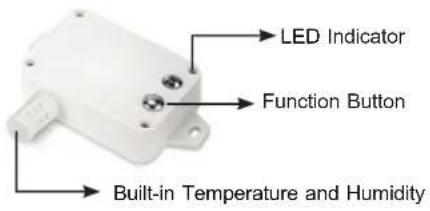 |
| LS200-LG | |
| Appearance | 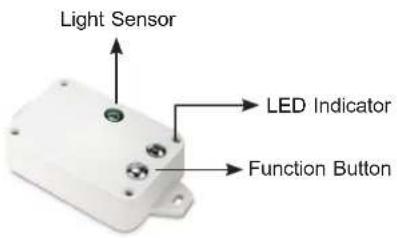 |
| LS200-CM3 | |
| Appearance |  |
| LS200-CM | |
| Appearance | 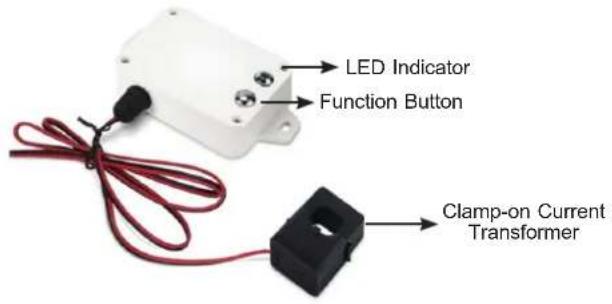 |
| LS200-PM25 | |
| Appearance |  |
 | |
 | |
| LS200-VOC | |
| Appearance |  |
| LS200-MF8 | |
| Appearance | 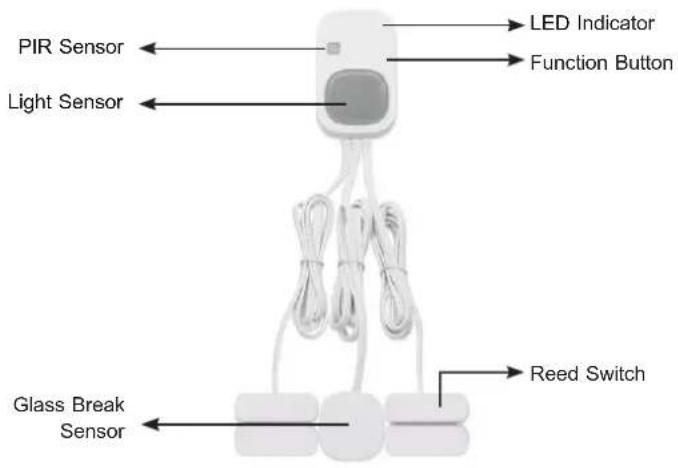 |
| LS200-PLUG | |
| Appearance |   |
LED Definition:
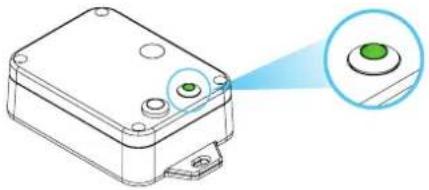
| Color Function | |||
| LED | Green | Lights 1 time | Indicating the network is successfully connected after turning on LoRaWAN sensor. |
| Flashes 1 time | Indicating it is triggered to send a report after pressing the Function Button Once. | ||
| Flashes 3 times | Indicating the LoRaWAN sensor is not in the network after pressing the Function Button Once. | ||
| Flashes 20 times | Indicating it goes to Factory Reset and Restart after long-pressing the Function Button for 5 seconds. | ||
2.2 Hardware Installation
Refer to the illustration and follow the simple steps below to quickly install your LoRaWAN Sensor.
2.2.1 Battery Installation
• Product uses two CR2450 batteries:
Module: LS100-DW
Unscrew the four screws on the device's cover to remove the front cover. Insert the battery and put back the device's cover and tighten the screws.

• Product uses two ER14505 batteries:
Modules: LS100-PIR, LS100-WL, LS200-TH, LS200-PT, LS200-TC, LS200-RF, LS200-LG, and LS200-CM
Unscrew the four screws on the device's cover to remove the front cover. Insert the battery and put back the device's cover and tighten the screws.

2.2.2 Magnetic Mounting or Wall Mounting
- Magnetic mounting
Models: LS100-WL, LS200-TH, LS200-PT, LS200-TC, LS200-RF, LS200-LG, and LS200-CM
The LoRaWAN Sensor features magnetic mounting for easy attachment to the surface with iron material.

• Wall mounting by screws (optional)
Models: LS100-WL, LS200-TH, LS200-PT, LS200-TC, LS200-RF, LS200-LG, and LS200-CM
To make the installation more secure, please use screws (purchased separately) to fix the device on the wall or other objects.

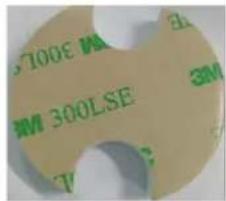
• Wall mounting by the double-sided stickers
Model: LS100-PIR
-
Clean the surface of the objects before sticking with the sticker.
-
Tear off the 3M300LSE side of the sticker, place it on the bottom product as shown in the picture, and press it.
-
Tear off the other side of the sticker and put the sticker to a clean the wall and press the sticker firmly for around 20 seconds.
Model: LS-100-DW
Tear off the magnetic body's 3M release paper, and then adhere the body to the window or door frame by sticking it in parallel with the magnetic body.


Note
Do not install the device in a metal shielded box or in an environment surrounded by other electrical equipment to avoid affecting the wireless transmission of the device.
2.3.2 Precautions
• LS100-WL: IP65 LoRaWAN Water Leak Sensor
The sensor probe of LS100-WL has to attach to the smooth ground that may accumulate leakage.

• LS100-PIR: IP30 LoRaWAN Indoor Occupancy Sensor
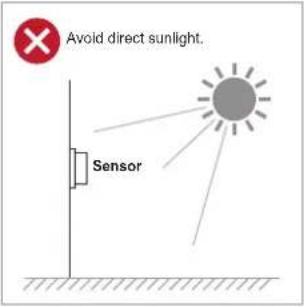
The correct installation of LS100-PIR is shown below.


- Detection Range

Coverage area A-Distance: 5 meters; sensing angle: 120°
Coverage area B-Distance: 8 meters; sensing angle: 60°
Coverage area C-Distance: 11 meters; sensing angle: 30°
• LS100-DW: IP30 LoRaWAN Door and Window Sensor
The distance between the two objects has to be less than 2 cm.
• LS200-TH: IP65 LoRaWAN Indoor Temperature and Humidity Sensor
Installation height recommendation: 1-2 m.
• LS200-PT: IP65 LoRaWAN Product Temperature Sensor
When LS200-TC is compared with the last reported values, the temperature change is expected to exceed 0.1\ °C (by default). It will report values at the Min Time interval if it does not exceed 0.1\ °C (by default). It will report values at the Max. Time interval.
• LS200-TC: IP65 LoRaWAN Machine Temperature Sensor
When LS200-TC is compared with the last reported values, the temperature change is expected to exceed 10\ °C (by default). It will report values at the Min. Time interval. If it does not exceed 10\ °C (by default), it will report values at the Max. Time interval.
• LS200-LG: IP65 LoRaWAN Refrigerator Temperature and Humidity Sensor
Compare the illumination value detected by the illumination sensor with the set illumination value. The detected value exceeds the set value (default 50 lux), the currently detected illumination value is sent.
• LS200-CM3/LS200-CM: IP53 LoRaWAN Current Meter
The 3-phase current meter (LS200-CM3) samples the current according to Min. Time. If the current value sampled this time relatively exceeds the set value (the default is 100 mA) more than the current value reported last time, the device will immediately report the current value sampled this time. If the current variation does not exceed the default value, the data will be reported regularly according to Max. Time.
- When using it, the back of it can be adsorbed on the iron surface, or the two ends can be fixed to the wall with screws.
- When installing the LS200-CM3 current transformer, please separate the live and neutral wires of the wire to be detected, and only take the live wire through current transformer and start the measurement according to the wiring below:
![graph TD A["Neutral Wire"] --> B["Live Wire"] B --> C["L ← K CT Phase A"] C --> D["LS200-CM3"] D --> E["Current Direction L ← K CT Phase B"] E --> F["Current Direction L ← K CT Phase C"] F --> G["The CT terminal should be close to the power terminal as much as possible."] style A fill:#f9f,stroke:#3…](/content/2026/07/1411253/images/ad842285fdf1659a454599d680b74d30fc02c1c00139fa5e490ba75340d47f40.jpg)
If the live wire and the neutral wire are connected together at the same time, they will offset each other and the measurement is 0.
"L ← K" is marked on the bottom of the CT.

- Before using, user must check whether the appearance is otherwise, the test accuracy will be affected.
- The operating environment should be kept away from strong magnetic fields, so as not to affect the test accuracy. It is strictly use in humid and corrosive gas environments.
- Before installation, please confirm the current value of the current value of the load is higher than the measurement range, select a model with a higher measurement range.
- Children and the persons who do not have enough knowledge about electric measurements must not use this instrument.
- Do not measure the electricity naked or barefooted to protect yourself from electrical shock hazard.
-
Be careful not to get hurt with the sharp test lead pins.
-
Warning for High Power Line Measurements
High Power Line (High Energy Circuits) such as Distribution Transformers, Bus Bars and Large Motors are very dangerous. High Power Line sometimes includes High Surge Voltage that could cause explosive short in the instrument and could result in shock hazard. For voltage measurement of High Power Line, do not touch Clamp Meter, its Test Leads, and any part of the circuit.
- Warning for High Voltage Measurements
Even for Low Energy Circuits of electric/electronic appliances, such as heating elements, small motors, line cords and plugs, High Voltage Measurements are very dangerous. Do not touch Clamp Meter, Test Leads, and any part of the circuit. Generally, shock hazard could occur when the current between the circuit that involves more than 33 V rms or 46.7 V DC or peak and ground goes up to 0.5 mA or more.
- LS100-CO
Default Settings:
Max Time: 3600 s (0x0e10)
Min Time: 3600 s (0x0e10)
Battery Voltage Change: 0.1 V (0x01)
CO Trigger
● The device samples CO concentration 30 seconds after power-up.
- If the CO concentration exceeds 110 ppm, the device triggers an alarm:
The red indicator light flashes.
The buzzer sounds an alarm.
A CO alarm report is immediately sent.
- If the CO concentration remains above 110 ppm, the device sends an alarm report every 30 seconds.
- Once the CO concentration drops below 110 ppm, the alarm stops, and a restoration report is sent.
High-Temperature Alarm
- The device samples temperature data every minute once it is connected to the network.
- If the temperature exceeds 60 °C, the device activates an alarm:
The red indicator light flashes.
The buzzer sounds an alarm.
A high-temperature alarm report is immediately sent.
- If the high-temperature condition persists, the alarm report is sent every minute.
- Once the temperature drops below 60 °C, the alarm stops, and a restoration report is sent.
- LS100-SMK
Default Settings:
Max Time: 3600 s (0x0e10)
Min Time: 3600 s (0x0e10)
Battery Voltage Change: 0.1 V (0x01)
Smoke Trigger
Upon power-up, the device continuously monitors smoke concentration levels. If a significant change in smoke status is detected, the buzzer will activate the red indicator will flash, signaling an alarm condition. Simultaneously, device will transmit an immediate alert report. Once the smoke concentration returns to normal, a clearance report is sent, and the alarm ceases.
High-Temperature Alarm
After successfully connecting to the network, the device samples ambient temperature every minute. If the temperature exceeds 60\ °C ( 140\ °F ), the buzzer will sound, and the red indicator will flash, accompanied by an diate alarm report. If the high-temperature condition persists, the device will continue transmitting alarm reports every minute. Once the temperature drops below 60\ °C ( 140\ °F ), the alarm ceases, and a clearance report is sent.
• LS200-VOC: IP65 LoRaWAN TVOC Sensor
LS200-VOC measurement range is 0 ppb to 60000ppb.
Default Settings
Max Time: 900 s
Min Time: 900 s
- The Min Time should not be less than 4 minutes.
- The Max Time should be greater than or equal to the Min Time.
Battery Change: 0.1 V (0x01)
TVOC Change: 300 ppb (0x012C)
| Excellent 0 to 65 ppb | |
| Good 65 to 220 ppb | |
| Moderate 220 to 660 ppb | |
| Poor 660 to 2200 ppb | |
| Unhealthy 2200 to 60000 ppb |
Note: This range represents common reference values; the exact standards should be based on local regulations.

Note
- LS200-VOC requires a 13-hour initialization period after the first power-on. During this time, the sensor undergoes automatic calibration, and the data readings may be biased. Accurate measurements will be available after the calibration process is complete.
- Once the sensor is operating normally, valid data readings can be obtained 20 minutes after the device is restarted. This 20-minute period allows the sensor to reach a stable state.
- If the sensor is damaged, fails to initialize, or encounters three consecutive data reading failures after warming up, the device will report a value of 0xFFFF. This process is automatically managed by the device upon startup, and no user intervention is required.
• LS200-PM25: IP30 LoRaWAN PM2.5 Sensor
Default setting:
Max Time: 8400 s
Min Time: 30 s (US915, AU915, KR920, AS923, IN865)
120 s (EU868)
Report Type count = 1

Note
- Max Time and Min Time rules, configured by formula: Max Time ≥ Report Type count * Report Min Time+10
- Min Time configuration is invalid. But due to software limitations, it is required to comply with the above formula and not equal to 0.
- The Min Time setting of EU868 cannot be less than 120 s, and the Max Time cannot be less than 370 s.
- LS250-PLUG: IP20 LoRaWAN Power Plug with Power Meter Default Setting:
Max Time: 900 s (15 min)
Min Time: 2 s
Current Change: 100 mA (0x0064)
Power Change: 20 W (0x14)

Note
- The device initially reports the ON/OFF status, energy consumption, and over-current alarm. After a 10-second interval, it transmits voltage, current, and power data.
- When an over-current alarm is triggered, the device automatically disconnects the load, and the network indicator flashes rapidly approximately 25 times.
- If the detected current exceeds the rated load current limit for more than 2 seconds, the device will automatically disconnect the load to prevent damage.
• LS200-MF8: IP30 LoRaWAN Multi-functional Sensor
Default Setting:
Max Time: 3600 s (0x0e10)
Min Time: 3600 s (0x0e10)
Battery Change: 0.1 V (0x01)
Temperature Change: 1 °C (0.0064), Signed 2 Bytes, unit: 0.01 °C
Humidity Change: 10 % (0x14), 1 Byte, unit: 0.5 %
Illuminance Change: 100 lux (0x64), 1 Byte, unit: 1 lux
Internal Shock Sensor Sensitivity: 0x05
Internal Vibration Sensor, Sensitivity Range: 0x00-0x0A
(The smaller the number, the more sensitive)
Disable Time: 30 s (0x001e) // PIR Occupancy (Disable Time must ≥ 5 s)
Detection Time: 300 s (0x012c) // PIR Occupancy (Detection Time must Disable Time)
Restore Report Set: 0x00 (DO NOT report when sensor restore) // Vibration Sensor
3. Preparation
Before accessing the LoRaWAN Sensor controllers, user has to install utility tool for operation.
3.1 Requirements
PLANET Industrial LoRaWAN Gateway, e.g., LCG-300 series
Workstations running Windows 7/8/10/11, macOS 10.12 or later, Linux Kernel 2.6.18 or later, or other modern operating system are compatible with TCP/IP protocols and installed with web browser.

It is recommended to use Google Chrome, Microsoft Edge or Mozilla Firefox to access the LoRaWAN Gateway. If the Web interface of the LoRaWAN Gateway is not accessible, please turn off the anti-virus software or firewall and then try it again.
![graph LR A["LoRaWAN Sensor"] --> B["Gateway"] B --> C["5G/LTE Ethernet Backhaul"] C --> D["Network Server"] D --> E["Application Server"] B --> F["TCP/IP SSL Secure Payload"]](/content/2026/07/1411253/images/8a25e9b6773376bb86787e6f4334c998e538b44bcccda2f67ae65ee8870f6086.jpg)
3.2 LoRaWAN Gateway Setup
3.2.1 LoRa Frequency Setting
a. Open browser and log in to the Web GUI of LCG-300 series.
b. Click LoRa label on main menu and LoRa label on function menu.

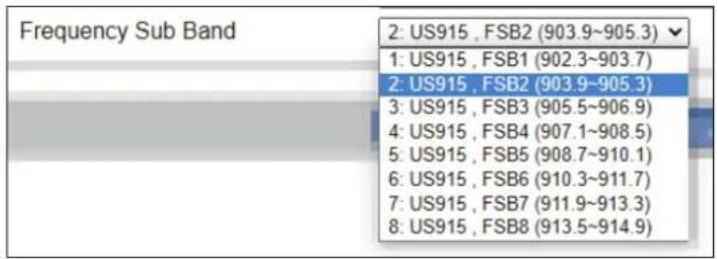
c. Select the Frequency Plan for your local area. Some Frequency Plan supports Frequency Sub Band. (In this test case, select "US915" for frequency plan and "US915, FSB2" for frequency sub band.)
LCG-300 series-US

LCG-300 series-EU

3.2.2 LoRaWAN Setting
Click LoRaWAN label and input the related data.
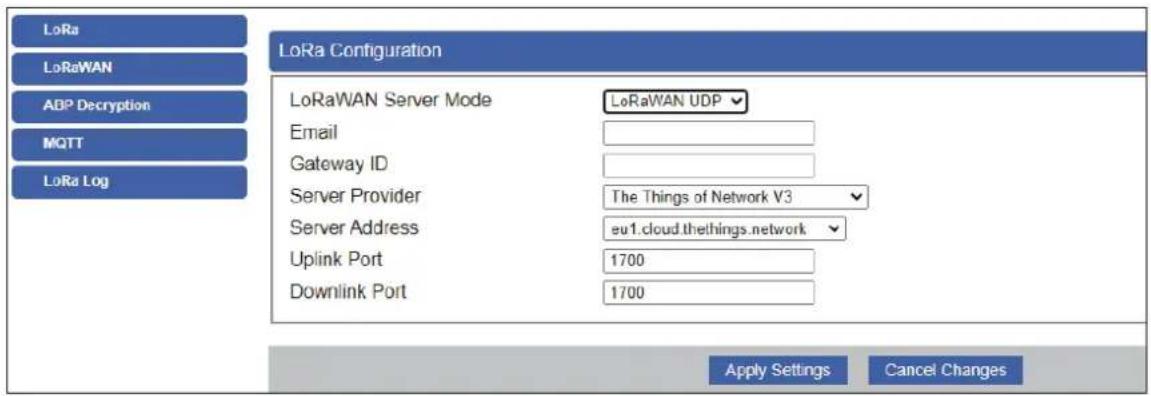
| Object Description | |
| LoRaWAN Server Mode | The service of LoRaWAN |
| Email The registered email of LoRaWAN server | |
| Gateway ID | The unique identity of the base station, which the server can distinguish a different LoRaWAN base station |
| Server Provider The service provider of LoRaWAN server | |
| Server Address The IP address of LoRaWAN server | |
| Uplink Port | LoRaWAN data service center program uplink port. Value range is 0-65535 and the default value is 1700. |
| Downlink Port | LoRaWAN data service center program downlink port. Value range is 0-65535 and the default value is 1700. |
3.2.3 Setting Up of LoRa Connection via ABP Decryption
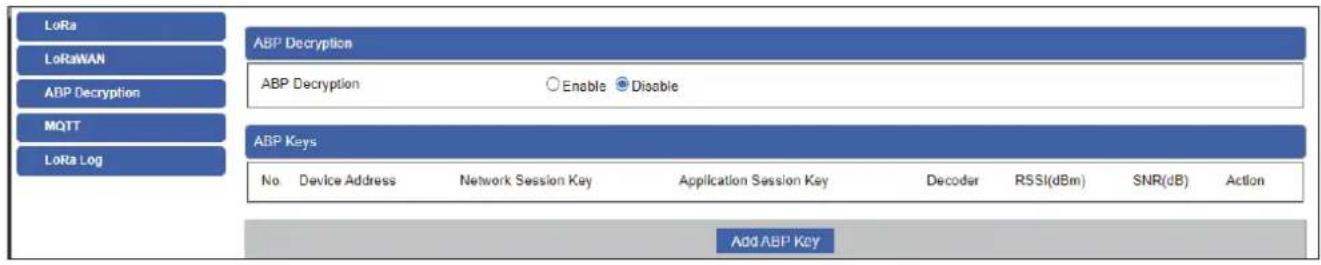
a. Click Enable.
b. Click Add ABP Key Button. Then input data which has to be the same as the settings of LoRa node/sensor.
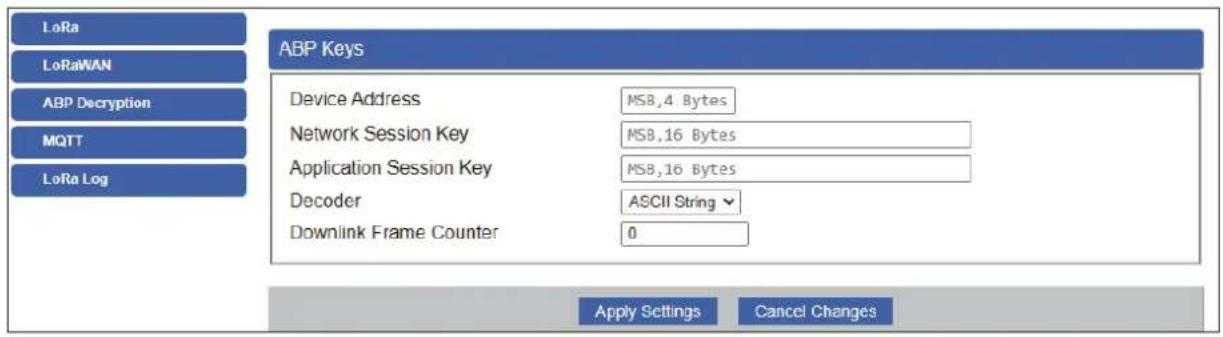
| Object Description |
| Device Address* The DevAddr of device |
| Network Session Key* The NWKSKEY of device |
| Application Session Key* The APPSKEY of device |
| Decoder The decoder way |
| Downlink Frame Counter The action status of sensor or node |
*The data of the LoRa sensor has to be provided by provider; and user also can change the setting after connecting.
When sensor connects to LoRa Gateway, the RSSI and SNR would be shown on the UI of gateway as seen below.
| ABP Decryption | |||||||
| ABP Decryption | ● Enable ○ Disable | ||||||
| ABP Keys | |||||||
| No. | Device Address | Network Session Key | Application Session Key | Decoder | RSSI(dBm) | SNR(dB) | Action |
| 1 | 0004 2478 | FEB4A5B7F15W13W4LDPE15W9E10SDE | C98FC6BC17F6D6G20D4A6GAC1BC1E2DE | ASCII_String | |||
| 2 | 0004 247D | 2DB52FF308FD84AA209C4D84A809B8B | 090E6E6E6E6FC64D812018121B07GB94E | ASCII_String -88 | 11 | ||
| 3 | 0004 2483 | ACF05F1605HC480C157B1257A5B5FB23 | ED8E6+ED80A6G6H322349IFETD601F4 | ASCII_String | |||
| 4 | 0004 2482 | 252133TC34DA4D40F1DCE30B3D0D13 | BCBD6E6E6C2A8FF41B8B13DCCD4CC588 | ASCII_String | |||
| 5 | 0004 2484 | FB7E909E679D28251L851B530D28A187 | A688DF2F2489D194E757E2CF06GBBC8 | ASCII_String | |||
| 6 | 0004 247E | CC153C44AA56E5D5E823E54BBAC5FA776 | 87F@CS21B13A8A7B9C2G2ADC7AB1BD6 | ASCII_String | |||
| 7 | 0004 247F | G39FE3C27F12B8C1480S2A7B2A1X1F87 | 446C2B1AF6B3C16C2B8BC2G6B5B7E1 | ASCII_String -75 | 12 | ||
| 8 | 0004 247C | 307E6CTFE77DCB2DCFSB4A77B9D8EB | E29E6F2FBA3G12B8A4G85B73CB5B62A | ASCII_String | |||
| 9 | 0004 247A | 3B7ZBA3F15A4BA2B5P1B5M45N47CB155 | 5CFA06AFC5D5E6E6C2E4B8B9B4GD5FA | ASCII_String | |||
| 10 | 0004 2480 | F187C P6CDBA14B5BCCTBDFT4B4B923B9 | 5C1G#A5C7W6BF9D9A4CCCTJ7B974BA | ASCII_String -94 | 8 | ||
3.3 Connecting to PLANET NMS-AIoT
Set up the NMS-AIoT Controller with an Ethernet connection for the first-tim configuration shown in the topology below.

Launch the Web browser (Google Chrome is recommended.) and enter the default IP address https://192.168.1.100:8888 of NMS-AIOT. Then, enter the default username and password shown above to log on to the system.
The secure login with SSL (HTTPS) prefix is required.

After logging on, connect the NMS-AIoT Controller to the network to centrally control PLANET managed devices.
- In NMS-AIOT, press the "Menu" icon ☐. Then click "Devices Management" and "Devices List" to go to devices list page.
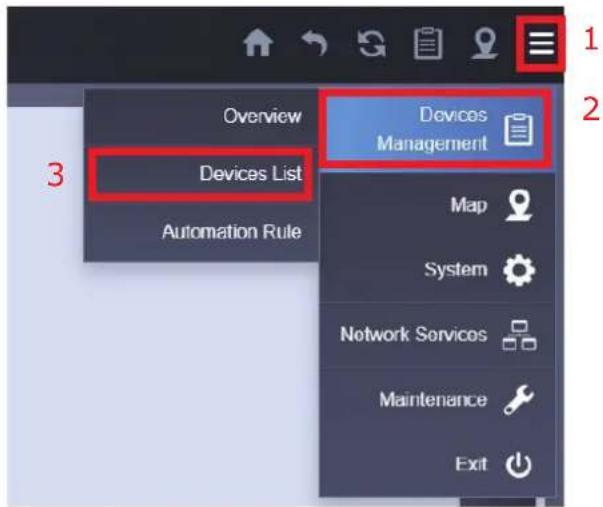
- Press the "plus" icon + to open the page to add a new device.

3. Add a new LoRaWAN Sensor on the NMS-AIoT
Enter the relevant data for the LoRaWAN Sensor.

After adding sensor(s), it will be shown in the device list in Web UI of NMS-AIoT.
| ■Status | Group | Device Type | Model Number | Alias Name | DevEUI | Device Description | Location | Action |
| □ | DEMO | LoRaWAN Sensor | LS200-TH | Temp & Humidity | 00137A1000042A7D | LoRaWAN Indoor Temperature and Humidity Sensor | Default Location | |
| □ | DEMO | LoRaWAN Sensor | LS100-PIR | Occupy sensor (PIR) | 00137A1000042A84 | LoRaWAN Indoor Occupancy Sensor | Default Location | |
| □ | DEMO | LoRaWAN Sensor | LS200-RF | T&H for refrigerator | 00137A1000042A7C | LoRaWAN Refrigerator Temperature and Humidity Sensor | Default Location | |
| □ | DEMO | LoRaWAN Sensor | LS200-CM3 | 3phase Current Meter | 00137A1000042A80 | LoRaWAN 3-Phase Current Meter | Default Location | |
| □ | DEMO | LoRaWAN Sensor | LS200-CM | 1phase Current Meter | 00137A1000043901 | LoRaWAN 1-Phase Current Meter | Default Location |
4. Customer Support
Thank you for purchasing PLANET products. You can browse our online FAQ resource and User's Manual on PLANET Web site first to check if it could solve you need more support information, please contact PLANET switch support team.
PLANET online FAQs: https://www.planet.com.tw/en/support/faq
Switch support team mail address: support@planet.com.tw
- PREPARATION 39
- 3.3 CONNECTING TO PLANET NMS-AIOT....42
- CUSTOMER SUPPORT 45
- COPYRIGHT
- DISCLAIMER
- FCC COMPLIANCE STATEMENT
- CE MARK WARNING
- WEEE
- TRADEMARKS
- REVISION
- PRODUCT INTRODUCTION
- 1.1 PACKAGE CONTENTS
- 1.2 OVERVIEW
- BUILD A SMART IOT ENVIRONMENT WITH FABULOUS LORAWAN SENSORS
- LORA AND LORAWAN WIRELESS TECHNOLOGY
- EXPANDING CAPABILITIES WITH PLANET INDUSTRIAL LORA NODE CONTROLLERS
- LORAWAN-BASED SENSOR
- ENVIRONMENTAL SENSORS
- DEVICE SENSORS
- 1.3 FEATURES
- KEY FEATURES
- LS100-WL
- LS100-PIR
- LS100-DW
- LS100-CO
- LS100-SMK
- LS200-TH
- LS200-PT
- LS200-TC
- LS200-RF
- LS200-LG
- LS200-CM3
- LS200-CM
- LS200-PM25
- LS200-VOC
- LS200-MF8
- LS250-PLUG
- 1.4 PRODUCT SPECIFICATIONS
- HARDWARE INTRODUCTION
- 2.1 PHYSICAL DESCRIPTIONS
- LED DEFINITION
- 2.2 HARDWARE INSTALLATION
- 2.2.1 BATTERY INSTALLATION
- MODULE: LS100-DW
- 2.2.2 MAGNETIC MOUNTING OR WALL MOUNTING
- WALL MOUNTING BY THE DOUBLE-SIDED STICKERS
- MODEL: LS100-PIR
- MODEL: LS-100-DW
- 2.3.2 PRECAUTIONS
- LS100-WL: IP65 LORAWAN WATER LEAK SENSOR
- LS100-PIR: IP30 LORAWAN INDOOR OCCUPANCY SENSOR
- DETECTION RANGE
- LS100-DW: IP30 LORAWAN DOOR AND WINDOW SENSOR
- LS200-TH: IP65 LORAWAN INDOOR TEMPERATURE AND HUMIDITY SENSOR
- LS200-PT: IP65 LORAWAN PRODUCT TEMPERATURE SENSOR
- DEFAULT SETTINGS
- CO TRIGGER
- HIGH-TEMPERATURE ALARM
- SMOKE TRIGGER
- LS200-VOC: IP65 LORAWAN TVOC SENSOR
- LS200-PM25: IP30 LORAWAN PM2.5 SENSOR
- DEFAULT SETTING
- LS250-PLUG: IP20 LORAWAN POWER PLUG WITH POWER METER DEFAULT SETTING
- LS200-MF8: IP30 LORAWAN MULTI-FUNCTIONAL SENSOR
- PREPARATION
- 3.1 REQUIREMENTS
- 3.2 LORAWAN GATEWAY SETUP
- 3.2.1 LORA FREQUENCY SETTING
- 3.2.2 LORAWAN SETTING
- 3.2.3 SETTING UP OF LORA CONNECTION VIA ABP DECRYPTION
- 3.3 CONNECTING TO PLANET NMS-AIOT
- ADD A NEW LORAWAN SENSOR ON THE NMS-AIOT
- CUSTOMER SUPPORT
Brand : Planet
Model : LS200-PT
Category : Electronic sensor