
Effekt - Loudspeaker Teufel - Free user manual and instructions
Find the device manual for free Effekt Teufel in PDF.


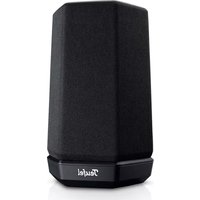
| Product Type | Wireless Speaker |
| Brand | Teufel |
| Model | Effekt |
| Dimensions (H x W x D) | 195 x 75 x 75 mm |
| Weight | 580 g |
| Power Output | 20 W |
| Frequency Range | 60 Hz - 20 kHz |
| Battery Life | Up to 12 hours |
| Charging Time | Approx. 3 hours |
| Connectivity | Bluetooth 5.0, AUX input |
| Controls | Buttons for power, volume, playback, pairing |
| Water Resistance | IPX5 (splash proof) |
| Material | Plastic with fabric grille |
| Included Accessories | USB-C cable, AUX cable, quick start guide |
| Color | Black |
| Special Features | TWS pairing, hands-free calling |
| Maintenance | Wipe with dry cloth; avoid liquids; store in dry place |
| Safety | Do not expose to extreme temperatures; keep away from small children |
| Spare Parts | Not user-replaceable; contact dealer for service |
Frequently Asked Questions - Effekt Teufel
User questions about Effekt Teufel
0 question about this device. Answer the ones you know or ask your own.
Ask a new question about this device
Download the instructions for your Loudspeaker in PDF format for free! Find your manual Effekt - Teufel and take your electronic device back in hand. On this page are published all the documents necessary for the use of your device. Effekt by Teufel.
USER MANUAL Effekt Teufel
Technical Description And User Manual

Effect Wireless Speaker
Teufel
Contents
General Notes And Information ..... 2
Overview 7
Setup......8
Operation....9
Troubleshooting......11
Technical Data 12
Declaration Of Conformity .....12
Disposal....13
General Notes And Information
Notice
The information in this document may change without prior notice and in no way constitutes any liability on the part of Lautsprecher Teufel GmbH.
No part of this user manual may be reproduced in any form or be broadcasted in any way electronically, mechanically, by photocopy or recording without the written permission of Lautsprecher Teufel GmbH.
© Lautsprecher Teufel GmbH Version 2.0, January 2022
Original packaging
If you wish to exercise your right of return, we ask that you be absolutely sure to hold on to the packaging. We can only accept product returns with the ORIGINAL PACKAGING.
Empty boxes are not available!
Complaints
In case of a complaint we will need the following information to process your enquiry:
1. Invoice number
Can be found on the sales slip (enclosed with the product) or on the order confirmation received as a PDF document, e.g. 4322543
2. Serial number or batch number
Located on the back side of the device, e.g. serial no.: KB20240129A-123.
Thank you for your support!
Contact
Please contact our customer service department with any questions, suggestions, or complaints:
Online support: www.teufelaudio.com/service
Contact form: www.teufelaudio.com/contact

Before operating the product for the first time, please read the safety notes and user manual carefully. Only in this way, you can ensure that all functions are used in a safe and reliable manner. Store the user manual in a safe place and also be sure to pass it on to any subsequent owner.
NOTICE
Check that all items have been delivered and that nothing is damaged. If you find any damage, do not operate the device; instead contact our customer service department.
Proper use
The wireless speakers are designed for the playback of audio signals from an external player via wireless connection.
Only use the wireless speakers as described in this user manual. Any other use will be deemed as not in accordance with the instructions and may lead to damage to property or even persons.
The manufacturer accepts no liability for damage caused by improper use.
The wireless speakers are intended for domestic use.
Explanation of terms
You can find the following signal terms in this user manual:
CAUTION
This signal term indicates a low risk, which, if not avoided, may result in minor or moderate injury.
NOTICE
This signal term warns you of potential damage.
Safety notes
This chapter contains general safety notes which you should always observe to protect yourself and third parties. Also observe the warning notes in each chapter of this user manual.
Touching live parts can result in severe injury or death.
- When connecting the device, make sure that the correct voltage is present. You can find more information about this on the rating plate.
- Regularly check the device and the mains adapter for damage. Immediately disconnect the mains plug from the socket and do not operate the device if its case is defective or exhibits other visible damages.
- This device is disconnected from the mains by pulling the mains plug out of the socket. Therefore make
sure that the socket is always easily accessible.
- If the device emits smoke, smells burnt or produces unusual sounds, immediately disconnect it from the mains and do not operate it further.
- Never open the device housing. Repairs may only be carried out by an authorised specialist workshop. Only parts that match the original specifications may be used.
- Only use the accessory products specified by the manufacturer.
- Never modify the device. Unauthorised modifications may affect the safety and functionality.
- Never touch the mains plug with wet hands.
An unsuitable setup location may result in injury and damage.
- Never use the device unmounted in vehicles, in unstable locations, on wobbly tripods or furniture, on insufficiently dimensioned brackets etc. The device could tip or fall down and cause injury to persons or be damaged itself.
- Arrange the device so that it cannot be knocked over accidentally and make sure that the cables do not pose a tripping hazard.
- Do not place the device near heat sources (e.g. heaters, ovens, other heat generating equipment such as amplifiers etc.).
- Do not use the device in environments where there is a risk of explosion.
- Only use the wireless speakers in locations where wireless radio transmission is allowed.
Children can become trapped in the plastic wrapping when playing and suffocate.
- Do not allow children to play with the device or the plastic wrapping. There is a danger of suffocation.
- Never allow children to operate electrical equipment unsupervised.
Extended listening at high volumes may lead to hearing loss.
To avoid damage to health, avoid extended listening at high volumes.
- When the volume is set high, always keep a certain distance from the device and never place your ears directly on the speaker.
- If your external player is set to full volume, it may produce very high sound pressure. This may have psychological consequences and also cause physical injury. Children and pets are particularly at risk. Set your signal source device volume to a low setting before turning on the power.
This product contains magnetic material.
- If necessary, consult your physician and ask about effects on implants such as pacemakers or defibrillators.
Improper use may lead to damage or fire.
- Do not place open flames such as burning candles or similar on the device.
- Ensure sufficient ventilation.
- Do not expose the device to direct sunlight.
- Only use the device indoors.
- Do not operate the device in wet rooms and protect it from dripping and splashing water.
Make sure that no vases or other liquid-filled objects are located on or near the device in order to prevent liquid from penetrating the housing. If water or other debris have infiltrated the device, immediately pull the mains adapter out of the socket. Then send the device to our service address.
The isolation pads can produce discolouration on sensitive surfaces.
- On parquet, varnished wood and similar surfaces, you should stick felt gliders to the rubber feet of the device or put a blanket under it. This will prevent discolouration of the floor over the long term.
Explanation of symbols
 | Protection class IIDual insulation |
 | Risk of electrical shock – do not open the housing.Disconnect the mains cord before changing a fuse. |
Package contents
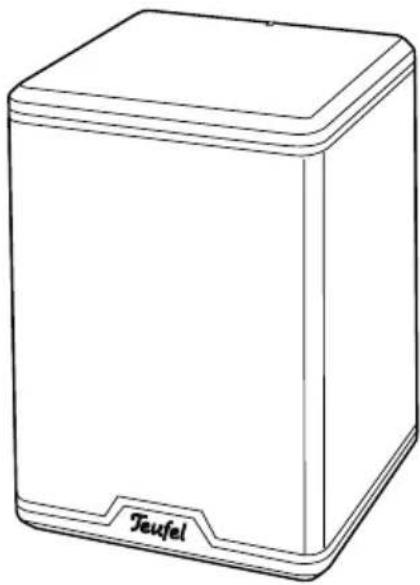
(1) 2× "Effect" wireless speaker
- Check that all items have been delivered and that nothing is damaged. If you find any damage, do not operate the device; instead contact our customer service department (see back side).
- Please keep the packaging for the duration of the warranty period.
Operational controls
(2) Power indicator:
LED illuminates continuously in white with the wireless connection.
Blinks slowly in white if there is no connection to the external player.
Blinks quickly in white in pairing mode.
Illuminates in red in standby.
(3) Keyhole openings for wall mounting.
(4) PAIRING: Establish a wireless connection to the external player (see chapter „First-time connection“ on page 10).
(5) Mains cord (approx. 4 metres long).
(6) L REAR R: Toggle for the left or right channel.
(1)
(2)

(6) (5) (4)
NOTICE
If the device is subjected to warm temperatures after being cold (e.g. after transport), condensation may occur inside of it.
- In this case, wait approx. 2 hours before you connect and activate it.

CAUTION
The device is disconnected from the mains by pulling the mains plug out of the socket.
- Therefore make sure that the socket is always easily accessible.
Location tips
- Make sure that the environment is clean and free from dust.
- Select a location away from heat sources and direct sunlight.
- Do not place any heavy objects on the cables or the device.
- The wireless connection has a maximum range of 50 m, but can be obstructed by objects, walls and other transmitters (Wi-Fi, DECT).
Rear speakers
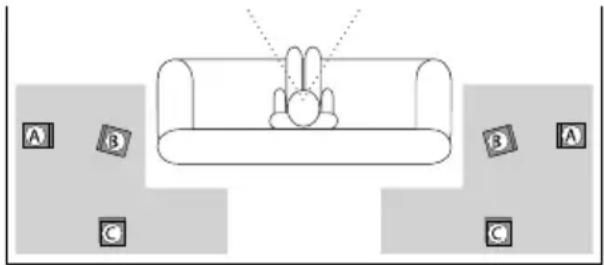
As rear speakers, the wireless speakers are set up or hung to the side of or behind the listener at a height of 1.20 m to 2.10 m (see the grey areas in the graphic).
The ideal position is offset by approx. 20 degrees from the parallel position to the listener on the left and right side (A). The distance between the rear speakers and the listening position should not be less than 1 m. However, if you (need to) sit closer, please ensure that the front side of the speaker is not directly facing you. Rather, the speaker must be angled towards the wall (B). Alternatively, you can create a greater distance by placing the speakers higher than 1.20 m (e.g. also on the ceiling) or further away (C).
Setting the channel
With the L REAR R switch (6), you determine the stereo channel (right or left) to be played back by the respective wireless speaker.
This switch is only queried when establishing the power supply. When you modify the setting,
- pull the mains plug,
- wait until the power indicator (2) is off,
- insert the mains plug back in the socket.
Mains connection
-
Insert the plug of the mains cord (5) in a mains socket (220–240 V\~/50 Hz).
-
The first time you turn the wireless speaker on, it will switch to pairing mode and the power indicator (2) will quickly blink in white.
- The power indicator (2) will slowly blink in white for approx. 30 seconds. If no compatible transmitter is detected during this period, the wireless speaker will switch to standby mode and the power indicator (2) will continuously illuminate in red.


You can find further tips and infos here:
https://www.teufelaudio.com/
service.html
First-timeconnection
- Hold the PAIRING button (4) down until the power indicator (2) blinks quickly in white.
- Switch the transmitter unit (receiver, transmitter) to pairing mode. Please refer to the user manual for the transmitter unit for more information.
- As soon as the Effect has found a compatible transmitter, it will connect with it.
The power indicator (2) illuminates continuously in white then.
Automatic connection
- If the wireless speakers were already connected to a compatible transmitter, they will immediately be connected to it.
The power indicator (2) illuminates continuously in white.
- If there is no transmitter nearby or if it is switched off, the Effect will search for the transmitter.
The power indicator (2) will slowly flash in white in the process.
- The connection will be established as soon as you switch on the transmitter.
The power indicator (2) illuminates continuously in white now.

Automatic activation/deactivation
As soon as the wireless speakers receive a signal from a connected transmitter, they will switch back on from standby mode.
If the signal is deactivated, the wireless speakers will switch back to standby mode after a short time. In standby mode, the power indicator (2) will be continuously illuminated in red.
Troubleshooting
The following advice should help you to solve problems. If this does not work, our online manual will provide help:
https://manual.teufelaudio.com
| Problem Possible cause/solution | |
| The wireless speaker's power indicator (2) does not illuminate. | Make sure that power is supplied. Check to make sure that the mains plug is securely seated. |
| No sound. The volume has been set too low. Increase the volume on the transmitter. | |
| No 5.1 audio. If e.g. a pure stereo signal is played, the rear speakers will remain mute. Then select a surround sound simulation such as Dolby Prologic on the transmitter unit.A “test tone” is suitable for testing the connection providing your transmitter unit offers this function for adjusting the level. | |
| No connection Transmitter is off – switch the transmitter on.Distance is too great or objects are blocking the connection signal. Correct the allocation of the devices. | |
| The connection is not automatically established. | Reconnect the devices (see chapter „First-time connection“ on page 10). |
| The transmission is disrupted. | Other wireless signal sources (cordless telephones, Wi-Fi stations or microwaves) affect the connection. Move the devices causing the disturbance. |
| With stereo sources such as the playback of radio or an MP3 player, the rear satellites and/or the center speaker do not emit sound. | MP3s, radio as well as many TV programmes only transmit stereo sound. Switch your receiver to a Pro-Logic mode or a DSP mode (5.1 Stereo). |
Technical Data
Operating voltage 220–240 V\~/50 Hz
Power consumption max. 40 W
Dimensions (W × H × D) 113 × 162 × 115 mm
Weight
1.2
kg
The following radio frequency bands and radio transmitting powers are used in this product:
| Frequency bands in GHz Max. transmission power in dBm |
| 2.40535 GHz–2.47735 GHz 1 mW / 0 dBm |
You can find further technical data about the product on our website.
Declaration Of Conformity

Lautsprecher Teufel GmbH declares that this product complies with Directive 2014/53/EU. The full text of the EU Declaration of Conformity can be found at this web address:
www.teufelaudio.com/declaration-of-conformity
Important information in accordance with the Electrical and Electronic Equipment Act (Germany: ElektroG)
We advise owners of electrical and electronic appliances that old electrical and electronic devices must be handed in separately from municipal waste, in accordance with the applicable regulations. Batteries and rechargeable batteries that are not firmly enclosed in old electrical devices and lamps, and that can be removed from the old device without destroying them, must be separated from them in a non-destructive manner before they are handed to the collection point for their intended disposal. Please take note of our information on the Batteries Act [Germany: BattG] below for disposing of batteries.
You make an important contribution to returning, recycling and further processing of old devices if you separate your old devices into the correct collection groups for recycling.
The symbol below of a crossed-out dustbin, applied to electrical and electronic appliances, also advises of the duty to separate collections:

Consumer electronics stores and supermarkets are obliged, under certain conditions, to take back old electrical and electronic devices, in accordance with section 17 of the Electrical and Electronic Equipment Act. Stationary retailers must take back an old electrical device of the same type when a new electrical device is bought (1:1 return). This also applies to home deliveries. These retailers must also take back up to three small old electrical devices ( 25cm) without this being linked to a new purchase (0:1 return). In accordance with the Electrical and Electronic Equipment Act, as online retailers of electrical devices and due to our product range, our obligation is limited to 1:1 return of large devices of >50 cm when selling a new electrical or electronic device of the same type. We comply with the obligation of return of devices other than large devices through our service provider. You can find the exact contact data and collection points on our website www.Teufel.de/entsorgung. It is also possible to return old electrical and electronic appliances free of charge at an official delivery point run by the public waste disposal authorities.
Important: For safety reasons we ask that you refrain from sending lighting fixtures (some lamps). For return of lighting fixtures please use the public waste disposal collection points or contact us directly at www.Teufel.de/entsorgung.
As an end-user, you are responsible for deleting any personal data on old electrical appliances before handing it in.
Important: Our appliances can contain batteries/rechargeable batteries. If this is the case, please refer to its attached product documentation for additional information on the type and chemical make-up of the battery. For products with battery compartments you can directly remove the batteries or rechargeable batteries and dispose of them properly. If the batteries are built in to the product, do not in any case attempt to remove the batteries yourself, instead contact one of our employees or appropriate specialist staff.
Teufel
Please contact our customer service department with any questions, suggestions, or complaints:
10787 Berlin (Germany)
www.teufelaudio.com
Phone: 00800 200 300 40 (toll-free)
Fax: +49 (0)30 - 300 930 930
Online-support:
www.teufelaudio.com/service
Contact:
www.teufelaudio.com/contact
No responsibility is assumed for the correctness of this information.
Technical changes, typographical errors and other errors reserved.

- TECHNICAL DESCRIPTION AND USER MANUAL
- EFFECT WIRELESS SPEAKER
- TEUFEL
- CONTENTS
- GENERAL NOTES AND INFORMATION
- NOTICE
- ORIGINAL PACKAGING
- COMPLAINTS
- INVOICE NUMBER
- SERIAL NUMBER OR BATCH NUMBER
- CONTACT
- PROPER USE
- EXPLANATION OF TERMS
- CAUTION
- SAFETY NOTES
- TOUCHING LIVE PARTS CAN RESULT IN SEVERE INJURY OR DEATH
- AN UNSUITABLE SETUP LOCATION MAY RESULT IN INJURY AND DAMAGE
- CHILDREN CAN BECOME TRAPPED IN THE PLASTIC WRAPPING WHEN PLAYING AND SUFFOCATE
- EXTENDED LISTENING AT HIGH VOLUMES MAY LEAD TO HEARING LOSS
- THIS PRODUCT CONTAINS MAGNETIC MATERIAL
- IMPROPER USE MAY LEAD TO DAMAGE OR FIRE
- THE ISOLATION PADS CAN PRODUCE DISCOLOURATION ON SENSITIVE SURFACES
- EXPLANATION OF SYMBOLS
- PACKAGE CONTENTS
- OPERATIONAL CONTROLS
- LOCATION TIPS
- REAR SPEAKERS
- SETTING THE CHANNEL
- MAINS CONNECTION
- FIRST-TIMECONNECTION
- AUTOMATIC CONNECTION
- AUTOMATIC ACTIVATION/DEACTIVATION
- TROUBLESHOOTING
- TECHNICAL DATA
- DECLARATION OF CONFORMITY
- IMPORTANT INFORMATION IN ACCORDANCE WITH THE ELECTRICAL AND ELECTRONIC EQUIPMENT ACT (GERMANY: ELEKTROG)
Brand : Teufel
Model : Effekt
Category : Loudspeaker